
Contour APK
The easiest way to manage your dongle. Pick a profile, hold to send. Done.
APK herunterladen v1.8.0 · 3,9 MB- Version1.8.0
- Größe3,9 MB
- BenötigtAndroid 9
- Aktualisiert20.11.2026
- LizenzApache-2.0
- PreisKostenlos
Über Contour
Beschreibung des Entwicklers (auf Englisch).
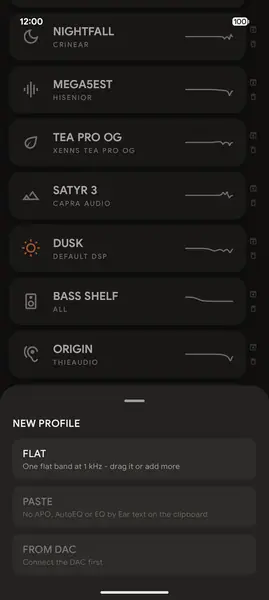
Contour is a free, open-source app for the parametric EQ stored inside your USB DAC. Keep your EQ profiles on your phone, plug the DAC in, pick a profile and hold to send. Contour writes the EQ into the DAC and reads it back to check every value.
The EQ stays in the dongle. It is written into the DAC itself, so it works in every app, not just one. On the DACs where Contour has confirmed it, the EQ stays after you unplug and plays on every device you plug the DAC into: another phone, a laptop, a PC or an iPhone. Each DAC's page says what was confirmed. No system equalizer, nothing running in the background.
Supported DACs, each tested on real hardware
- CrinEar Protocol Micro
- CrinEar Protocol Max
- FiiO KA15
- FiiO K13 R2R
- FiiO JadeAudio JA11
- FiiO JadeAudio JIEZI
- SnowSky Melody
- SnowSky Tiny A
- SnowSky Retro Nano
- TRN Black Pearl
- Moondrop Dawn Pro 2
- Moondrop Echo-A
- Moondrop DUSK-SP
- Kiwi Ears Allegro Mini
- Kiwi Ears AD1
- Tanchjim Space 2 (Space II)
- JCally JM12
Made for your DAC
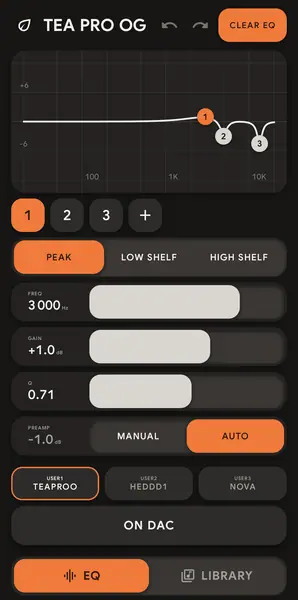
Contour only shows what your DAC can do: its bands, filter types and gain range. Where it has several USER slots, you pick one before you send: USER1, USER2 or USER3, or one of ten on the FiiO K13 R2R.
Tune on the go
- Drag bands on the response graph, or add one with +.
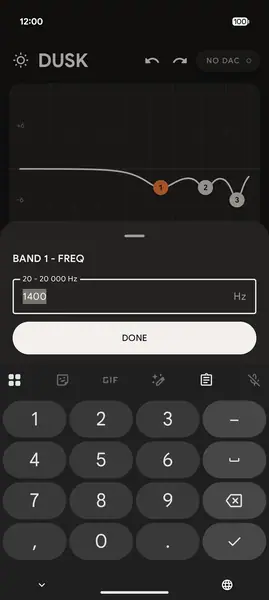
- Fine-tune frequency, gain and Q with sliders, or tap a number to type it.
- Leave the preamp on AUTO, or tap AUTO off and set it by hand with its slider.
- PEAK on every DAC, plus LOW SHELF, HIGH SHELF, LOW PASS, HIGH PASS, BAND PASS and ALL PASS where your DAC has them.
- Undo and redo, up to 100 steps per profile.
Your EQ library
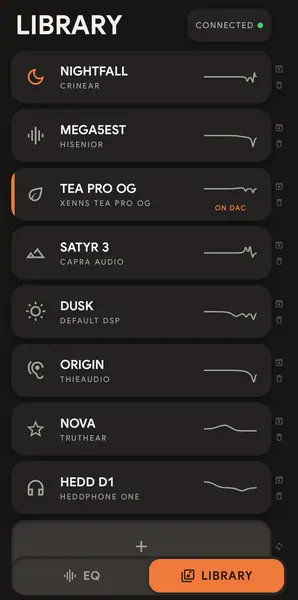
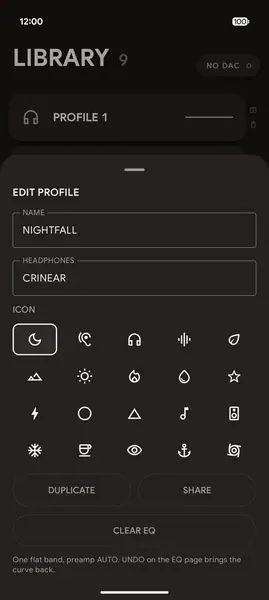
- One profile per pair of IEMs or headphones, or per mood.
- Every profile keeps a saved version: save your changes or restore the saved one.
- Archive the profiles you don't use, delete the ones you don't need.
- Import a parametric profile from AutoEQ, squig.link or Equalizer APO (clipboard or .txt file), or read the EQ that is on the DAC now.
- Share a profile as Equalizer APO text or save it as a .txt file.
- Three profiles to start from: BASS BOOST, SOFTER VOCALS and TREBLE BOOST.
DAC settings in the same app
Most of these DACs have a DAC page with their own settings, such as volume, balance, filter, output or presets. Factory reset on the KA15 and Melody saves a copy of your slots and settings on the phone first.
Private by design
No account, no ads, no analytics. The app has no internet access and talks only to the DAC you plug in. Your profiles stay on your phone and leave it only when you share or save them yourself.
Good to know
- Needs Android 9 or newer and a phone with USB host (OTG) support.
- Contour writes to the DAC only when you hold HOLD TO SEND or change a setting on the DAC page.
- Contour does not update firmware.
- Moondrop Dawn Pro 2: its custom EQ has to be switched on. According to Moondrop it is off after every plug-in; holding both volume buttons for 2 seconds toggles it.
- Moondrop DUSK-SP: after every plug-in it plays its DUSK-DEFAULT preset. Tap CUSTOM EQ on the DAC page to hear what you sent.
- TRN Black Pearl: plug your headphones in first. Without them it does not show up on USB.
Every supported DAC has its own page with its limits and notes: contoureq.app/install
Contour is free and open source (Apache-2.0) and part of Soundblooms, a small audio label by Chronosaur.
Unofficial. Not affiliated with or endorsed by CrinEar, FiiO, SnowSky, TRN, Moondrop, Kiwi Ears, Tanchjim or JCally. AutoEQ, squig.link and Equalizer APO are named only as profile formats Contour can read.
Neu in Version 1.8.0
New DACs: SnowSky Retro Nano, FiiO JadeAudio JIEZI, Kiwi Ears AD1 and Tanchjim Space II, with filter, output, gain, balance and mic gain. FiiO JadeAudio JA11 and SnowSky Melody played 12 dB quieter with EQ on (thanks, randomaltthing). Turn the volume down before you send: AUTO and a manual PREAMP play up to 12 dB louder than in 1.7.0. New haptics: feel the hertz, the tenths of a dB and the send. New in the library: OPEN CONTOUR WHEN A DAC IS PLUGGED IN (thanks, -IAmThis-) and HAPTIC FEEDBACK.
Informationen zur APK-Datei
| Paketname | io.github.chronosauros.contour |
|---|---|
| Version | 1.8.0 (Code 41) |
| Mindestens | Android 9 · ausgelegt für Android 16 |
| Architekturen | arm64-v8a, armeabi-v7a, x86, x86_64 |
| SHA-256 | 4ac267d73e9c130f8725b4e243b5d2a0f1a013f19b38f005ceb283cce96ae719 |
| Signatur | c8c8caea761628ed9d505ff07342ee5ea0d466a4ad718d0db077422ba3f7e601 |
| Lizenz | Apache-2.0 — freie, freizügige Lizenz: Der Quellcode ist öffentlich und wiederverwendbar |
| Quellcode | github.com/Chronosauros/contour |
Berechtigungen
- Vibrieren
Ältere Versionen
- Contour 1.8.020. November 2026 · 3,9 MB
- Contour 1.7.017. November 2026 · 3,9 MB
- Contour 1.6.613. November 2026 · 3,9 MB
So installieren Sie Contour APK
- Tippen Sie oben auf APK herunterladen und öffnen Sie die Datei nach dem Download.
- Wenn Android fragt, erlauben Sie Ihrem Browser, unbekannte Apps zu installieren.
- Tippen Sie auf Installieren. Contour erscheint dann bei Ihren anderen Apps.
→ APK-Datei auf Android installieren (Schritt für Schritt)
→ „App nicht installiert“: Ursachen und Lösungen
Häufige Fragen
Ist Contour kostenlos?
Ja. Contour steht unter der Lizenz Apache-2.0: kostenlos, ohne Abo, und der Quellcode ist öffentlich.
Ist diese APK-Datei sicher?
Die Datei wurde vom F-Droid-Repository aus dem öffentlichen Quellcode erstellt und veröffentlicht. Ihr SHA-256-Fingerabdruck steht oben, Sie können ihn nach dem Download vergleichen. Ist eine APK gefährlich? So prüfen Sie eine Datei vor der Installation
Läuft Contour auf meinem Handy?
Sie benötigen mindestens Android 9. Die App funktioniert auch ohne Google-Dienste, also auch auf aktuellen Huawei-Handys.





