
Myne APK
Myne: Download & Read eBooks
Android application to download & read ebooks from the Project GutenBerg.
APK herunterladen v5.1.0 · 6,1 MB- Version5.1.0
- Größe6,1 MB
- BenötigtAndroid 8.0
- Aktualisiert26.8.2026
- LizenzApache-2.0
- PreisKostenlos



Über Myne
Beschreibung des Entwicklers (auf Englisch).
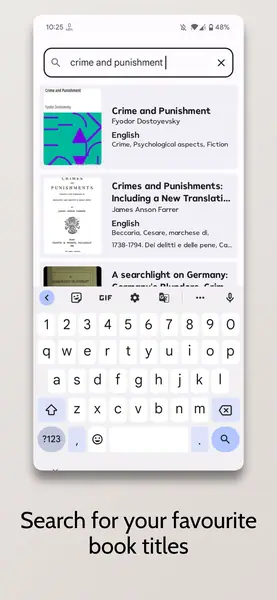
Myne is a FOSS Android application for downloading and reading ebooks from Project Gutenberg. It uses the GutenDex API to fetch metadata for ebooks in the backend. Additionally, it functions as an EPUB reader, allowing you to easily import and immerse yourself in your favorite EPUB books!
Highlights:
- Clean & beautiful UI based on Google's material design three guidelines.
- Browse and download over 70k free ebooks available in multiple languages and updated daily.
- Comes with inbuilt ebook reader while also having an option to use third-party ebook readers
- Compatible with Android 7.0 and above (API 24+)
- Supports Material You theming in devices running on Android 12+
- Comes in both light and dark mode.
- MAD: UI and logic written with pure Kotlin. Single activity, no fragments, only composable destinations.
PS: *The name of the app is inspired from the main character of an anime called Ascendance of a Bookworm.*
Note: The app also uses the Google Books API to fetch some extra data like book summary and pages count etc, as the GutenBerg project don't include those values in their metadata. It tries it's best to map the data received from Google books with Gutenberg's metadata but the mapping is not 100% accurate and not all books available on GutenBerg is also available on Google books or is available but with different title, so you may find some books without summary or page count etc.
Neu in Version 5.1.0
- Added ability to create bookmarks in the ebook reader.
- Added sepia theme in ebook the ebook reader.
- Fixed reader screen readjusting/scrolling when opening reader menu.
- Some optimization in progress polling when downloading books.
- Updated German and Chinese translations.
Informationen zur APK-Datei
| Paketname | com.starry.myne |
|---|---|
| Version | 5.1.0 (Code 510) |
| Mindestens | Android 8.0 · ausgelegt für API 37 |
| Architekturen | arm64-v8a, armeabi-v7a, x86, x86_64 |
| SHA-256 | b4949a2ff9530f9ac1c64f9e5ea73843910a03286a1bb540496c3cf8e1c630cb |
| Signatur | 5dfe06da0fe3b0813f3f3dc5305699c2dbb9dfdbab1349da7c41c59d2fcf319c |
| Lizenz | Apache-2.0 — freie, freizügige Lizenz: Der Quellcode ist öffentlich und wiederverwendbar |
| Quellcode | github.com/Pool-Of-Tears/Myne |
Berechtigungen
- Netzwerkstatus sehen
- Internetzugriff
1 weitere technische Berechtigung(en)
ACCESS_NOTIFICATION_POLICY
Ältere Versionen
- Myne 5.1.026. August 2026 · 6,1 MB
- Myne 5.0.027. Mai 2026 · 6,1 MB
- Myne 4.9.124. Mai 2026 · 5,9 MB
So installieren Sie Myne APK
- Tippen Sie oben auf APK herunterladen und öffnen Sie die Datei nach dem Download.
- Wenn Android fragt, erlauben Sie Ihrem Browser, unbekannte Apps zu installieren.
- Tippen Sie auf Installieren. Myne erscheint dann bei Ihren anderen Apps.
→ APK-Datei auf Android installieren (Schritt für Schritt)
→ „App nicht installiert“: Ursachen und Lösungen
Häufige Fragen
Ist Myne kostenlos?
Ja. Myne steht unter der Lizenz Apache-2.0: kostenlos, ohne Abo, und der Quellcode ist öffentlich.
Ist diese APK-Datei sicher?
Die Datei wurde vom F-Droid-Repository aus dem öffentlichen Quellcode erstellt und veröffentlicht. Ihr SHA-256-Fingerabdruck steht oben, Sie können ihn nach dem Download vergleichen. Ist eine APK gefährlich? So prüfen Sie eine Datei vor der Installation
Läuft Myne auf meinem Handy?
Sie benötigen mindestens Android 8.0. Die App funktioniert auch ohne Google-Dienste, also auch auf aktuellen Huawei-Handys.