
QRAlarm APK
Ein Wecker, bei dem Du einen QR-Code scannen musst um ihn abzuschalten
APK herunterladen v2.11.5 · 18,8 MB- Version2.11.5
- Größe18,8 MB
- BenötigtAndroid 8.0
- Aktualisiert13.11.2026
- LizenzGPL-3.0-only
- PreisKostenlos
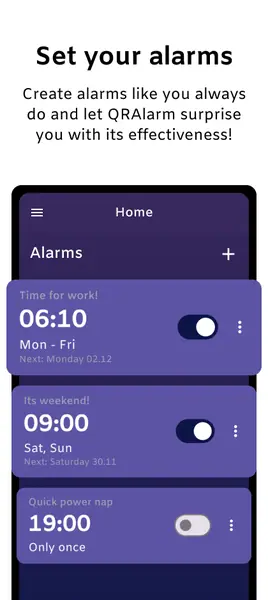
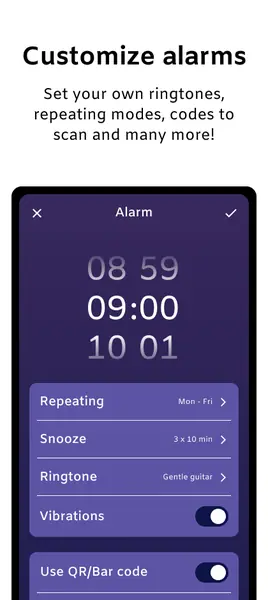
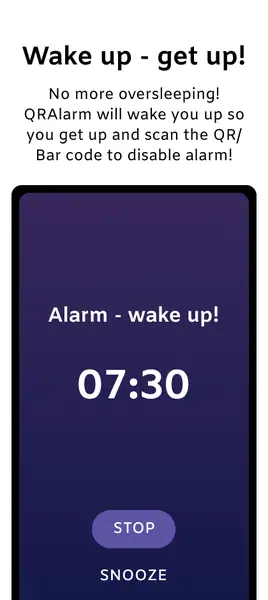
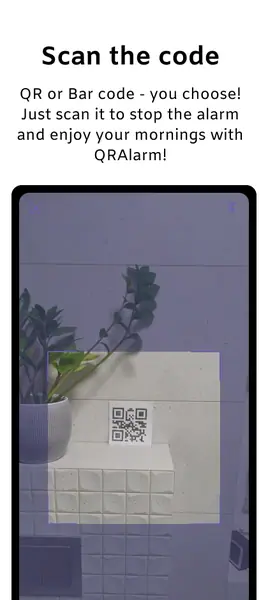
Über QRAlarm
Beschreibung des Entwicklers (auf Englisch).
Say goodbye to oversleeping with QRAlarm! 🚀
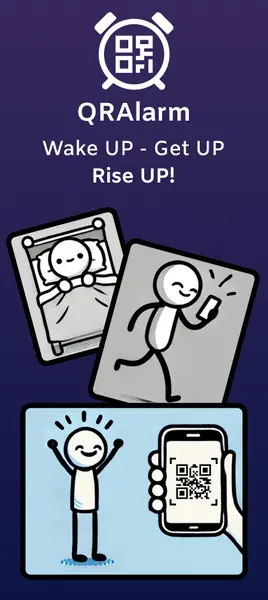
QRAlarm - QR Code Alarm Clock is an effective and smart alarm clock that gets you out of bed by making you scan the QR or Barcode to turn off the alarm! This makes it perfect for both heavy sleepers and productive early risers! 🔝
Have you ever...
- ⏰ ...found yourself caught in the “snooze loop” where you kept snoozing the alarm while never getting up?
- 😴 ...turned off your alarm giving yourself those mythical “5 more minutes” just to fall back asleep again and oversleep?
- 📝 ...wanted to start off the day earlier to get your tasks done but you simply couldn’t leave your bed in the morning?
Then QRAlarm is perfect for you! 🫵
QRAlarm is not just another alarm clock app - the QR alarm mission functionality is there to help you always get up on time! Because a strong and innovative alarm clock does not only wake you up - it makes sure that you GET UP! 🙌
If you are seeking to:
- Fight with oversleeping,
- Break your snooze habits,
- Improve your morning productivity,
- Build your perfect morning routine,
- Stay healthy and happy,
Then you have found the perfect alarm clock application - this is your new life hack! 📈
QRAlarm is a simple and lightweight alarm clock! Don't worry about low memory in your phone - QRAlarm is only around 15 MB making it perfect fit for everyone, no matter the device! 📱
QRAlarm has a simple, clean and intuitive user interface that makes the experience easy and seamless! You will feel at ease using QRAlarm as it does not overwhelm the user with bloated functions. QRAlarm is uncluttered, clear and beautiful! ✨
Download the app now, set up and configure your alarms and let QRAlarm work its magic! 🪄
Neu in Version 2.11.5
- Bug fixes.
Informationen zur APK-Datei
| Paketname | com.sweak.qralarm |
|---|---|
| Version | 2.11.5 (Code 94) |
| Mindestens | Android 8.0 · ausgelegt für API 37 |
| Architekturen | arm64-v8a, armeabi-v7a, x86, x86_64 |
| SHA-256 | 5d165c66f10a7d0fac11deac39e75f2aa1052031918091330d6a66facad43198 |
| Signatur | ffce98427301adb280fb37d36b82af74ead3f19b05c7b76d8a6f537f7ba48589 |
| Lizenz | GPL-3.0-only — freie Copyleft-Lizenz: Der Code ist öffentlich und veränderte Versionen müssen frei bleiben |
| Quellcode | github.com/sweakpl/qralarm-android |
Berechtigungen
- Im Hintergrund laufen
- Beim Start ausführen
- Kamera sensibel
- Vibrieren
- Benachrichtigungen anzeigen
- Ruhezustand verhindern
4 weitere technische Berechtigung(en)
REQUEST_IGNORE_BATTERY_OPTIMIZATIONS USE_FULL_SCREEN_INTENT USE_EXACT_ALARM SCHEDULE_EXACT_ALARM
Ältere Versionen
- QRAlarm 2.11.513. November 2026 · 18,8 MB
- QRAlarm 2.11.429. Oktober 2026 · 18,8 MB
- QRAlarm 2.11.316. Oktober 2026 · 18,8 MB
So installieren Sie QRAlarm APK
- Tippen Sie oben auf APK herunterladen und öffnen Sie die Datei nach dem Download.
- Wenn Android fragt, erlauben Sie Ihrem Browser, unbekannte Apps zu installieren.
- Tippen Sie auf Installieren. QRAlarm erscheint dann bei Ihren anderen Apps.
→ APK-Datei auf Android installieren (Schritt für Schritt)
→ „App nicht installiert“: Ursachen und Lösungen
Häufige Fragen
Ist QRAlarm kostenlos?
Ja. QRAlarm steht unter der Lizenz GPL-3.0-only: kostenlos, ohne Abo, und der Quellcode ist öffentlich.
Ist diese APK-Datei sicher?
Die Datei wurde vom F-Droid-Repository aus dem öffentlichen Quellcode erstellt und veröffentlicht. Ihr SHA-256-Fingerabdruck steht oben, Sie können ihn nach dem Download vergleichen. Ist eine APK gefährlich? So prüfen Sie eine Datei vor der Installation
Läuft QRAlarm auf meinem Handy?
Sie benötigen mindestens Android 8.0. Die App funktioniert auch ohne Google-Dienste, also auch auf aktuellen Huawei-Handys.