T16Fling APK
A keyboard controlled with touch gestures on 16 large keys
APK herunterladen v1.3.0 · 3,4 MB- Version1.3.0
- Größe3,4 MB
- BenötigtAndroid 7.0
- Aktualisiert20.4.2021
- LizenzGPL-3.0-or-later
- PreisKostenlos


Über T16Fling
Beschreibung des Entwicklers (auf Englisch).
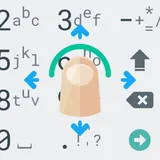
T16Fling is an Android keyboard with 16 keys in a 4x4 grid (similar to the AOSP numeric keypad) that works by flinging each key in the direction of the desired character.
Once installed you must enable the keyboard in your Android Settings (System -> Languages & input -> Virtual keyboard -> Manage keyboards).
Each key has one main character (shown in a larger and darker font on the left) and one or more secondary characters (shown in a smaller and lighter font on the right). Depending on the gesture you use on the key it will produce different characters:
- When tapped, a key will produce its main character.
- When flinged (swiped quickly in a direction) a key will produce the secondary character that is in that direcion.
- When long-pressed, new keys will appear with extra characters related to those on the main key. Tapping on any of these keys will produce the corresponding character.
For example, the second key in the first row (with a large "2" on the left and "abc" on the right) will produce a "2" when tapped, an "a" when flinged left, a "b" when flinged up, and a "c" when flinged right. When long-pressed it will show new keys "á", "à", "â", "ä", "ã", and "ç".
There are some exceptions to these rules:
- The "0" key only has one secondary character, which is space. No matter which direction you fling it, it will always produce a whitespace.
- The shift key (⇪) has two special functions associated to its fling: when flinged up it will turn on Caps Lock, and when flinged down it will turn it off.
- The backspace key (⇦) and the enter key (➡) always do the same thing, no matter if you tap them or fling them.
Neu in Version 1.3.0
- Added French keyboard
Informationen zur APK-Datei
| Paketname | es.ideotec.t16fling |
|---|---|
| Version | 1.3.0 (Code 4) |
| Mindestens | Android 7.0 · ausgelegt für Android 11 |
| Architekturen | Alle (universell) |
| SHA-256 | 2fa6132753f4e043166a72fe6d90a6ccaec352a1d46b6afc177e0b2fea5cf564 |
| Signatur | ab0d05dbc19a950166df8bae93b7b141eceac6d703c4913072d802133f778039 |
| Lizenz | GPL-3.0-or-later — freie Copyleft-Lizenz: Der Code ist öffentlich und veränderte Versionen müssen frei bleiben |
| Quellcode | gitlab.com/ideotec/t16fling |
Berechtigungen
Keine besonderen Berechtigungen.
Ältere Versionen
- T16Fling 1.3.020. April 2021 · 3,4 MB
- T16Fling 1.226. März 2021 · 3,4 MB
- T16Fling 1.114. März 2021 · 3,3 MB
So installieren Sie T16Fling APK
- Tippen Sie oben auf APK herunterladen und öffnen Sie die Datei nach dem Download.
- Wenn Android fragt, erlauben Sie Ihrem Browser, unbekannte Apps zu installieren.
- Tippen Sie auf Installieren. T16Fling erscheint dann bei Ihren anderen Apps.
→ APK-Datei auf Android installieren (Schritt für Schritt)
→ „App nicht installiert“: Ursachen und Lösungen
Häufige Fragen
Ist T16Fling kostenlos?
Ja. T16Fling steht unter der Lizenz GPL-3.0-or-later: kostenlos, ohne Abo, und der Quellcode ist öffentlich.
Ist diese APK-Datei sicher?
Die Datei wurde vom F-Droid-Repository aus dem öffentlichen Quellcode erstellt und veröffentlicht. Ihr SHA-256-Fingerabdruck steht oben, Sie können ihn nach dem Download vergleichen. Ist eine APK gefährlich? So prüfen Sie eine Datei vor der Installation
Läuft T16Fling auf meinem Handy?
Sie benötigen mindestens Android 7.0. Die App funktioniert auch ohne Google-Dienste, also auch auf aktuellen Huawei-Handys.