AA-AuralListen Podcatcher APK
Private, ad-free podcast app – audio only, no account, all data on your phone
Download APK v1.3.6 · 26.8 MB- Version1.3.6
- Size26.8 MB
- RequiresAndroid 7.0
- Updated11/11/2026
- LicenceGPL-3.0-only
- PriceFree
About AA-AuralListen Podcatcher
AA-AuralListen Podcatcher is a private podcast app for Android. Audio only, no account, no ads, no tracking. Everything stays on your phone – there is no server of the developer.
Find and subscribe
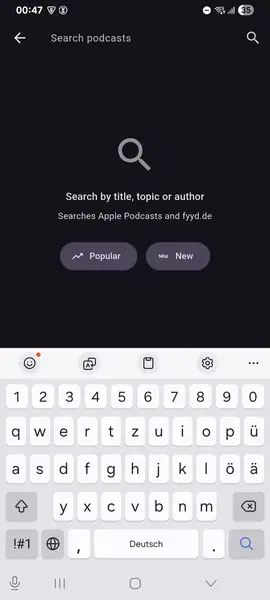
- Search Apple Podcasts and fyyd.de, subscribe by RSS address, import and export OPML
- New podcasts start out provisional: listen in (streaming only), then subscribe
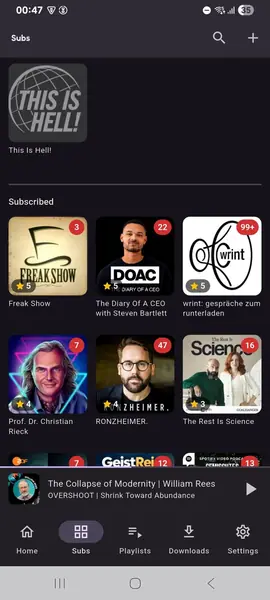
- Rate podcasts with 1 to 5 stars – your subscriptions are sorted by it
- Pull to refresh with a status line for each podcast being refreshed; moved podcasts (new feed address) are followed automatically
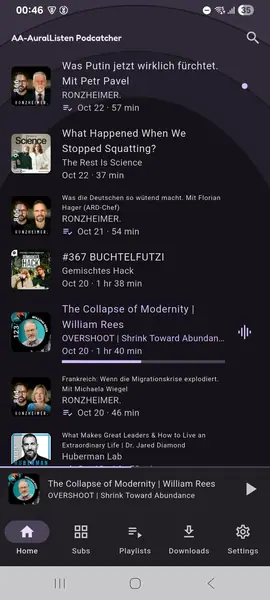
- Red counter of unplayed episodes on each subscription; search within your subscriptions
- Podcast page with a foldable description and links to the website and to support the podcast
- Search with “Popular” (Apple charts) and “New” – by app language
- Home: a flame marks podcasts and topics you hardly ever skip
- Seasons: "S2·5" on the cover and a season filter; serial podcasts in listening order
Listening
- Background playback with notification, lock screen and Bluetooth controls
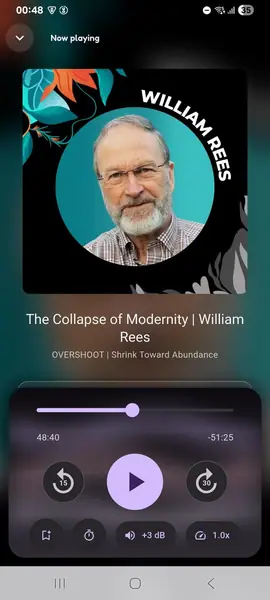
- Skip −15 s / +30 s – hold a skip button to scan through the episode without playing; speed 1.0× to 2.0× and volume boost, each global or per podcast
- Remaining time or total length at a tap; at higher speed also the real remaining time
- Show notes with tappable links
- Chapters (Podlove, JSON, ID3) with chapter pictures, the progress of the current chapter and per-chapter skip; bookmarks with notes
- Sleep timer with gentle fade-out, also "until the end of the episode"
- Remembers the position of every episode; an episode counts as played only at its end
- Playback history of the last 100 episodes played to the end
- Robust against network problems and MP3s with variable bitrate
Player
- Seek bar, play row and the four action buttons stay pinned at the bottom, the rest scrolls
- Strongly blurred cover or chapter picture as background
- Own landscape layout: info on the left, controls on the right
- Choose the control panel background (Settings → Design): starry sky, aurora, waves, crystal, camouflage
Playlists
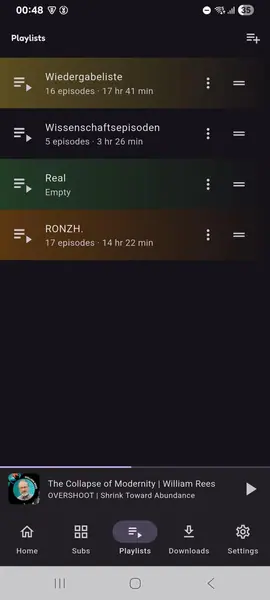
- Several playlists that continue automatically, with colors, sorting and "Resume"
- "Play next" and "Add to the end" for the playlist that is playing; ⏮ ⏭ in the player and via Bluetooth
- Finished episodes leave the playlist at once, after 5 minutes or never – your choice
- New episodes of a podcast can go into a playlist without downloading (streamed)
- All new or unplayed episodes of a podcast, topic or season into a playlist
- A symbol on every episode that is in a playlist
Android Auto
- Playlists, new episodes, downloads and subscriptions in the car; −15 s / +30 s and ⏭; voice commands ("Hey Google, play the playlist … on AA-AuralListen")
- Not from the Play Store: turn on "Unknown sources" once in Android Auto's developer settings
Downloads
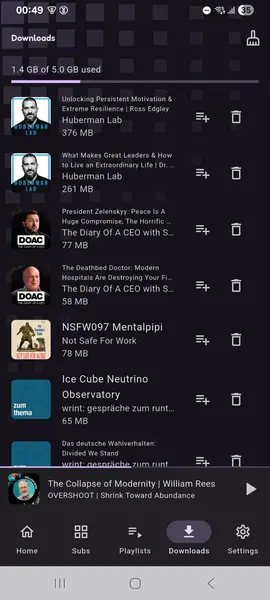
- Manual or automatic downloads per podcast, optionally into a playlist; "Wi-Fi only" with "Download now over mobile data"
- Network feeds: downloads only for chosen topics; new episodes of a topic can arrive as played
- Played downloads are deleted after 96 hours (not while they are in a playlist); adjustable storage limit
More
- German, English, French, Spanish, Portuguese, Russian and Italian, light and dark mode, selectable app color or the color of your wallpaper (Android 12+)
- Episode numbers on the covers, backup and restore
The podcast search uses Apple's iTunes Search API and fyyd.de; your search term is sent to them. Everything else connects directly to the podcast providers.
What's new in version 1.3.6
- New: Android Auto – playlists, new episodes, downloads and subscriptions in the car; −15/+30, ⏭, voice commands ("Hey Google, play the playlist … on AA-AuralListen")
- New languages: French, Spanish, Portuguese, Russian, Italian – the app offers your phone's language once
- Fix: MP3s without a length in the feed ended too early
- Fix: Google's automatic backup killed the app during playback
- The "moved" message names the podcasts
APK file information
| Package name | io.github.rainerwingel.aurallisten |
|---|---|
| Version | 1.3.6 (code 5043) |
| Minimum Android | Android 7.0 · targets Android 16 |
| Architectures | x86_64 |
| SHA-256 | 959d51e665abe2ebc28bf2738cea0afb4f946caad0fab9ac1d646f8698dac011 |
| Signature | ffe35bb2c5c6c765983794e52af566a5969b9c0b92e7d56a79e12208e80aba81 |
| Licence | GPL-3.0-only — copyleft free licence: the code is public and modified versions must stay free |
| Source code | github.com/RainerWingel/AA-AuralListen-Podcatcher |
Permissions
- Internet access
- Keep the device awake
- Run in the background
- View network status
- Start at boot
Older versions
- AA-AuralListen Podcatcher 1.3.6November 11, 2026 · 26.8 MB
- AA-AuralListen Podcatcher 1.3.6November 11, 2026 · 25.4 MB
- AA-AuralListen Podcatcher 1.3.6November 11, 2026 · 23.4 MB
- AA-AuralListen Podcatcher 1.3.5October 29, 2026 · 26.5 MB
- AA-AuralListen Podcatcher 1.3.5October 29, 2026 · 25.0 MB
- AA-AuralListen Podcatcher 1.3.5October 29, 2026 · 23.0 MB
- AA-AuralListen Podcatcher 1.3.4October 18, 2026 · 26.4 MB
- AA-AuralListen Podcatcher 1.3.4October 18, 2026 · 25.0 MB
- AA-AuralListen Podcatcher 1.3.4October 18, 2026 · 22.9 MB
How to install AA-AuralListen Podcatcher APK
- Tap Download APK above, then open the file once the download has finished.
- If Android asks, allow your browser to install unknown apps.
- Tap Install. AA-AuralListen Podcatcher then appears with your other apps.
Having trouble? Read our guides how to install an APK on Android and "App not installed": how to fix it.
Frequently asked questions
Is AA-AuralListen Podcatcher free?
Yes. AA-AuralListen Podcatcher is distributed under the GPL-3.0-only licence: free, no subscription, and its source code is public.
Is this APK file safe?
The file is the one built and published by the F-Droid repository from the public source code. Its SHA-256 fingerprint is shown above, so you can compare it after downloading. How to check an APK.
Will AA-AuralListen Podcatcher work on my phone?
You need at least Android 7.0. The app also works without Google services, so it runs on recent Huawei phones too.