Anti-Vocale APK
Transcribe voice notes and calls on-device
Download APK v1.16.1 · 38.6 MB- Version1.16.1
- Size38.6 MB
- RequiresAndroid 8.0
- Updated11/17/2026
- LicenceApache-2.0
- PriceFree
About Anti-Vocale
Anti-Vocale transcribes voice messages from WhatsApp, Telegram, and other messaging apps directly on your Android device. All processing happens on-device: your audio never leaves your phone. It works on recorded calls and meetings too: recordings of any length are split and stitched automatically (up to two hours on the streaming path), a failed run keeps the transcript it produced, and long transcripts can be exported as subtitles (SRT, VTT) or timestamped text, with sentence-level timing on streaming models.
BUILT-IN MODELS
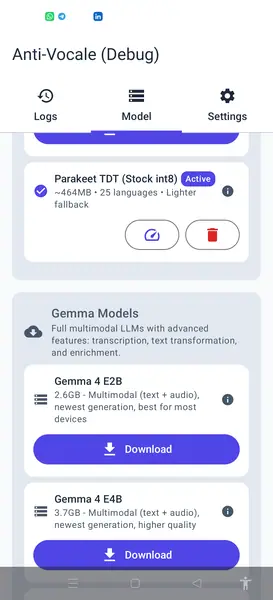
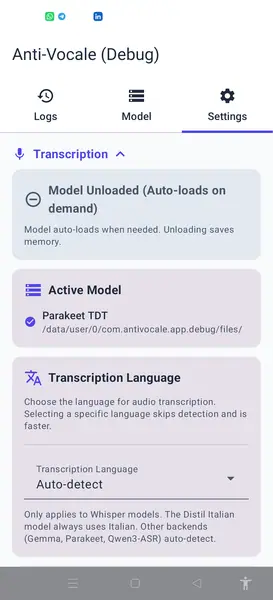
- Parakeet TDT (recommended): fast, 25 European languages. Two variants: high-quality (862MB) or compact (640MB)
- Whisper Turbo: 99 languages, balanced speed and quality
- Whisper Distil Italian: best Italian quality, tuned for voice messages
- Whisper Medium / Small: more accuracy or smaller download
- Nemotron 3.5 streaming: text appears in real time while it decodes, 45 languages
- Qwen3-ASR: compact, 59 languages
- GigaAM v3: Russian, very small and fast
- Gemma 4 / 3n (LiteRT): multimodal AI with customizable prompts
BRING YOUR OWN MODELS
Import custom transcription models from a folder on your phone or from a link: Whisper fine-tunes, CTC models, SenseVoice and other sherpa-onnx architectures. Files are integrity-checked on import, split-file models are supported, and every imported model gets its own share target. Ideal for languages the built-in models don't cover.
FEATURES
- Share voice messages from any app via the Android share sheet
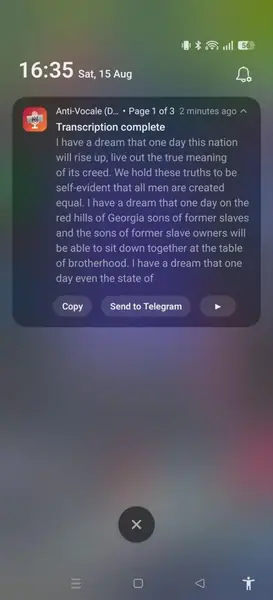
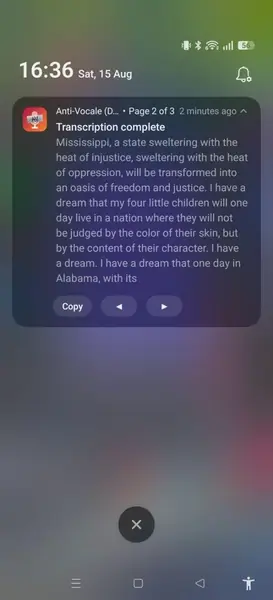
- Smart notifications: one-tap copy, share back, page through long transcripts without opening the app
- Auto-copy to clipboard and auto-save transcripts to a folder you pick (Drive, Syncthing, ...)
- Video file transcription (audio track extracted)
- Real-time progressive text with streaming models
- Per-app notification preferences
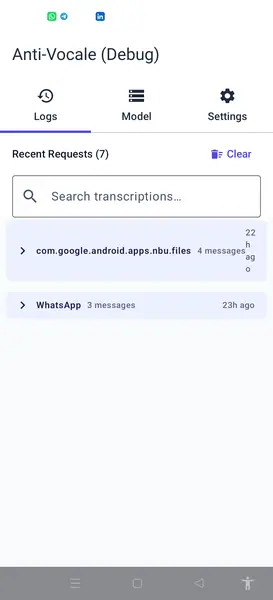
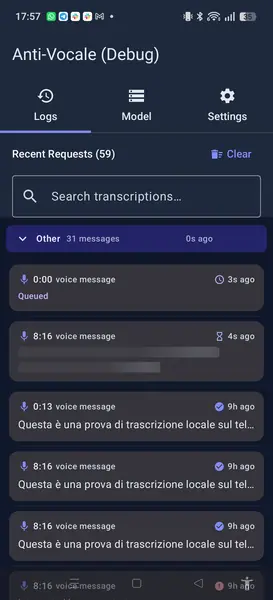
- Transcription log with search and swipe actions
- In-row audio playback: replay a recent transcription's audio right from its history row, with speed control and an optional skip-silences mode
- Silence stripping and parallel chunk processing for speed
- Neural acceleration (NNAPI) on supported devices, with automatic CPU fallback
- Tasker integration for automation
- Scheduled folder watch: transcribe new audio files in folders you choose automatically (on Android 11+, even a messaging app's media folder)
- Remote offload (experimental, off by default): delegate long transcriptions to your own OpenAI-compatible server
- WhatsApp voice notes transcribe themselves: new voice notes in WhatsApp and WhatsApp Business become transcripts as they arrive, zero taps, with the sender's name when it can be confirmed
- Built for aggressive battery savers: an opt-in background protection keeps transcription running with the screen off (Realme, Oppo, OnePlus, Vivo and similar), and the app recovers on its own from crashes and corrupted models
- Open Transcribe provider (experimental): apps that speak the open contract, like Forkgram, turn Anti-Vocale into their inline voice transcriber
PRIVACY
No network needed after download, no accounts, no data collection, no ads, no tracking. By default the audio never leaves your phone; the only exception is the optional Remote offload feature, which sends audio solely to the server address you configure and stays off unless you turn it on.
OPEN SOURCE
Apache 2.0. Source code: https://github.com/RisorseArtificiali/anti-vocale
REQUIREMENTS
Android 8.0+ | 4GB+ RAM recommended | 326MB-4.7GB storage per model
NOTE: on some phones with aggressive battery savers (Realme, OnePlus, Vivo), open the app once after sharing audio so the transcription can finish; the Background transcription protection setting helps keep long runs alive with the screen off.
APK file information
| Package name | com.antivocale.app |
|---|---|
| Version | 1.16.1 (code 514) |
| Minimum Android | Android 8.0 · targets Android 16 |
| Architectures | x86_64 |
| SHA-256 | 8d8f4f8a1fa461b77b31df32fe08886339c612942a3fd8996c40262396b801ec |
| Signature | 8e72e1143ca42e14ae74b3ec3055627904c99154c59925887f3edd2ca5a8b5a3 |
| Licence | Apache-2.0 — permissive free licence: the source code is public and reusable |
| Source code | github.com/RisorseArtificiali/anti-vocale |
Permissions
- Read music
- Read storage
- Run in the background
- Show notifications
- Internet access
- Keep the device awake
- View network status
- Start at boot
1 other technical permission(s)
REQUEST_IGNORE_BATTERY_OPTIMIZATIONS
Older versions
- Anti-Vocale 1.16.1November 17, 2026 · 38.6 MB
- Anti-Vocale 1.16.1November 17, 2026 · 35.6 MB
- Anti-Vocale 1.16.1November 17, 2026 · 24.1 MB
- Anti-Vocale 1.16.0November 13, 2026 · 38.6 MB
- Anti-Vocale 1.16.0November 13, 2026 · 35.6 MB
- Anti-Vocale 1.16.0November 13, 2026 · 24.1 MB
- Anti-Vocale 1.15.0November 4, 2026 · 38.4 MB
- Anti-Vocale 1.15.0November 4, 2026 · 35.4 MB
- Anti-Vocale 1.15.0November 4, 2026 · 24.0 MB
How to install Anti-Vocale APK
- Tap Download APK above, then open the file once the download has finished.
- If Android asks, allow your browser to install unknown apps.
- Tap Install. Anti-Vocale then appears with your other apps.
Having trouble? Read our guides how to install an APK on Android and "App not installed": how to fix it.
Frequently asked questions
Is Anti-Vocale free?
Yes. Anti-Vocale is distributed under the Apache-2.0 licence: free, no subscription, and its source code is public.
Is this APK file safe?
The file is the one built and published by the F-Droid repository from the public source code. Its SHA-256 fingerprint is shown above, so you can compare it after downloading. How to check an APK.
Will Anti-Vocale work on my phone?
You need at least Android 8.0. The app also works without Google services, so it runs on recent Huawei phones too.