AwayDoomscrollin' APK
Break the scrolling loop on Instagram, TikTok and YouTube
Download APK v1.5.0 · 3.4 MB- Version1.5.0
- Size3.4 MB
- RequiresAndroid 8.0
- Updated11/23/2026
- LicenceGPL-3.0-only
- PriceFree
About AwayDoomscrollin'
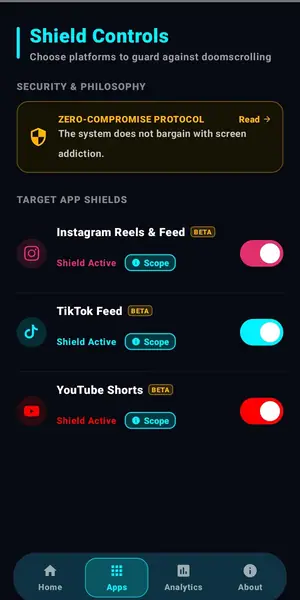
Break the scrolling loop without losing touch. AwayDoomscrollin' is an open-source Android app from Resolve Community. It covers the feeds and stops short-video scrolling on Instagram, TikTok and YouTube, while messages, search and the things you choose to watch stay available. It does not set time limits.
How it works:
- Protection uses the accessibility information these apps provide. It reads the structure of the screen rather than its text, so it works the same in any language. Updates to these apps, Android or your phone's software can delay or break detection, so it is not guaranteed to work on every device.
What it covers:
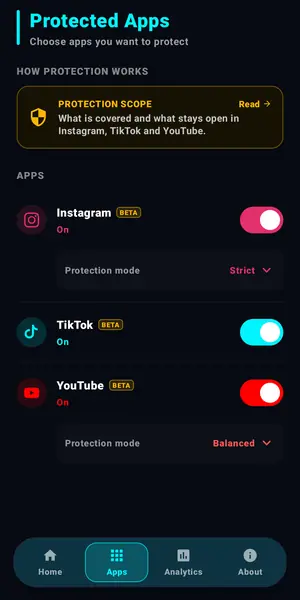
- Instagram: Both modes cover Home and Explore and block the Reels tab. Messages and search stay open, and the Explore cover stays below the keyboard. Balanced keeps profiles, profile posts, Stories and Highlights open and lets you watch one Reel you open, with its comments; swiping to the next one takes you back. Strict also covers profile posts and blocks Reels, Stories and Highlights.
- YouTube: Both modes cover Home and block the Shorts tab. Search results, channels, playlists, the You tab and long videos stay open. Balanced keeps Subscriptions open and lets you watch one Short opened from Subscriptions, search, a channel or a link; swiping to the next one takes you back. Strict also covers Subscriptions and blocks all Shorts.
- TikTok: You can open and browse TikTok. The first swipe to the next video in a video feed takes you back, and on Home every top tab other than For You switches back to For You. TikTok has a single protection setting. The regional TikTok app used in Korea, Japan and Southeast Asia is protected too.
- Open in Messages (Instagram, optional): when Instagram opens on Home, the app opens Messages for you.
- Languages: English, Turkish, French, Italian, Spanish, Russian and Korean.
- If your phone stops protection in the background, a notification tells you within about a minute. On Xiaomi, Redmi and POCO, setup also leads to Autostart, which brings protection back by itself.
- You stay in control: protection can be turned off in the app or in Android's accessibility settings, and the app does not try to stop you.
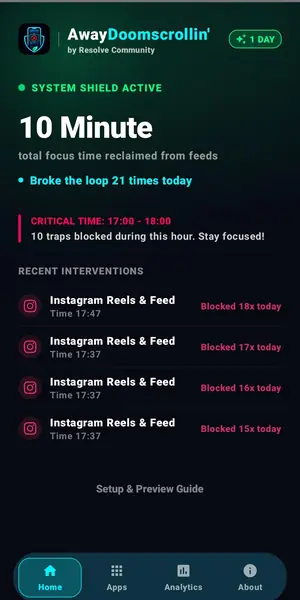
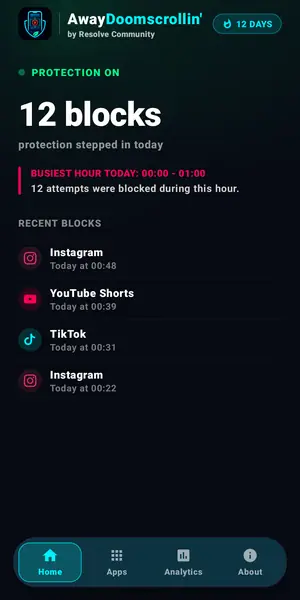
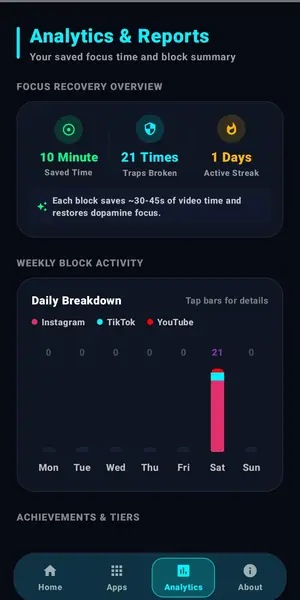
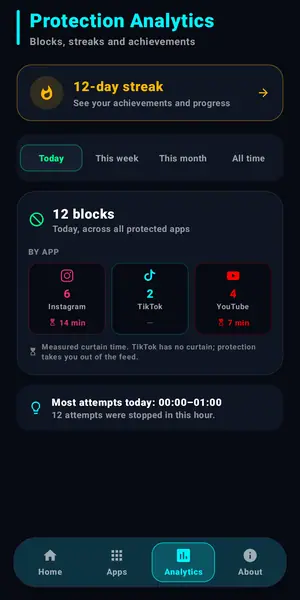
- Analytics: blocks for today, this week, this month and all time, your busiest hour, measured Instagram and YouTube curtain time (not an estimate of time saved) and a daily streak for every day protection is on.
Privacy:
- All protection decisions are made on your phone. What is on your screen is never sent anywhere.
- The app has internet access only for optional usage data sharing, which is off by default. Nothing is sent until you read the details and tap "Agree to share", and protection works without it.
- When sharing is on, the app sends a short summary to awaydoomscrollin.com at most once a day: a random installation ID, your phone model, Android and screen details, the versions of AwayDoomscrollin', Instagram, TikTok and YouTube, block counts per app, and the measured Instagram and YouTube curtain time. Your streak is not sent. Turning sharing off stops new reports. The server keeps the latest summary for up to 90 days and stores only a hashed form of the ID; encrypted backups are kept for 14 days.
- The troubleshooting log in About is off unless you turn it on. It stays on your phone for 24 hours, contains no names, messages or screen text and is never sent on its own; you can paste it into a support email.
AwayDoomscrollin' is an independent project. It is not affiliated with, sponsored by, or endorsed by Meta, ByteDance, Google, Instagram, TikTok, or YouTube. Their names are used only to describe compatibility.
What's new in version 1.5.0
New
- French, Italian, Spanish, Russian and Korean.
- Instagram: optional "Open in Messages".
- A notification if the phone stops protection.
- Xiaomi: Autostart reminder so protection comes back by itself.
Fixed
- Balanced: Stories are no longer covered for a moment.
- YouTube: Shorts opened from a list no longer close at once.
Improved
- Curtains lift much faster and cover sooner when you go back.
- Status notifications vibrate only when protection stops.
APK file information
| Package name | com.resolvecommunity.awaydoomscrollin |
|---|---|
| Version | 1.5.0 (code 12) |
| Minimum Android | Android 8.0 · targets Android 16 |
| Architectures | All (universal) |
| SHA-256 | 75ff47e23f552b72d0123c758c175781af2824b8d1396c9907836a2da3ca2bd9 |
| Signature | c59c79a593d1e026f92f5ab264626dfc0799046df6b7ee83b254863db8ab8716 |
| Licence | GPL-3.0-only — copyleft free licence: the code is public and modified versions must stay free |
| Source code | github.com/resolvecommunity/AwayDoomscrollin |
| Official website | awaydoomscrollin.com |
Permissions
- Internet access
- Show notifications
- Vibrate
- Start at boot
1 other technical permission(s)
REQUEST_IGNORE_BATTERY_OPTIMIZATIONS
Older versions
- AwayDoomscrollin' 1.5.0November 23, 2026 · 3.4 MB
- AwayDoomscrollin' 1.4.1November 9, 2026 · 3.0 MB
- AwayDoomscrollin' 1.4.0November 1, 2026 · 3.0 MB
How to install AwayDoomscrollin' APK
- Tap Download APK above, then open the file once the download has finished.
- If Android asks, allow your browser to install unknown apps.
- Tap Install. AwayDoomscrollin' then appears with your other apps.
Having trouble? Read our guides how to install an APK on Android and "App not installed": how to fix it.
Frequently asked questions
Is AwayDoomscrollin' free?
Yes. AwayDoomscrollin' is distributed under the GPL-3.0-only licence: free, no subscription, and its source code is public.
Is this APK file safe?
The file is the one built and published by the F-Droid repository from the public source code. Its SHA-256 fingerprint is shown above, so you can compare it after downloading. How to check an APK.
Will AwayDoomscrollin' work on my phone?
You need at least Android 8.0. The app also works without Google services, so it runs on recent Huawei phones too.