Keep Alive Lite APK
Notify others if you haven't used your device in a given period of time
Download APK v1.5.1-lite · 2.5 MB- Version1.5.1-lite
- Size2.5 MB
- RequiresAndroid 5.1
- Updated7/1/2026
- LicenceApache-2.0
- PriceFree
About Keep Alive Lite
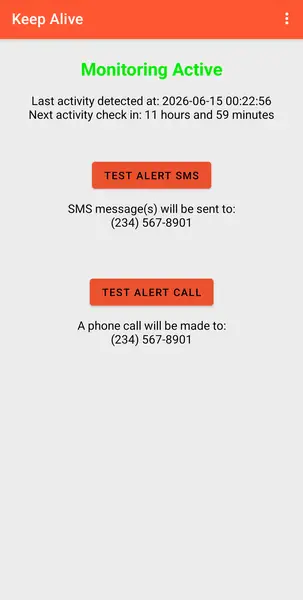
Keep Alive will send a custom message via SMS to one or more people if you haven't used your device in a given period of time. Intended to be used as a failsafe for those living alone in case of an accident or other emergency. Once the settings are configured, no further interaction is required.
- 100% Device-based, no cloud services or accounts required
- Free with no ads or trackers
- Open Source (https://github.com/keepalivedev/KeepAlive)
- Minimal Battery Usage
- Multiple SMS Recipients
- Custom Alert Message
- Optional: Include Location Information in SMS
- Optional: Place a phone call with speakerphone enabled
- Optional: Send an HTTP request to a custom URL
Requirements Keep Alive requires that your device has an active cellular plan. WiFi calling and messaging will be used if the device supports it.
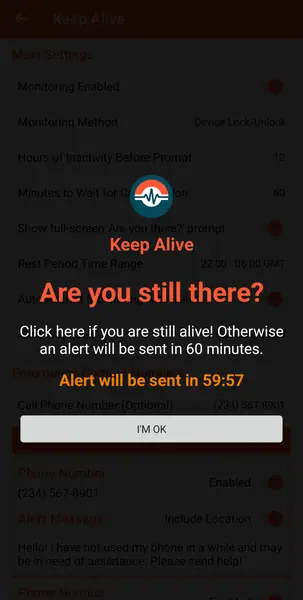
How it Works Keep Alive uses either your device's lock screen or another app(s) to detect activity. If your device hasn't been lock or unlocked for a set period of time, or if you haven't accessed the selected app(s), you will be prompted with an 'Are you there?' notification. If this notification is not acknowledged an Alert will be triggered. Based on the configured Emergency Contact Settings, one or more SMS messages and/or a phone call will be placed to notify others that you may be in need of assistance.
WARNING: If your device restarts, Keep Alive will not be able to check for recent activity until the screen is unlocked. On Android 7.0+, Keep Alive can still send an alert before the screen is unlocked but must assume you have been inactive based on its last saved state. On older Android versions, Keep Alive cannot run at all until the screen is unlocked and alerts will not be sent.
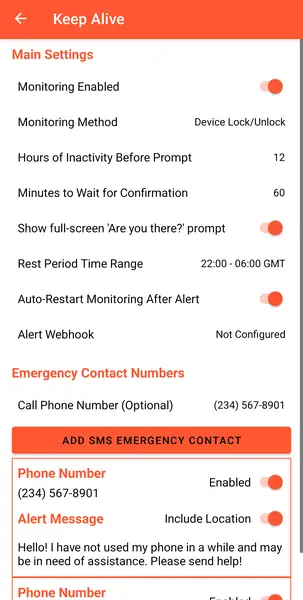
Main Settings
- Monitoring Method - Choose between using the lock screen or another app(s) to detect activity. If using another app(s), you will be prompted to select the app(s) to monitor.
- Hours of Inactivity Before Prompt - how many hours since your phone was last locked or unlocked before you are prompted with an 'Are you there?' notification. Defaults to 12 hours
- Minutes to Wait - if the prompt is not acknowledged within this time, an Alert will be sent based on the configured emergency contact settings. Defaults to 60 minutes
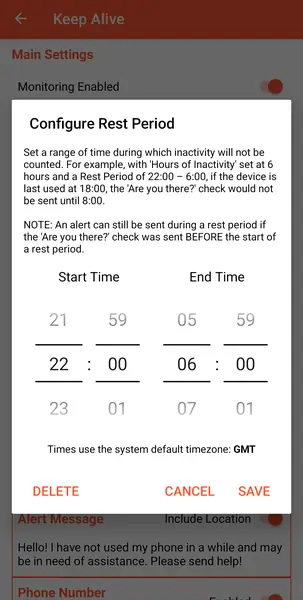
- Rest Period Time Range - a range of time during which inactivity will not be counted. For example, with 'Hours of Inactivity' set at 6 hours and a Rest Period of 22:00 – 6:00, if the device is last used at 18:00, the 'Are you there?' check would not be sent until 8:00. Note that an alert can still be sent during a rest period if the 'Are you there?' check was sent BEFORE the start of a rest period.
- Auto-Restart Monitoring After Alert - If enabled, monitoring will be automatically restarted after an Alert is sent.
- Alert Webhook - Configure an HTTP request to be sent when an Alert is triggered
Emergency Contact Settings
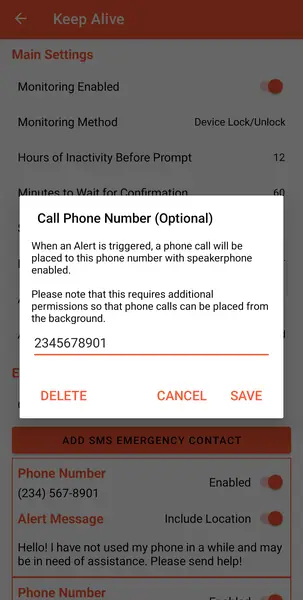
- Phone Call Number (Optional) - when an Alert is triggered a phone call will be placed to this number with speakerphone enabled
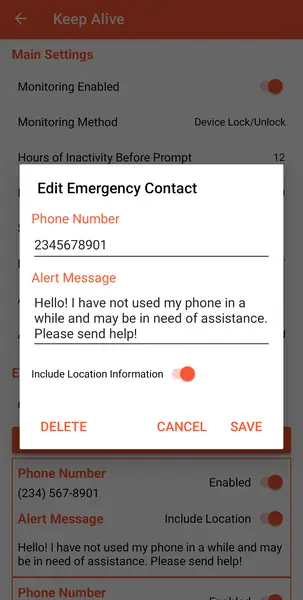
One or more SMS recipients can be configured with:
- Phone Number - the phone number to send the Alert SMS to
- Alert Message - the message that will be sent when an Alert is triggered
- Include Location - if enabled, your location will be included in a second SMS
Privacy/Data Collection No data is collected other than the configured settings and nothing is shared with the developers or any 3rd parties. The only data transmitted is to the configured emergency contacts.
Disclaimer
- Not responsible for SMS or phone call charges incurred by the use of the Keep Alive app
- The operation of the Keep Alive app is dependent on the device, software, and network connectivity. The developers are not responsible for any failure due to device malfunctions, software incompatibilities, or network issues.
What's new in version 1.5.1-lite
- Add full-screen "Are you there?" prompt
- Add Spanish translation
- Alerting now works after a reboot before first unlock
APK file information
| Package name | io.keepalive.lite.android |
|---|---|
| Version | 1.5.1-lite (code 151) |
| Minimum Android | Android 5.1 · targets Android 16 |
| Architectures | All (universal) |
| SHA-256 | 87ea4bda74115afe7117079e3f6bd38cf303a69050d38bab6ec6246bbfd392dd |
| Signature | c45567b712d6fd7979df14f66f8a5c25859ee223e1f07e915a7eee201c14baef |
| Licence | Apache-2.0 — permissive free licence: the source code is public and reusable |
| Source code | github.com/keepalivedev/KeepAlive |
Permissions
- Start at boot
- Send SMS sensitive
- Approximate location sensitive
- Make calls sensitive
- Phone status sensitive
- Precise location (GPS) sensitive
- Background location sensitive
- Show notifications
- Draw over other apps sensitive
- See installed apps sensitive
- Keep the device awake
- Run in the background
- View network status
2 other technical permission(s)
SCHEDULE_EXACT_ALARM PACKAGE_USAGE_STATS
Older versions
- Keep Alive Lite 1.5.1-liteJuly 1, 2026 · 2.5 MB
- Keep Alive Lite 1.3.3-liteNovember 12, 2025 · 2.4 MB
How to install Keep Alive Lite APK
- Tap Download APK above, then open the file once the download has finished.
- If Android asks, allow your browser to install unknown apps.
- Tap Install. Keep Alive Lite then appears with your other apps.
Having trouble? Read our guides how to install an APK on Android and "App not installed": how to fix it.
Frequently asked questions
Is Keep Alive Lite free?
Yes. Keep Alive Lite is distributed under the Apache-2.0 licence: free, no subscription, and its source code is public.
Is this APK file safe?
The file is the one built and published by the F-Droid repository from the public source code. Its SHA-256 fingerprint is shown above, so you can compare it after downloading. How to check an APK.
Will Keep Alive Lite work on my phone?
You need at least Android 5.1. The app also works without Google services, so it runs on recent Huawei phones too.