Marmalade TTS APK
Fast, natural, private text-to-speech for your whole phone. Works offline.
Download APK v1.3.4 · 106.9 MB- Version1.3.4
- Size106.9 MB
- RequiresAndroid 9
- Updated11/11/2026
- LicenceGPL-3.0-or-later
- PriceFree
About Marmalade TTS
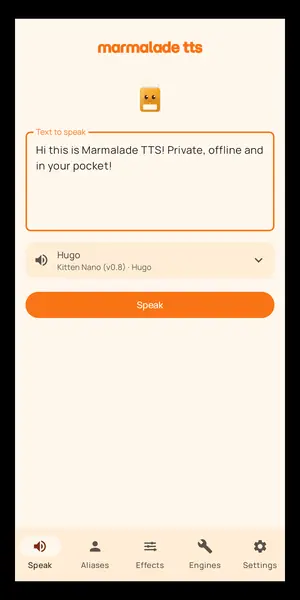
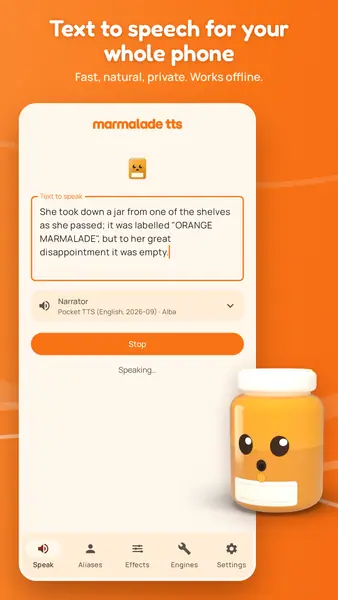
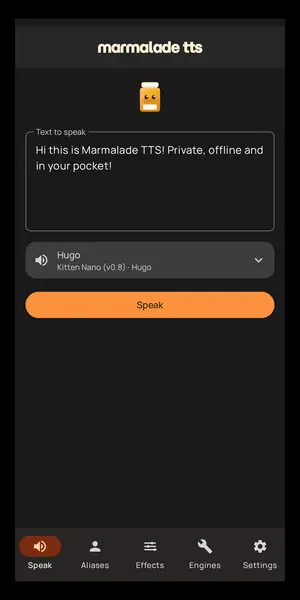
Marmalade TTS gives your phone a voice worth listening to. Set it as your text-to-speech engine and every app that reads aloud, from screen readers to e-book readers to chat apps, speaks through Marmalade, with natural voices that run offline on your phone.
- Natural neural voices. Over 70, with a fast English voice ready the moment you install
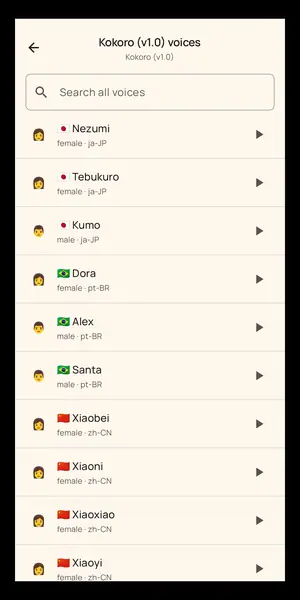
- Hear before you pick. Every on-device voice plays a short sample
- Fast. Speech responds quickly even on modest phones
- Private by default. Everything runs on your device
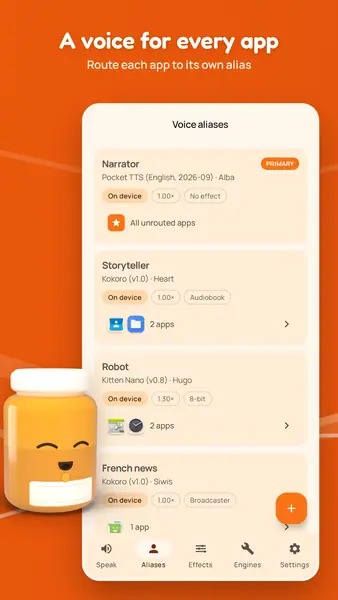
- Per app voices. Route each app to its own voice
- Speaks 9 languages. Kokoro TTS detects what language is being read
- Expressive English voices. Pocket TTS runs lively, natural English voices on your phone
- Accessible. TalkBack supported and designed to meet WCAG 2.1 AA
- Voice effects. Over 20 presets plus an editor to make your own
- Optional cloud voices. From cloud providers such as Venice.ai, with your own API key
- Free, open source, no ads, no accounts
SPEAKS 9 LANGUAGES
The multilingual Kokoro engine speaks English (US and UK), Spanish, French, Italian, Portuguese (Brazil), Hindi, Japanese, and Mandarin Chinese. It detects the language as it reads and switches pronunciation on the fly. Kokoro German adds a native German voice.
WORKS EVERYWHERE
Marmalade plugs into Android's standard text-to-speech setting, so any app that speaks through it speaks with Marmalade. Pick it once as your TTS engine in Settings.
READY OUT OF THE BOX
Marmalade comes with a fast English voice built in, so text to speech works offline from your very first launch. Bigger and better engines download only when you choose them, then run offline too.
A VOICE FOR EVERY APP
Marmalade is built around aliases. Build your favorite voice with speed and effect settings. Route apps to aliases and your e-reader can speak in one voice while your chat app uses another. Anything unrouted follows your primary alias.
EXPRESSIVE ENGLISH VOICES
Pocket TTS, from Kyutai Labs, gives English its most expressive voices: natural rhythm and intonation, generated on your phone as it speaks. It keeps up on most mid-range phones, and Marmalade recommends it when your phone can run it comfortably.
PRIVATE, WITH OR WITHOUT THE CLOUD
No analytics, no telemetry, no accounts, and no backend of ours. On-device voices touch the network only to download the engines you pick. If you want voices beyond what your phone can run, add voices from a cloud provider with your own API key. Some cloud providers, such as Venice.ai, say they don't store or log requests; others may, so check their privacy policies. Until you set one up, nothing you read ever leaves your phone.
READ THE WEB
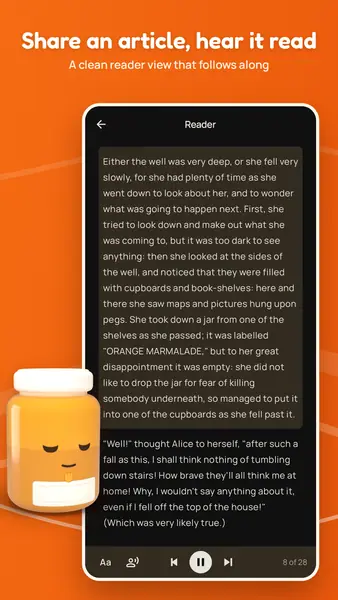
Share a link to Marmalade and it opens the article in a clean reader view, then reads it aloud with the current paragraph highlighted as it goes. Choose which voice reads each article, and how fast. Only the page you shared is contacted, no images or trackers are loaded, and nothing is stored.
BUILT FOR SCREEN READERS
Use Marmalade as the TTS engine behind TalkBack and other screen readers. The app itself is TalkBack supported and designed to meet WCAG 2.1 AA, with a dark theme that meets AA contrast. Progress and errors are announced aloud when TalkBack is enabled.
MAKE IT YOURS
Over 20 built-in effect presets like 8-bit, cyborg, megaphone, and vintage radio give spoken output character. Or build your own effect chains in the editor. Set any speed from half to double, and voices keep their natural sound.
READS THE LONG STUFF
Marmalade keeps reading long text with the screen off, with lock-screen and Bluetooth cont
What's new in version 1.3.4
Marmalade TTS 1.3.4, a bug-fix release.
- Setup is readable with Android 16's dark theme, and Back steps back a step.
- Voices read through abbreviations and initials like "Dr. Smith" instead of stopping.
- Better reading of times, prices, "#1", "C#" and "<3".
- Routing an app to another alias works again after you delete the alias it used.
- Apps that look for the default voice always find one.
- Stopping a cloud voice is instant.
- Small fixes.
APK file information
| Package name | app.marmalade.tts |
|---|---|
| Version | 1.3.4 (code 10030040) |
| Minimum Android | Android 9 · targets Android 16 |
| Architectures | arm64-v8a, armeabi-v7a |
| SHA-256 | 42d909a93117b83bf482b723558746203b83288d2417f4307e583a75dbe105f3 |
| Signature | 556ebcb67b5ba498707c345a72ffe59ea156dca544800bf966d40989272118d0 |
| Licence | GPL-3.0-or-later — copyleft free licence: the code is public and modified versions must stay free |
| Source code | github.com/maxwhipw/marmalade-tts-android |
Permissions
- Run in the background
- Keep the device awake
- Show notifications
- Internet access
1 other technical permission(s)
REQUEST_IGNORE_BATTERY_OPTIMIZATIONS
Older versions
- Marmalade TTS 1.3.4November 11, 2026 · 106.9 MB
- Marmalade TTS 1.3.3October 27, 2026 · 106.9 MB
- Marmalade TTS 1.3.2October 22, 2026 · 106.8 MB
How to install Marmalade TTS APK
- Tap Download APK above, then open the file once the download has finished.
- If Android asks, allow your browser to install unknown apps.
- Tap Install. Marmalade TTS then appears with your other apps.
Having trouble? Read our guides how to install an APK on Android and "App not installed": how to fix it.
Frequently asked questions
Is Marmalade TTS free?
Yes. Marmalade TTS is distributed under the GPL-3.0-or-later licence: free, no subscription, and its source code is public.
Is this APK file safe?
The file is the one built and published by the F-Droid repository from the public source code. Its SHA-256 fingerprint is shown above, so you can compare it after downloading. How to check an APK.
Will Marmalade TTS work on my phone?
You need at least Android 9. The app also works without Google services, so it runs on recent Huawei phones too.