AlarmClock Deluxe (Wecker, Uhr, Timer, Stoppuhr) APK
Alarm, clock, timer and stopwatch with advanced alarm tools
Descargar APK v2026.08.001 · 7,1 MB- Versión2026.08.001
- Tamaño7,1 MB
- RequiereAndroid 6.0
- Actualizada15/10/2026
- LicenciaGPL-3.0-only
- PrecioGratis
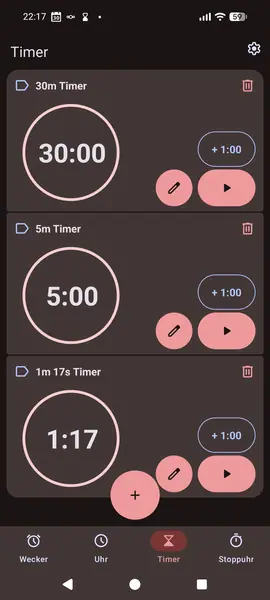
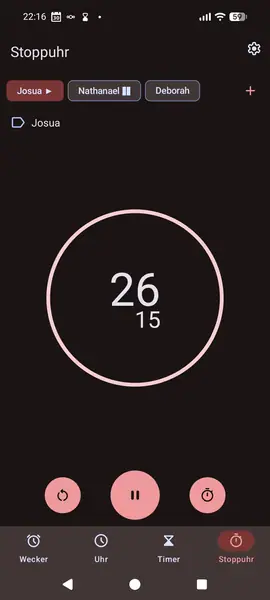
Acerca de AlarmClock Deluxe (Wecker, Uhr, Timer, Stoppuhr)
Descripción del desarrollador (en inglés).
AlarmClock Deluxe (Wecker, Uhr, Timer, Stoppuhr) (de.huttersoft.mightyalarmclock) is a fork of BlackyHawky's Clock, itself based on AOSP, released under the GNU General Public License v3.0 (GPL-3.0).
Does not use the internet permission, and thus is 100% offline.
The location permission is used only to read the SSID of the connected Wi-Fi network for optional per-alarm Wi-Fi rules. No location data is collected or sent; the app cannot access the internet.
On top of everything the original Clock app offers, AlarmClock Deluxe adds:
- A fire queue so multiple alarms firing close together are presented one after another instead of being marked missed;
- Progressive snooze (each snooze can automatically get longer) plus a manual snooze duration picker;
- Global mute: silence or vibrate-only every alarm until a chosen time;
- Naming a new alarm right when it's created;
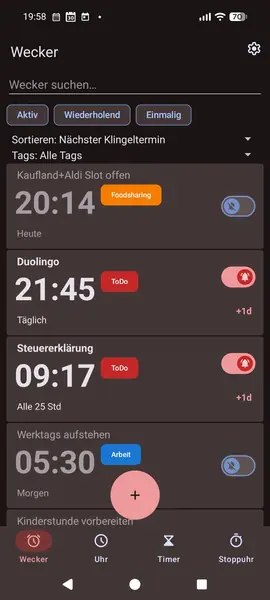
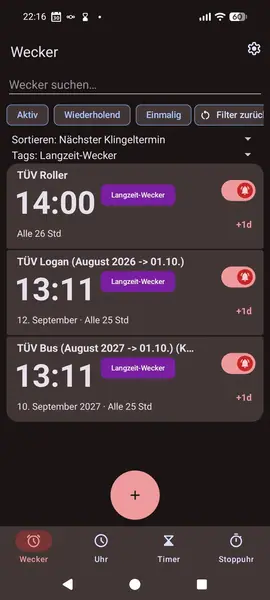
- Searching, filtering and extra sorting options for the alarm list;
- Tags with their own ringtone, automatically used by alarms that don't set one explicitly;
- Device-wide alarm statistics with a shareable event log;
- Wi-Fi based rules to automatically enable/disable alarms depending on the connected network;
- Plain JSON backups (no ZIP) to a folder of your choice, with optional scheduled backups;
- An experimental "exchange" mechanism to move or share alarms between devices via a shared folder;
- Multiple named stopwatches that can run in parallel, with runs recorded in the event log;
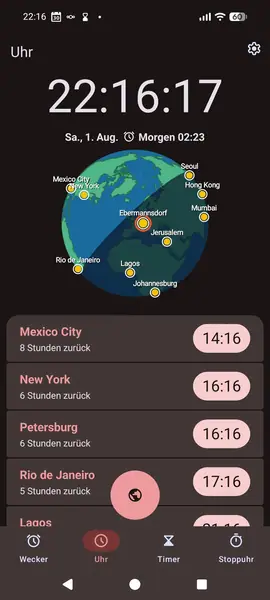
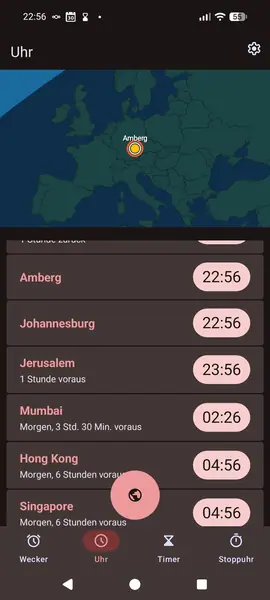
- A small rotatable timezone globe on the clock screen showing your selected world cities;
...and the full original Clock feature set:
- Set the alarms to a specific date;
- Flip and shake action to dismiss/postpone alarm;
- Turn off/postpone the alarm with the power button or volume buttons;
- Swipe to delete an alarm;
- Duplicate alarms;
- Customizable alarm title and ringtone;
- Light, dark or system theme, with AMOLED mode;
- Customizable interface;
- Digital or analog clock style;
- Display home time when traveling, and the time in many cities around the world;
- Timer and stopwatch included;
- Customizable screensaver;
- Modern, customizable widgets;
- Support for tiles in quick settings (for Android 7+);
- Backup and restore application data;
- Material design with dynamic colors for Android 12+;
Novedades de la versión 2026.08.001
First public CalVer release (2026.08.001) of AlarmClock Deluxe.
Fork of BlackyHawky's Clock with richer alarm management: fire queue, progressive snooze, global mute, tags, search/filters, Wi-Fi rules, JSON backups, Syncthing-friendly exchange, multi-stopwatch, timezone globe, and more. Location permission is used only to read the Wi-Fi SSID for optional rules — no internet access.
Información del archivo APK
| Nombre del paquete | de.huttersoft.mightyalarmclock |
|---|---|
| Versión | 2026.08.001 (código 202608001) |
| Android mínimo | Android 6.0 · diseñada para Android 16 |
| Arquitecturas | Todas (universal) |
| SHA-256 | 828219b591fa2a496b84f2287b4b979c12fc68243bb3cdb17cdda1106497af38 |
| Firma | a4a2509ae7022d17168145ab7fa10d3c07bf102d78c4b417b6545f862a9d614a |
| Licencia | GPL-3.0-only — licencia libre copyleft: el código es público y las versiones modificadas deben seguir siendo libres |
| Código fuente | github.com/RapidAppCoder/mighty-alarm-clock |
Permisos solicitados
- Iniciarse al arrancar
- Impedir la suspensión
- Vibrar
- Funcionar en segundo plano
- Mostrar notificaciones
- Ver el estado del Wi-Fi
- Ubicación aproximada sensible
- Ubicación precisa (GPS) sensible
7 permiso(s) técnico(s) más
USE_FULL_SCREEN_INTENT SCHEDULE_EXACT_ALARM USE_EXACT_ALARM TURN_SCREEN_ON MODIFY_AUDIO_SETTINGS REQUEST_IGNORE_BATTERY_OPTIMIZATIONS FLASHLIGHT
Cómo instalar AlarmClock Deluxe (Wecker, Uhr, Timer, Stoppuhr) APK
- Pulsa Descargar APK arriba y abre el archivo cuando termine la descarga.
- Si Android lo pide, permite que tu navegador instale apps desconocidas.
- Pulsa Instalar. AlarmClock Deluxe (Wecker, Uhr, Timer, Stoppuhr) aparecerá junto a tus otras apps.
→ Cómo instalar un archivo APK en Android (paso a paso)
→ «La aplicación no está instalada»: causas y soluciones
Preguntas frecuentes
¿AlarmClock Deluxe (Wecker, Uhr, Timer, Stoppuhr) es gratis?
Sí. AlarmClock Deluxe (Wecker, Uhr, Timer, Stoppuhr) se distribuye con licencia GPL-3.0-only: gratis, sin suscripción y con el código fuente público.
¿Es seguro este archivo APK?
El archivo es el que compila y publica el repositorio F-Droid a partir del código fuente público. Su huella SHA-256 aparece arriba para que puedas compararla tras la descarga. ¿Un APK es peligroso? Cómo verificar un archivo antes de instalarlo
¿Funciona AlarmClock Deluxe (Wecker, Uhr, Timer, Stoppuhr) en mi teléfono?
Necesitas como mínimo Android 6.0. La app también funciona sin los servicios de Google, así que funciona en los teléfonos Huawei recientes.