
InterTune APK
Material 3 local music player and YouTube Music client
Descargar APK v0.12.11 · 14,5 MB- Versión0.12.11
- Tamaño14,5 MB
- RequiereAndroid 7.0
- Actualizada23/11/2026
- LicenciaGPL-3.0-only
- PrecioGratis
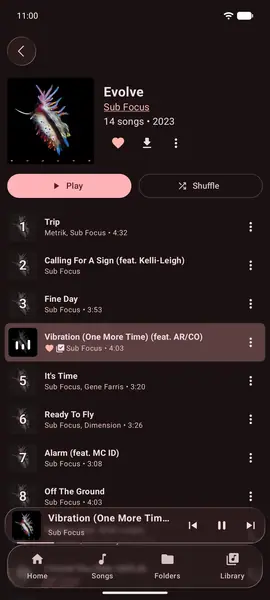
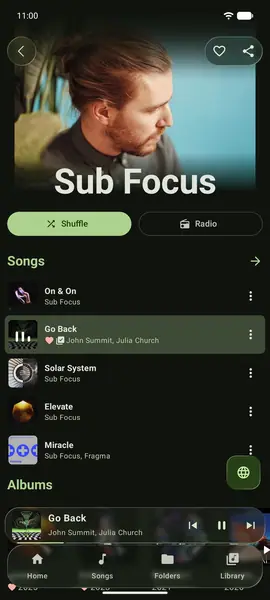
Acerca de InterTune
Descripción del desarrollador (en inglés).
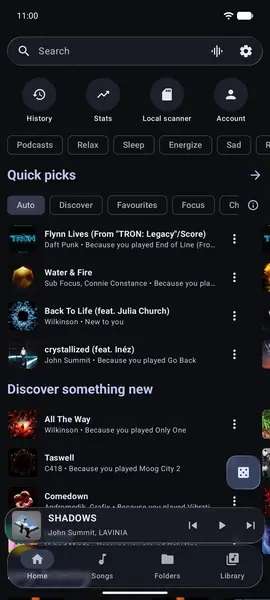
InterTune is a fork of OuterTune, which is itself a fork of InnerTune. It is both a local media player and a YouTube Music client.
Features:
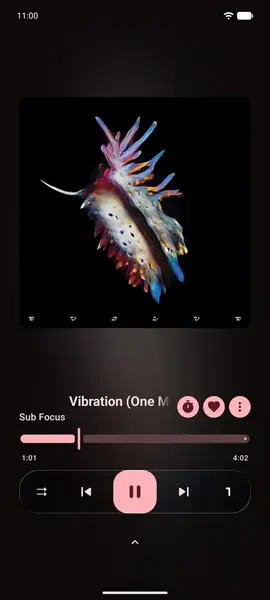
- YouTube Music client with song downloading for offline playback, background playback, no ads, and account synchronization
- Local audio file playback (MP3, OGG, FLAC, and more)
- A custom tag extractor rather than MediaStore's metadata extractor, so tags delimited with a backslash show up properly
- Play local files and YouTube Music songs in the same queue
- Cast to a Chromecast, an FCast receiver or a DLNA TV
- An offline tab listing the songs already cached on the device, so you can see what will play with no connection
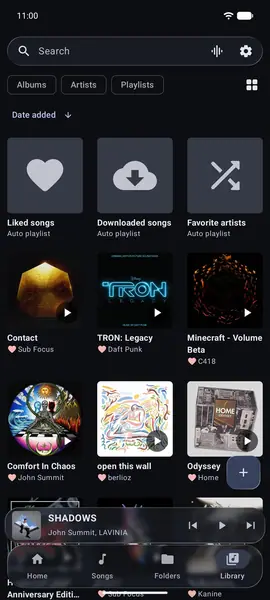
- Integrated library screen design
- Multiple queues
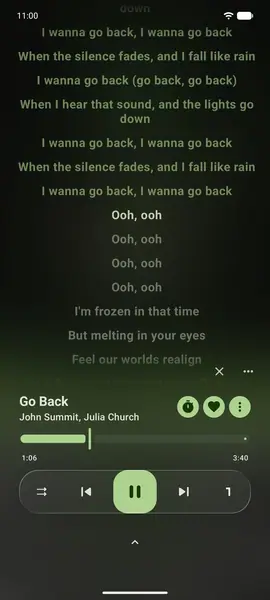
- Synchronized lyrics, including word by word and karaoke lyrics (LRC, TTML)
- A line in Latin letters under Japanese (romaji, kanji kept), Korean, Chinese, Russian and more, from Android 10
- A ten-band equalizer: ready curves, or the one measured for your own headphones (AutoEq)
- Audio normalization, tempo and pitch adjustment, and other audio effects
- Choose where Quick picks comes from: YouTube Music, Your library, or Best recommendations, which builds the row on your phone from how you listen
- What's playing? names the song around you, using Shazam, and can fill a playlist with what it hears
- A home screen widget that takes the shape of its size
- Spatial audio on any headphones, with head tracking on supported ones
- Android Auto support
What it connects to:
- YouTube Music, for everything you search, play, download or sync. Signing in is optional.
- LRCLIB and KuGou, to find lyrics for the song that is playing. Each can be turned off.
- AutoEq's measurements on GitHub, only when you look for your headphones in the equalizer.
- Shazam, only while you have it listening. A sound fingerprint is sent, with the time and your time zone, never the recording. The cover of a song it finds is loaded from the address Shazam gives.
- Last.fm, only if you turn it on. To find similar songs it is sent the title and artist of songs you play, and, once, those of the songs you liked or played in the last month, with no account. If you connect a Last.fm account, the songs you play are also recorded on it, with album, length and the time they started. You sign in on Last.fm's own page.
- GitHub, only if you turn on the update check or tap Check for update yourself. The app can then download a new release and hand it to Android's installer, which always asks you first. A copy installed from F-Droid is sent to F-Droid for its update instead.
- Polls and announcements, only if you turn them on. They are read from a GitHub gist, and a picture in one is loaded from the address it gives. Opening or answering one is counted on Umami Cloud, with no account and no device identifier.
- The usage count, only if you turn it on. Once a day at most it tells Umami Cloud the app is in use: a random name that changes every month, whether it was installed from F-Droid, and the app and Android versions.
Notice:
- Android 7.0 or later.
- Something not working? Please report it, from the app (Settings, About, Submit a bug report) or on GitHub.
InterTune is not affiliated with, sponsored by, or endorsed by Google or YouTube.
Novedades de la versión 0.12.11
Version 0.12.11
- If you chose to be counted, the daily count and poll answers now go to InterTune's own counter instead of Umami, whose free plan ran out. What's sent doesn't change.
- Crash fixes: the player in split screen or on small screens, and lyrics changing twice in a moment.
- A wired headset's button plays your queue when the app is closed.
https://github.com/ItzSkyeYT/InterTune/releases/tag/v0.12.11
Información del archivo APK
| Nombre del paquete | dev.skye.intertune |
|---|---|
| Versión | 0.12.11 (código 103) |
| Android mínimo | Android 7.0 · diseñada para Android 16 |
| Arquitecturas | arm64-v8a, armeabi-v7a, x86, x86_64 |
| SHA-256 | 5c942740efae7d687fc3c9110760f586ce3b8730d88a7f14b8b6e8a964aac475 |
| Firma | 69c6b5fbf1220a44206e8a3a098f41c78af7f94d2fa56eb3165ca40b9199a2a7 |
| Licencia | GPL-3.0-only — licencia libre copyleft: el código es público y las versiones modificadas deben seguir siendo libres |
| Código fuente | github.com/ItzSkyeYT/InterTune |
| Sitio oficial | intertune.app |
Permisos solicitados
- Acceso a Internet
- Instalar otras apps sensible
- Mostrar notificaciones
- Ver el estado de la red
- Iniciarse al arrancar
- Impedir la suspensión
- Funcionar en segundo plano
- Leer música
- Micrófono sensible
- Leer el almacenamiento
- Buscar dispositivos Bluetooth
1 permiso(s) técnico(s) más
POST_PROMOTED_NOTIFICATIONS
Versiones anteriores
- InterTune 0.12.1123 de noviembre de 2026 · 14,5 MB
- InterTune 0.12.911 de noviembre de 2026 · 14,5 MB
- InterTune 0.12.89 de noviembre de 2026 · 14,5 MB
Cómo instalar InterTune APK
- Pulsa Descargar APK arriba y abre el archivo cuando termine la descarga.
- Si Android lo pide, permite que tu navegador instale apps desconocidas.
- Pulsa Instalar. InterTune aparecerá junto a tus otras apps.
→ Cómo instalar un archivo APK en Android (paso a paso)
→ «La aplicación no está instalada»: causas y soluciones
Preguntas frecuentes
¿InterTune es gratis?
Sí. InterTune se distribuye con licencia GPL-3.0-only: gratis, sin suscripción y con el código fuente público.
¿Es seguro este archivo APK?
El archivo es el que compila y publica el repositorio F-Droid a partir del código fuente público. Su huella SHA-256 aparece arriba para que puedas compararla tras la descarga. ¿Un APK es peligroso? Cómo verificar un archivo antes de instalarlo
¿Funciona InterTune en mi teléfono?
Necesitas como mínimo Android 7.0. La app también funciona sin los servicios de Google, así que funciona en los teléfonos Huawei recientes.





