
openScale APK
Rastreador de peso y métricas corporales, con soporte para básculas Bluetooth
Descargar APK v3.1.4 · 30,1 MB- Versión3.1.4
- Tamaño30,1 MB
- RequiereAndroid 12
- Actualizada4/11/2026
- LicenciaGPL-3.0-only
- PrecioGratis
Acerca de openScale
Descripción del desarrollador (en inglés).
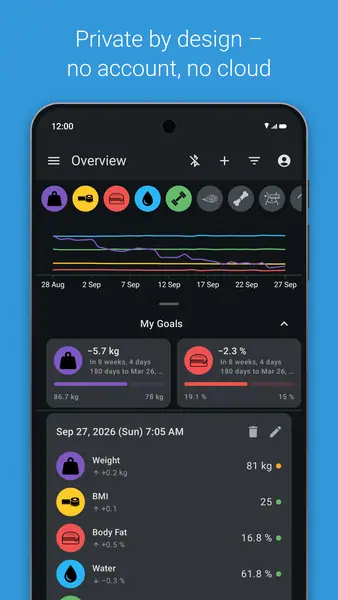
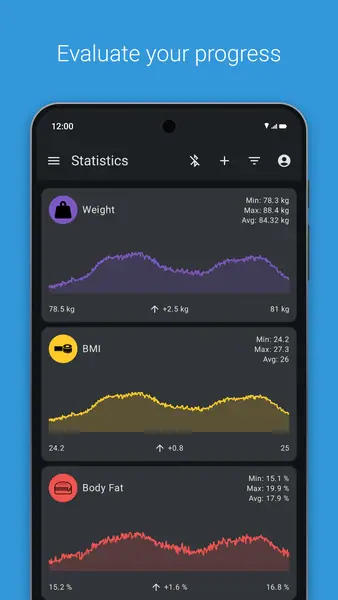
Monitor and track your weight, BMI, body fat, body water, muscle and other body metrics in an open source app that:
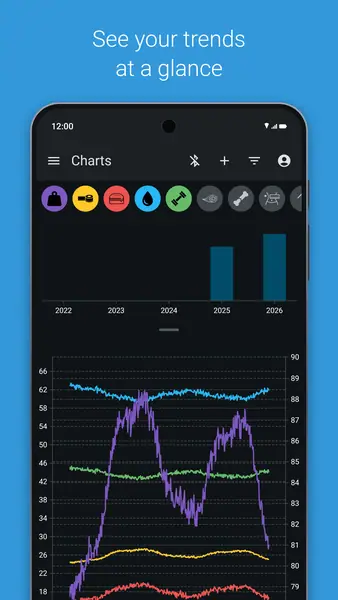
- has an easy to use user interface with graphs,
- doesn't require you to create an account,
- can be configured to only show the metrics you care about, and
- respects your privacy and lets you decide what to do with your data.
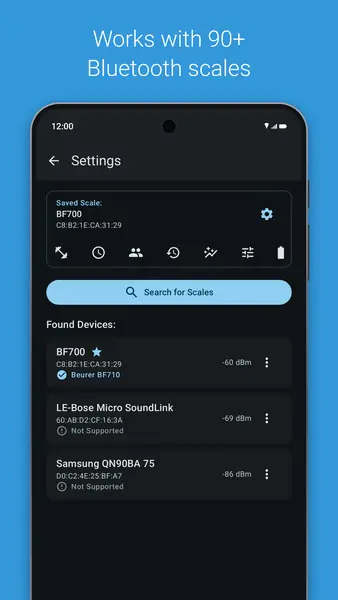
Bluetooth scales
openScale has built-in support for a number of Bluetooth (BLE or "smart") scales from many manufacturers, e.g. Beurer, Sanitas, Yunmai, Xiaomi, etc. (see model list below). Together with our users we constantly improve and extend the set of supported scales and in many cases pick up where the original app falls short.
For scales without Bluetooth, or Bluetooth scales not (yet) supported by openScale, measurements can be manually entered in a quick and easy way.
Privacy
This app has no ads and requests no unnecessary permissions. The location permission is only needed to find a Bluetooth scale. Once found the permission can be revoked (or never granted if Bluetooth isn't used).
Supported metrics
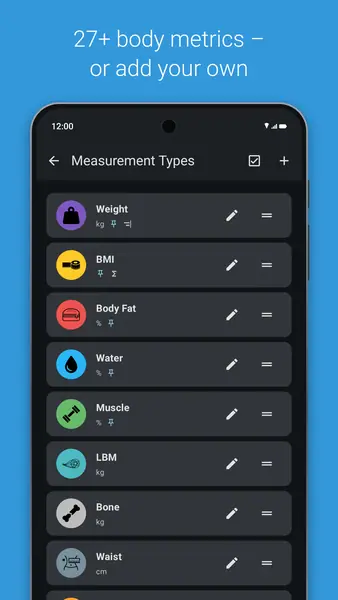
Weight, BMI (body mass index), body water, muscle, LBM (lean body mass), body fat, bone mass, waist circumference, waist-to-height ratio, hip circumference, waist-hip ratio, visceral fat, chest circumference, thigh circumference, biceps circumference, neck circumference, body fat caliper and BMR (basal metabolic rate). Each entry can also have an optional comment.
Note: don't worry if you think the list is too long: metrics you don't use can be disabled and hidden.
Other features
- Resizable widget to show the latest measurement on the home screen
- Configure your weight unit: kg, lb or st
- Set a goal to help keep your diet
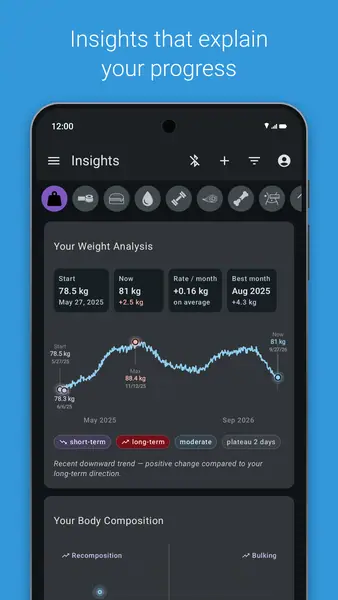
- Displays all your data on a chart and in a table to track your progress
- Evaluates measurements and gives a quick visual feedback to show you if you're within or outside the recommended range given your age, sex, height etc.
- Import or export your data from/into a CSV (comma separated value) file
- Supports body fat, body water and lean body mass estimations based on scientific publications. Useful if your scale doesn't support those measurements.
- Support for multiple users
- Partially or fully translated into Catalan, Chinese (traditional), Czech, Dutch, English, French, Galician, German, Greek, Italian, Japanese, Norwegian Bokmål, Polish, Portuguese (Brazil), Romanian, Slovak, Spanish, Swedish and Turkish
- Optional dark theme
Supported Bluetooth scales
- Custom made Bluetooth scale
- Beurer BF700, BF710 and BF800
- Digoo DG-S038H
- Excelvan CF369BLE
- Exingtech Y1
- Hesley (Yunchen)
- MGB
- Medisana BS444, BS440
- Runtastic Libra
- Sanitas SBF70
- Silvercrest SBF75
- Xiaomi Mi scale v1 and v2
- Yunmai Mini and SE
- iHealth HS3
- Easy Home 64050
- and many more
Please see Wikipage for the full list and the level of support for each scale.
Support
If you find a bug, have an idea on how to improve openScale or have a question, please visit the openScale project page on GitHub
Novedades de la versión 3.1.4
- New scale support: QardioBase, Hume Body Pod 2, Redmond SkyBalance, Samsung Smart Scale, iHealth HS2S, Wyze Scale, Xiaomi S200, Renpho Elis Solar, Fitdays, FITINDEX and more.
- Photo measurements with before/after comparison, exported as ZIP with the CSV.
- Compare two measurements side by side.
- Adaptive layout for tablets and foldables.
- Goals with a start date.
- Xiaomi S400: improved body composition.
- Many Bluetooth fixes.
Información del archivo APK
| Nombre del paquete | com.health.openscale |
|---|---|
| Versión | 3.1.4 (código 78) |
| Android mínimo | Android 12 · diseñada para API 37 |
| Arquitecturas | arm64-v8a, armeabi-v7a, x86, x86_64 |
| SHA-256 | 9dfb9b276ff19c60e6ad8dd6923118f89521ecf121b0f3f47e4d87f0cec9a3e6 |
| Firma | fadfeba2ecff3c70181a7e108f992cacd4eb7db144b03a8867e1e5f032478dbe |
| Licencia | GPL-3.0-only — licencia libre copyleft: el código es público y las versiones modificadas deben seguir siendo libres |
| Código fuente | github.com/oliexdev/openScale |
| Sitio oficial | github.com/oliexdev/openScale/wiki |
Permisos solicitados
- Conectar por Bluetooth
- Buscar dispositivos Bluetooth
- Iniciarse al arrancar
- Mostrar notificaciones
- Vibrar
- Impedir la suspensión
- Ver el estado de la red
- Funcionar en segundo plano
- Bluetooth
- Ubicación precisa (GPS) sensible
- Ubicación aproximada sensible
2 permiso(s) técnico(s) más
BLUETOOTH_ADMIN BLUETOOTH_ADVERTISE
Versiones anteriores
- openScale 3.1.44 de noviembre de 2026 · 30,1 MB
- openScale 3.1.39 de septiembre de 2026 · 29,3 MB
- openScale 3.1.211 de agosto de 2026 · 28,9 MB
Cómo instalar openScale APK
- Pulsa Descargar APK arriba y abre el archivo cuando termine la descarga.
- Si Android lo pide, permite que tu navegador instale apps desconocidas.
- Pulsa Instalar. openScale aparecerá junto a tus otras apps.
→ Cómo instalar un archivo APK en Android (paso a paso)
→ «La aplicación no está instalada»: causas y soluciones
Preguntas frecuentes
¿openScale es gratis?
Sí. openScale se distribuye con licencia GPL-3.0-only: gratis, sin suscripción y con el código fuente público.
¿Es seguro este archivo APK?
El archivo es el que compila y publica el repositorio F-Droid a partir del código fuente público. Su huella SHA-256 aparece arriba para que puedas compararla tras la descarga. ¿Un APK es peligroso? Cómo verificar un archivo antes de instalarlo
¿Funciona openScale en mi teléfono?
Necesitas como mínimo Android 12. La app también funciona sin los servicios de Google, así que funciona en los teléfonos Huawei recientes.