BatteryTemperatureDisplay APK
Temperature monitor and logging to prevent overheating, damage, and safety risks
Scarica l'APK v1.4 · 4,4 MB- Versione1.4
- Dimensione4,4 MB
- RichiedeAndroid 8.0
- Aggiornata23/06/2026
- LicenzaGPL-3.0-only
- PrezzoGratis
Informazioni su BatteryTemperatureDisplay
Descrizione fornita dallo sviluppatore (in inglese).
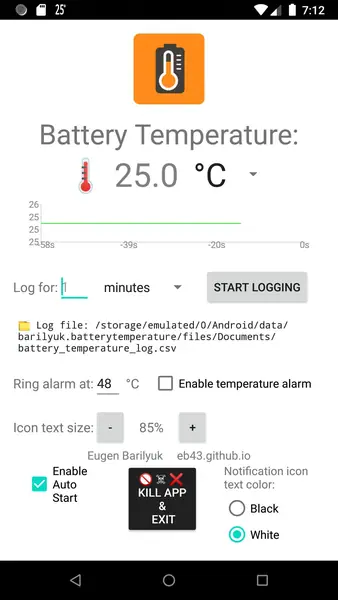
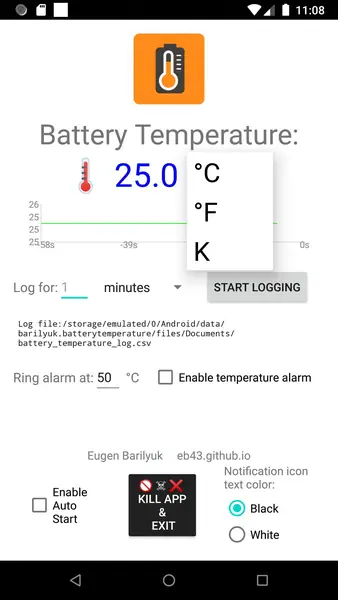
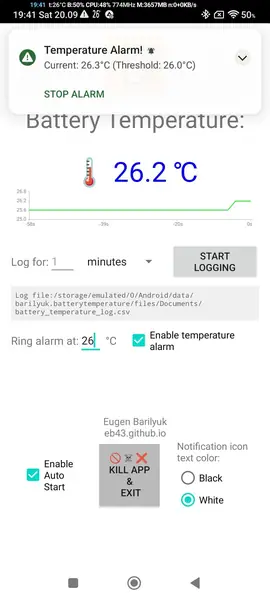
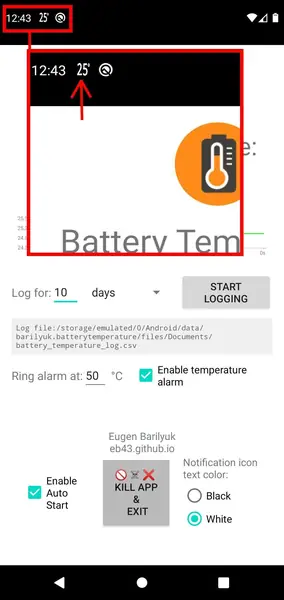
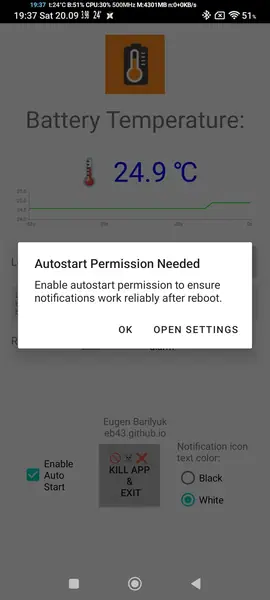
BatteryTemperatureDisplay shows Android phone’s real-time battery temperature. The information is always visible in an icon in the status bar and in a notification, even while you use other apps.
Practical uses of monitoring battery temperature:
🔥 Overheating detection during gaming or charging Li-ion battery degrades and loses its capacity when heated over 40 degrees Celsius for prolonged time. This can happen during gaming, 4K video recording, wireless charging. Set alarm to immediately get notified before battery gets actually overheated.
🧩 Prevent solder cracks under phone's processor Battery is the main channel for phone's process to dumpits heat. When your battery gets over 40 degrees Celsius under heavy load of gaming or video recording, phone processor is melting itself at that moment. Repeated cycles of processor overheating cause its solder to crack, leading to phone unable to boot and work.
⚠Reduce risk of phone li-ion battery fire Reaching 50 degrees Celsius may lead to li-ion thermal runaway and fire. Set an alarm to get alerted before your battery reaches this dangerous threshold. That is especially valuable if you leave your phone charging overnight, alowing to avoid cases of phone getting on fire while everyone in the house sleeps.
📊Use old Android as temperature logger Repurpose your old smartphone as temperature logging device to track the environment in your home, 🌱 greenhouse or 🐕 animal barn. Temperature fluctuations affect plant and animal health before they show visual stress signs. Log temperature for any time range - set if for minutes, hours, days, months. Temperature log is produced in timestamped CSV format, allowing for easy analysis in Excel, Google Sheets or any other spreadsheet editor.
🏃Heat stroke prevention During outdoor work or sports, let your phone to work as a body temperature monitor. If your phone reaches +40 °C in your pocket, you're in conditions that can cause heat exhaustion.
❄Body heat conservation Avoid excessive heat loss in cold weather. Phone placed against body shows how effectively your clothing retains heat during cold emergencies.
🚗Hot car safety Phone temperature rise in parked car indicates when interior becomes dangerous for children or pets - provides quantified warning beyond "it feels hot."
🥶Food safety monitoring Place your phone in a cooler during camping or power outages to know your food is safe. If the battery temperature rises above +4 °C, your food is entering the danger zone for bacterial growth.
🛏Bed assessment Place your phone between bed sheets and launch temperature logging. The log may highlight your bedding retains too much heat, affecting sleep quality and suggesting bed sheets material changes.
🏠Know heat insulation problems Phone temperature varying dramatically in different parts of your house reveals insulation issues. Rooms with poor insulation will cause your phone to heat up or cool down faster.
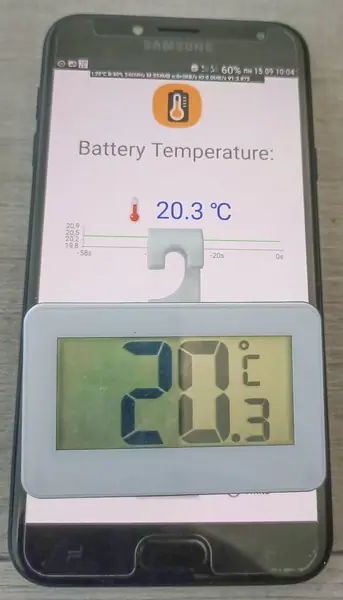
🌡Poor man's thermometer Track ambient temperature of any room with your phone if no dedicated thermometer is available.
The Android Battery Temperature app is a tool for anyone who wants to monitor, log, and act on temperature data using nothing more than your own smartphone. The app can be both a safety instrument and a multi-purpose temperature monitoring solution.
Created by Eugen Barilyuk EB43 https://eb43.github.io
Informazioni sul file APK
| Nome del pacchetto | barilyuk.batterytemperature |
|---|---|
| Versione | 1.4 (codice 5) |
| Android minimo | Android 8.0 · pensata per Android 13 |
| Architetture | Tutte (universale) |
| SHA-256 | 682b10b3903e4a7c2792f1b800e634368e49ea25910528f9c1deca2d18ab6475 |
| Firma | e99d38ac9afaa76bf187fb6398bb73ad4981e9b91f198a23243ca6f32034450c |
| Licenza | GPL-3.0-only — licenza libera copyleft: il codice è pubblico e le versioni modificate devono restare libere |
| Codice sorgente | github.com/Eb43/batterytemperature |
Autorizzazioni richieste
- Funzionare in background
- Mostrare notifiche
- Avviarsi all'accensione
- Impedire lo standby
Altre 1 autorizzazioni tecniche
MODIFY_AUDIO_SETTINGS
Versioni precedenti
- BatteryTemperatureDisplay 1.423 giugno 2026 · 4,4 MB
- BatteryTemperatureDisplay 1.318 dicembre 2025 · 4,4 MB
- BatteryTemperatureDisplay 1.118 ottobre 2025 · 4,4 MB
Come installare BatteryTemperatureDisplay APK
- Tocca Scarica l'APK qui sopra, poi apri il file al termine del download.
- Se Android lo chiede, consenti al browser di installare app sconosciute.
- Tocca Installa. BatteryTemperatureDisplay comparirà insieme alle altre app.
→ Come installare un file APK su Android (passo passo)
→ «App non installata»: cause e soluzioni
Domande frequenti
BatteryTemperatureDisplay è gratis?
Sì. BatteryTemperatureDisplay è distribuita con licenza GPL-3.0-only: gratuita, senza abbonamento e con codice sorgente pubblico.
Questo file APK è sicuro?
Il file è quello compilato e pubblicato dal repository F-Droid a partire dal codice sorgente pubblico. L'impronta SHA-256 è indicata qui sopra: puoi confrontarla dopo il download. Un APK è pericoloso? Come verificare un file prima di installarlo
BatteryTemperatureDisplay funziona sul mio telefono?
Serve almeno Android 8.0. L'app funziona anche senza i servizi Google, quindi anche sui telefoni Huawei recenti.