
Easy Watermark APK
Aggiungi in modo facile e sicuro una filigrana alle tue foto sensibili.
Scarica l'APK v3.0.6 · 3,8 MB- Versione3.0.6
- Dimensione3,8 MB
- RichiedeAndroid 6.0
- Aggiornata23/11/2026
- LicenzaMIT
- PrezzoGratis

Informazioni su Easy Watermark
Descrizione fornita dallo sviluppatore (in inglese).
Securely, easily add a watermark to your sensitive photos. To prevent them from being leaked or exploited by the BAD GUY.
Of course, it is also suitable for making emojis.
Characteristics
Exciting 👓
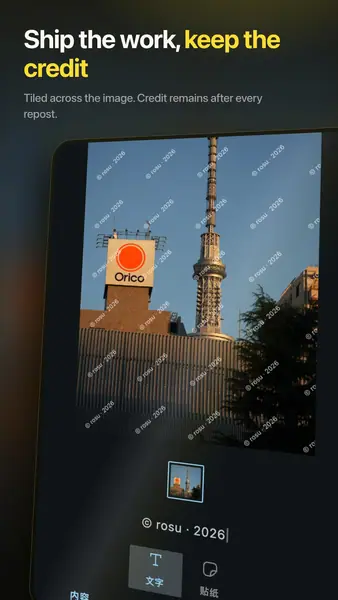
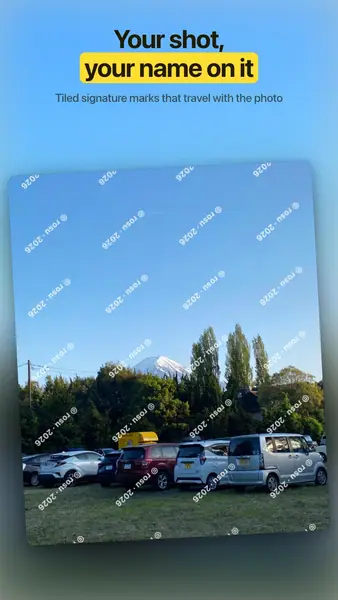
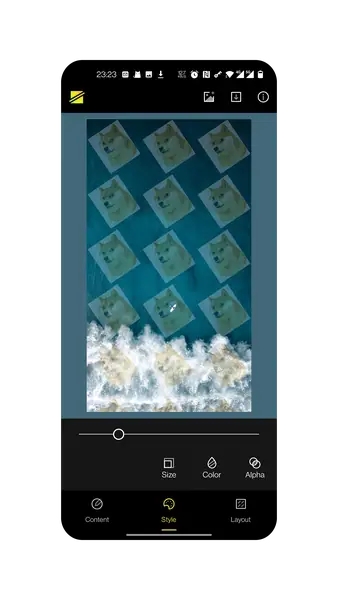
Purely offline local applications , code to see on open source. Vertical and horizontal spacing can be adjusted, the color of light and dark change at will. Rotate freely in all sizes and angles, text and pictures can be printed. The watermark repeats all over the picture, and it's a little hard for the bad guys to remove it.
Seriously (pushes up glasses)
- Security:
The code is completely open source and uses a loose MIT protocol, you are free to Fork yourself to modify and remove code you think is problematic ;) No network requests, no network request permissions, no fear of your photos being compromised. users with API >= 29 don't even need to request any permissions. (28 and below users need to apply for storage permissions to access and store photos) No stats, no Device IDs, no crash reporting, no third-party SDK — what's yours is yours.
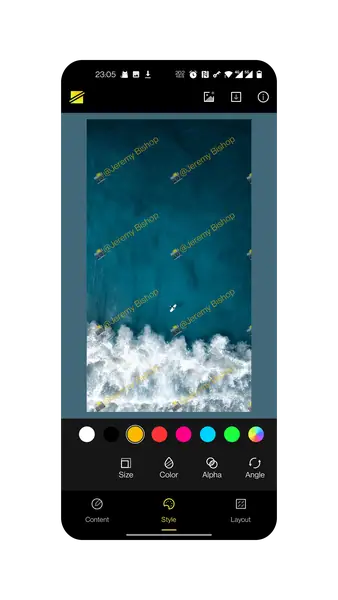
- Layout: support for horizontal and vertical intervals between the watermark, automatically repeat the full picture.
- Style: font color, transparency, size and rotation angle can be adjusted.
- Content: Support text watermark and image watermark.
Use
You can use it however you want. It is more suitable for situations where you need to submit a photo ID, a hand-held photo ID or a sensitive photo. Example.
Various real names in the country, uploading front and back photos of ID cards at every turn, even handheld ID photos. Pre-project previews, samples, copyrighted or simply spoofed images Reference text.
This photo is for xx for xxx purposes only, no other use.
You can turn down the transparency, just don't block the key information.
We can't prevent leaks, but we can reduce their value — and at least annoy the leaker.
UI
Designed by renowned UI guru @tovi (👏🤪) Anything you think doesn't work well is my UI restore that doesn't work, and has nothing to do with the UI draft. xD This app was designed by @tovi, so all rights to the UI and related design resources belong to him and may not be used without permission from any person or organization.
Open Source License.
Third party libraries used.
daniel-stonuk/material-about-library skydoves/ColorPickerView material-components/material-components-android
Feedback and contribution
We welcome your comments and suggestions in the issues section, or you can contribute your code by submitting a PR directly to us. Of course, you can also contact the developer directly via telegram or email and we'll get back to you shortly.
Informazioni sul file APK
| Nome del pacchetto | me.rosuh.easywatermark |
|---|---|
| Versione | 3.0.6 (codice 30006) |
| Android minimo | Android 6.0 · pensata per Android 16 |
| Architetture | arm64-v8a, armeabi-v7a, x86, x86_64 |
| SHA-256 | f22e7072c6a7cdccbc9180c42b6f54b9e0f6be68800bdcd422fbd76702661157 |
| Firma | 15c8ac45d5af692731c70b977ba7ecaf421a4cbd9824d162793a98a67c44ac2e |
| Licenza | MIT — licenza libera permissiva: il codice sorgente è pubblico e riutilizzabile |
| Codice sorgente | github.com/rosuH/EasyWatermark |
Autorizzazioni richieste
- Scrivere nell'archivio
- Leggere l'archivio
- Vibrare
- Leggere le foto
Altre 1 autorizzazioni tecniche
READ_MEDIA_VISUAL_USER_SELECTED
Versioni precedenti
- Easy Watermark 3.0.623 novembre 2026 · 3,8 MB
- Easy Watermark 3.0.422 ottobre 2026 · 3,8 MB
- Easy Watermark 3.0.315 ottobre 2026 · 3,6 MB
Come installare Easy Watermark APK
- Tocca Scarica l'APK qui sopra, poi apri il file al termine del download.
- Se Android lo chiede, consenti al browser di installare app sconosciute.
- Tocca Installa. Easy Watermark comparirà insieme alle altre app.
→ Come installare un file APK su Android (passo passo)
→ «App non installata»: cause e soluzioni
Domande frequenti
Easy Watermark è gratis?
Sì. Easy Watermark è distribuita con licenza MIT: gratuita, senza abbonamento e con codice sorgente pubblico.
Questo file APK è sicuro?
Il file è quello compilato e pubblicato dal repository F-Droid a partire dal codice sorgente pubblico. L'impronta SHA-256 è indicata qui sopra: puoi confrontarla dopo il download. Un APK è pericoloso? Come verificare un file prima di installarlo
Easy Watermark funziona sul mio telefono?
Serve almeno Android 6.0. L'app funziona anche senza i servizi Google, quindi anche sui telefoni Huawei recenti.





