
Mihrab APK
Mihrab: The Muslim Companion
Prayer times matching Diyanet, Kemenag & more to the minute. Quran, dua, qibla.
Scarica l'APK v2.38.3 · 47,1 MB- Versione2.38.3
- Dimensione47,1 MB
- RichiedeAndroid 7.0
- Aggiornata23/11/2026
- LicenzaAGPL-3.0-or-later
- PrezzoGratis
Informazioni su Mihrab
Descrizione fornita dallo sviluppatore (in inglese).
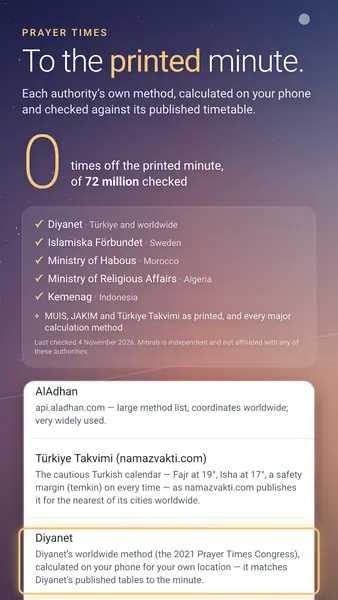
Prayer times that match the published timetable to the printed minute: Diyanet’s in Türkiye and worldwide, Islamiska Förbundet’s in Sweden, and those of Morocco’s Ministry of Habous, Algeria’s Ministry of Religious Affairs and Indonesia’s Kemenag. Each authority’s own method is calculated on your phone and checked, day by day, against its published timetables: 0 of 77.6 million times off the printed minute, last checked 17 November 2026. Singapore (MUIS), Malaysia (JAKIM) and Türkiye Takvimi are their published tables, used as printed. Everywhere else, times come from AlAdhan or a calculation method you choose, with per-prayer offsets to match your mosque.
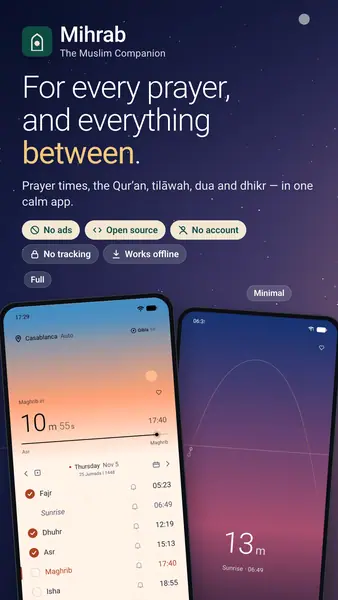
Around the prayers, Mihrab is a calm companion for a Muslim’s day: the Quran, and the remembrance in between, with no ads and no account.
PRAY
- Today, the week and the month ahead — shareable as an image or a PDF
- The adhan for each prayer, from built-in recordings or your own, a reminder before it, and a snooze that offers only what the prayer’s time still allows
- A full-screen prayer alert over the lock screen, like an alarm clock, with Stop, Snooze and Log prayer
- Silence the phone for the prayer itself and let it come back on its own, with its own length for Jumu'ah
- A pinned countdown to the next prayer on the lock screen and in the notification shade
- Minimal: only the sky and the countdown on Today, and the day's times a swipe away
- Hanafi or standard Asr, and a minute offset for each prayer
- Qibla compass with signal strength and a cross-check against the sun
- Log each prayer with one tap; the journal keeps the record, the streak and the graph
- Home-screen widgets for the prayer times, today's log, the Hijri date, tasbih and reading
READ AND LISTEN
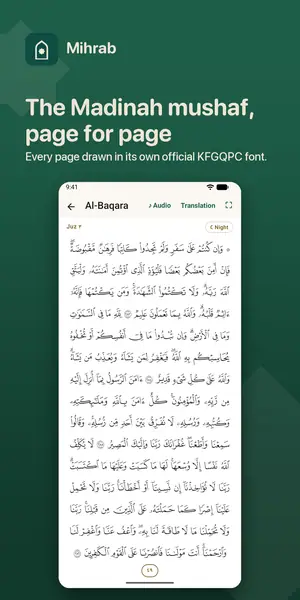
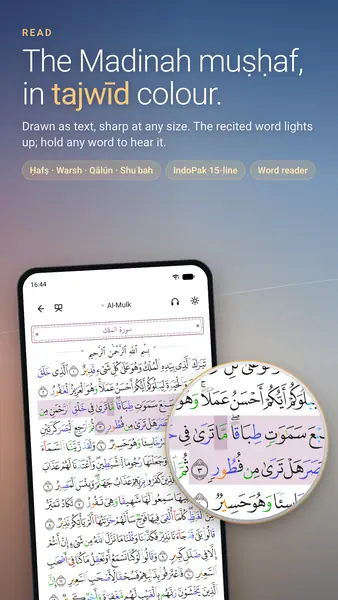
- The Madinah mushaf, drawn as text from the King Fahd Complex's page fonts and sharp at any size — Warsh, Qalun, Shu'bah and the 15-line IndoPak print beside it
- Tajweed colours, every rule explained — on Hafs and on Warsh
- The word reader: hold a word to hear it read on its own
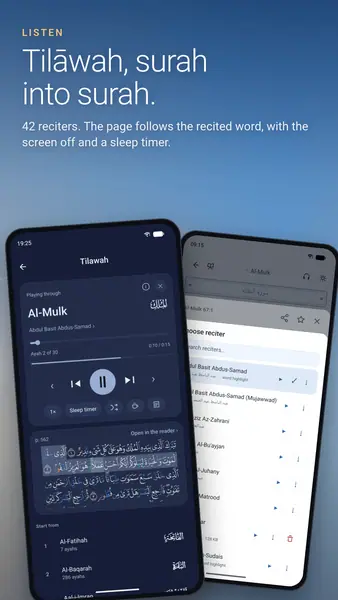
- A choice of reciters, and for those with word timings, the recited word lit on the page
- Tilawah: surah into surah with the screen off, with a sleep timer
- Translations and classical tafsir, kept for offline reading
- Hifz: what you know by heart, revised on its own cycle; drills, bookmarks, khatmah plans
REMEMBER
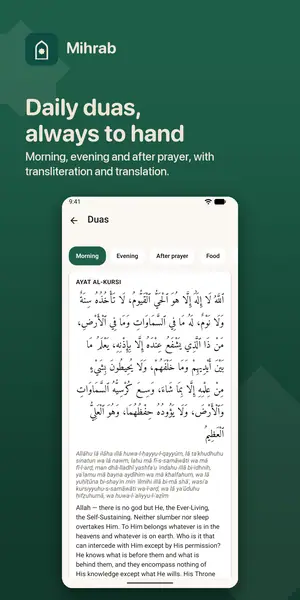
- Duas from Hisn al-Muslim, with transliteration and translation
- A tasbih counter for the dhikr after prayer and beyond
- A fasting log for Ramadan and the Sunnah fasts, with reminders
- The Hijri calendar with Ramadan, Eid and Jumu'ah
YOURS
- No ads, no analytics, no trackers, no account
- Sync between your own devices with no account and no server of ours: sealed files in a folder you already keep in sync
- Backup and restore to a file you keep
- Android, iPhone, iPad and Mac, with Arabic and Urdu fully right-to-left
WHAT GOES OVER THE NETWORK Where your times come from decides what is sent. For Sweden, Diyanet’s places, Morocco, Algeria and Indonesia the times are calculated on the phone and no prayer-time request is made. Elsewhere, AlAdhan (api.aladhan.com) receives your coordinates and the date. Malaysia’s and Singapore’s tables come from Mihrab’s GitHub repository by city, with the authority’s own service as a backup; Türkiye Takvimi by a map tile around you, and namazvakti.com only a city’s number. With automatic location, your city’s name is looked up from your coordinates through OpenStreetMap Nominatim; place search sends what you type. The app checks Mihrab’s GitHub repositories for correction-list and Hijri-date updates, and downloads Quran pages, translations, tafsir and recitation when you ask. Nothing is sent to the developer.
Mihrab is independent. It is not affiliated with or endorsed by Diyanet, Islamiska Förbundet, the Moroccan or Algerian ministries, Kemenag, MUIS, JAKIM or Türkiye Takvimi: it matches their published timetables and does not speak for them. Open source under AGPL-3.0-or-later.
Novità della versione 2.38.3
- Today's sky after Maghrib: the sun sets into the horizon on opening instead of climbing to the moon.
- iPhone, iPad and Mac: the day bar moves one day a tap, "Back to today" opens today, and Juz opens Juz.
- Qatar: times through 2026 match the Calendar House's timetable even offline.
- Help texts updated in every language.
- Android: no Live activity flash before "Show from"; the Countdown preview fits large text.
- Tunisia: 2025 dates at Kairouan and Sidi Bouzid have the Institute's times.
Informazioni sul file APK
| Nome del pacchetto | com.prayer_times |
|---|---|
| Versione | 2.38.3 (codice 300) |
| Android minimo | Android 7.0 · pensata per Android 16 |
| Architetture | arm64-v8a |
| SHA-256 | 096d2fecb9977ecef32501aedb9e9f856ef38c438bac1d49e6dd1958a2e4ff1e |
| Firma | cdb25eecdba1ad6773be11e0bc7f532c88ec3f85459832523988c250c83f0e91 |
| Licenza | AGPL-3.0-or-later — licenza libera copyleft: il codice è pubblico e le versioni modificate devono restare libere |
| Codice sorgente | github.com/MihrabHQ/Mihrab |
Autorizzazioni richieste
- Accesso a Internet
- Fotocamera sensibile
- Connettersi via Bluetooth
- Bluetooth
- Posizione approssimativa sensibile
- Posizione precisa (GPS) sensibile
- Mostrare notifiche
- Avviarsi all'accensione
- Funzionare in background
- Impedire lo standby
- Vedere lo stato della rete
- Vedere lo stato del Wi-Fi
- Vibrare
Altre 6 autorizzazioni tecniche
SCHEDULE_EXACT_ALARM USE_FULL_SCREEN_INTENT ACCESS_NOTIFICATION_POLICY POST_PROMOTED_NOTIFICATIONS DOWNLOAD_WITHOUT_NOTIFICATION BROADCAST_CLOSE_SYSTEM_DIALOGS
Versioni precedenti
- Mihrab 2.38.323 novembre 2026 · 47,1 MB
- Mihrab 2.38.217 novembre 2026 · 47,1 MB
- Mihrab 2.37.011 novembre 2026 · 54,8 MB
Come installare Mihrab APK
- Tocca Scarica l'APK qui sopra, poi apri il file al termine del download.
- Se Android lo chiede, consenti al browser di installare app sconosciute.
- Tocca Installa. Mihrab comparirà insieme alle altre app.
→ Come installare un file APK su Android (passo passo)
→ «App non installata»: cause e soluzioni
Domande frequenti
Mihrab è gratis?
Sì. Mihrab è distribuita con licenza AGPL-3.0-or-later: gratuita, senza abbonamento e con codice sorgente pubblico.
Questo file APK è sicuro?
Il file è quello compilato e pubblicato dal repository F-Droid a partire dal codice sorgente pubblico. L'impronta SHA-256 è indicata qui sopra: puoi confrontarla dopo il download. Un APK è pericoloso? Come verificare un file prima di installarlo
Mihrab funziona sul mio telefono?
Serve almeno Android 7.0. L'app funziona anche senza i servizi Google, quindi anche sui telefoni Huawei recenti.