Kairos APK
You capture. Kairos decides. A to-do list that sorts itself.
Baixar APK v4.2.0 · 4,0 MB- Versão4.2.0
- Tamanho4,0 MB
- RequerAndroid 8.0
- Atualizado23/11/2026
- LicençaMIT
- PreçoGrátis
Sobre o Kairos
Descrição fornecida pelo desenvolvedor (em inglês).
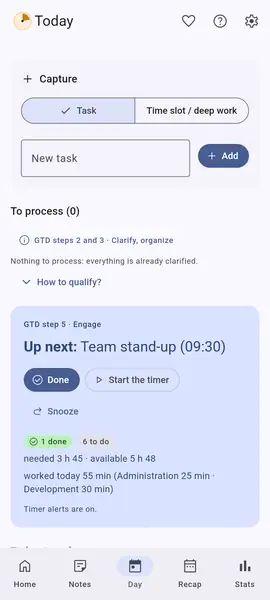
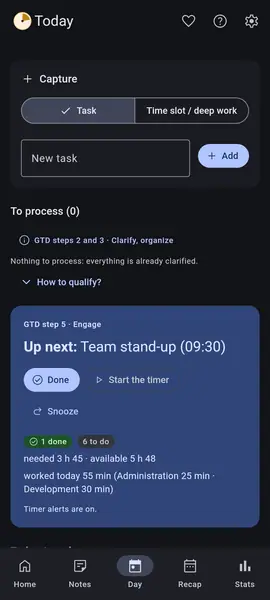
Most to-do tools manage a list, more or less finely, but never sort it: deciding where to start is still up to you. Kairos merges agile development, a to-do tool and the GTD method into a list that evolves by itself. You capture and process with GTD; Kairos tells you what to do now, so you can trust it, unload your mind and focus on something else. It puts your tasks in the order to do them, fits them into the gaps of your day, and learns with on-device machine learning how long they really take: the more you use it, the better its estimates.
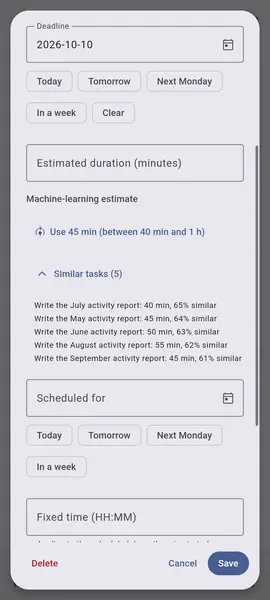
New in 4.0: on-device machine learning A machine-learning model trained on your device gives a task with a new title a duration from your finished tasks that look like it, with a range and the list of those tasks. Kairos only applies it once it beats the default duration on your own history, learns your pace by day and time, and tells you when estimates change. Everything stays on the device. AI? No, machine learning: no chatbot, no cloud, just robust, local machine learning that trains on every task you finish, light and very fast.
An order you can explain Each task gets a priority score (WSJF): its value (priority P0, P1 or P2, plus the urgency of its deadline) divided by its effort in points. Small and important goes before big and distant; an overdue task always comes first. “Why this position?” shows the calculation in one tap.
A realistic day
- Tasks are placed around your meetings, with a buffer after each one.
- Deep-work slots are protected; in the afternoon, complex tasks give way to lighter ones.
- Fixed times, recurring tasks (daily, weekdays, weekly, “on the 23rd of the month”), dependencies between tasks, editable subtasks, French public holidays.
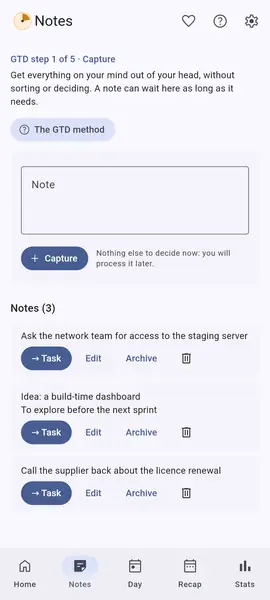
Capture without friction (GTD) An idea? A note. A task? A title is enough: it waits in “To process” until you give it a priority and a size, one tap each.
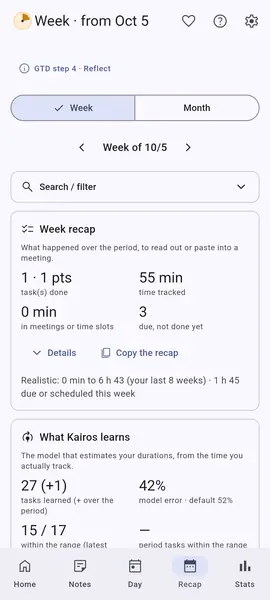
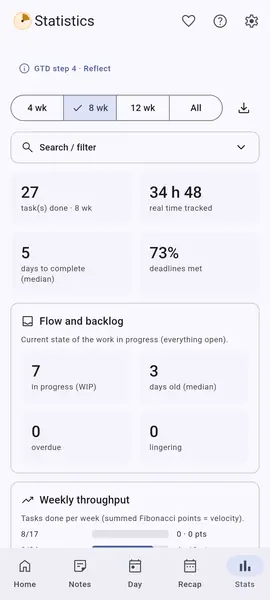
Real time A timer per task, with an ongoing notification; alerts when you go past the estimate, forget a running timer or need a break, even with the app closed. Statistics compare your estimates with the time actually spent.
Manage a team (optional) Off by default, team management adds a second space for the manager, who remains the only user:
- Members and absences, a shared backlog, progress tracking with its log.
- Each person’s load against their capacity, and a suggested split of the tasks; your own personal tasks can count in your load.
- Monte Carlo forecasts: finish dates as percentage chances, threatened deadlines, “What if…?” scenarios.
- File exchanges with members who use Kairos: they receive their tasks and send back their progress.
- Everything stays on the device; the personal space never shows anything from the team.
Your data stays with you
- No account, no ads, no trackers. The network is used only by the optional online connections, off by default.
- Export and import a JSON file, to back up or switch devices; or keep an up-to-date copy in a folder you sync.
- Meetings from a calendar file (.ics: Outlook, Google, Thunderbird) or, optionally, from your phone’s calendars: Kairos then asks for calendar access, read only. Importing a file never uses the network.
Kairos is also available for Windows, Linux and macOS, and in the browser. Free software under the MIT licence, in English, French, Spanish, German, Russian and Italian (your choice in the settings; by default your system’s language when it is one of these, English otherwise).
Novidades da versão 4.2.0
Kairos 4.2: subscribe to an online calendar by its ICS link (Android and desktop): off by default, read-only, and the link stays on the device. Tips at the right time show you what you don’t use yet, never during a timer. Beta and stable are now the same “Kairos” app, and a portable copy replaces the old “Kairos Preview” menu entry. Also: many fixes.
Informações do arquivo APK
| Nome do pacote | com.skohscripts.kairos |
|---|---|
| Versão | 4.2.0 (código 4020099) |
| Android mínimo | Android 8.0 · feito para Android 16 |
| Arquiteturas | arm64-v8a, armeabi-v7a, x86, x86_64 |
| SHA-256 | c920732470fb3dd1ebe04907115d11b34da8d39a52732e4f6a50b9f0df749d6a |
| Assinatura | 3885399c1116bea6fed50ce144a1cb10d516bc74d9c9e0773dad23a4e8fa2111 |
| Licença | MIT — licença livre permissiva: o código-fonte é público e reutilizável |
| Código-fonte | github.com/SKOHscripts/Kairos |
| Site oficial | skohscripts.github.io/Kairos/ |
Permissões solicitadas
- Mostrar notificações
- Iniciar com o sistema
- Ler a agenda sensível
- Acesso à internet
- Ver o estado da rede
Mais 1 permissão(ões) técnica(s)
SCHEDULE_EXACT_ALARM
Versões anteriores
- Kairos 4.2.023 de novembro de 2026 · 4,0 MB
- Kairos 4.1.020 de novembro de 2026 · 4,0 MB
- Kairos 4.0.09 de novembro de 2026 · 3,3 MB
Como instalar o Kairos APK
- Toque em Baixar APK acima e abra o arquivo quando o download terminar.
- Se o Android pedir, permita que o navegador instale apps desconhecidos.
- Toque em Instalar. O Kairos aparecerá junto aos seus outros apps.
→ Como instalar um arquivo APK no Android (passo a passo)
→ "App não instalado": causas e soluções
Perguntas frequentes
O Kairos é grátis?
Sim. O Kairos é distribuído sob a licença MIT: grátis, sem assinatura e com código-fonte público.
Este arquivo APK é seguro?
O arquivo é o compilado e publicado pelo repositório F-Droid a partir do código-fonte público. A impressão digital SHA-256 aparece acima para você comparar depois do download. APK é perigoso? Como verificar um arquivo antes de instalar
O Kairos funciona no meu celular?
É preciso ter pelo menos Android 8.0. O app também funciona sem os serviços do Google, inclusive em celulares Huawei recentes.