
Libre Contacts Backup APK
Offline contact backups with optional encryption
Baixar APK v2.9.0 · 232 KB- Versão2.9.0
- Tamanho232 KB
- RequerAndroid 8.0
- Atualizado27/10/2026
- LicençaGPL-3.0-only
- PreçoGrátis
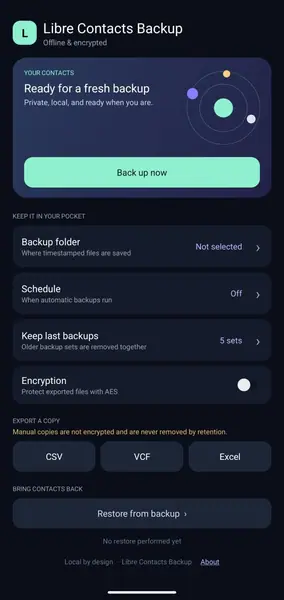
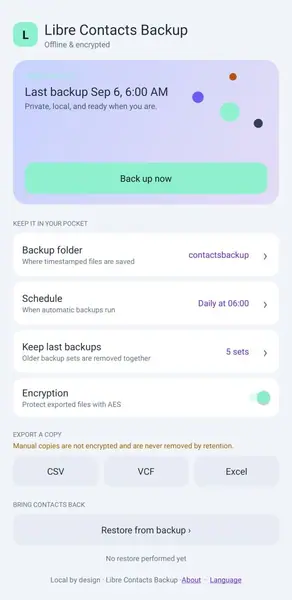
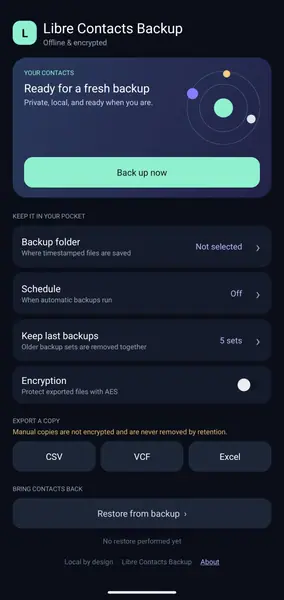
Sobre o Libre Contacts Backup
Descrição fornecida pelo desenvolvedor (em inglês).
Libre Contacts Backup is a FLOSS native Android app for private, local-first contact backups. No account, no tracking, and no automatic uploads — your contacts stay on your device unless you choose to move a backup file, export data, or share a report.
Features:
- Lossless backup preserving the full Contact → RawContact → Data hierarchy, including contact groups
- SIM card phonebook captured on a best-effort basis when the device exposes it; if it cannot be read, the backup reports that it contains device contacts only. On restore, SIM contacts can be written back to the SIM card, into the device address book, or both
- Scheduled local backups at a time you choose — daily, weekly on a selected weekday, or monthly on a selected day (if a month is shorter than that day, it runs on the month's last day) — with no internet connection required
- Single-file LCB archives containing canonical JSON, VCF, CSV, and normalized exports
- Optional AES-256-GCM password-protected encryption (Android Keystore backed)
- Restore consolidates each source contact correctly, without merging different people who share a name
- Manual CSV and vCard exports, and the CSV opens in Excel and other spreadsheet apps
- Retention by age — keep the newest backups per day, week, and month with counts you choose (for example 7 daily, 4 weekly, 3 monthly), so the recent past stays densely backed up while older history thins out — or simply keep the last N sets
- Choose the app language and system, light, or dark theme from the Display menu
- Create a problem report from About and choose whether to include technical diagnostics before sharing it with an email or sharing app
Libre Contacts Backup is free and open source. If you find it useful, you can support its development — see the donation options in the project README: https://librecontactsbackup.ashkanrafiee.com/#donate
Novidades da versão 2.9.0
Added:
- You can now report a problem from About using your email or another sharing app
- Reports can optionally include technical diagnostics; contact data, backup files, and storage paths stay out
Informações do arquivo APK
| Nome do pacote | com.ashkanrafiee.librecontactsbackup |
|---|---|
| Versão | 2.9.0 (código 34) |
| Android mínimo | Android 8.0 · feito para Android 16 |
| Arquiteturas | Todas (universal) |
| SHA-256 | eb36837033d2f6ea4cd925233cadf020ceef29d1cad66da5e007214ccdce8405 |
| Assinatura | e90d878e33ab6f41dd841b4209311ec3fa816aeea7ca75687354e28401415e55 |
| Licença | GPL-3.0-only — licença livre copyleft: o código é público e versões modificadas devem continuar livres |
| Código-fonte | github.com/AshkanRafiee/Libre-Contacts-Backup |
Permissões solicitadas
- Ler contatos sensível
- Alterar contatos sensível
- Mostrar notificações
- Iniciar com o sistema
- Impedir o modo de espera
Mais 2 permissão(ões) técnica(s)
REQUEST_IGNORE_BATTERY_OPTIMIZATIONS SCHEDULE_EXACT_ALARM
Versões anteriores
- Libre Contacts Backup 2.9.027 de outubro de 2026 · 232 KB
- Libre Contacts Backup 2.8.022 de outubro de 2026 · 217 KB
- Libre Contacts Backup 2.7.415 de outubro de 2026 · 215 KB
Como instalar o Libre Contacts Backup APK
- Toque em Baixar APK acima e abra o arquivo quando o download terminar.
- Se o Android pedir, permita que o navegador instale apps desconhecidos.
- Toque em Instalar. O Libre Contacts Backup aparecerá junto aos seus outros apps.
→ Como instalar um arquivo APK no Android (passo a passo)
→ "App não instalado": causas e soluções
Perguntas frequentes
O Libre Contacts Backup é grátis?
Sim. O Libre Contacts Backup é distribuído sob a licença GPL-3.0-only: grátis, sem assinatura e com código-fonte público.
Este arquivo APK é seguro?
O arquivo é o compilado e publicado pelo repositório F-Droid a partir do código-fonte público. A impressão digital SHA-256 aparece acima para você comparar depois do download. APK é perigoso? Como verificar um arquivo antes de instalar
O Libre Contacts Backup funciona no meu celular?
É preciso ter pelo menos Android 8.0. O app também funciona sem os serviços do Google, inclusive em celulares Huawei recentes.