MeteoCompare APK
Compare 21 weather models, 10-day forecasts, local alerts and detailed charts.
Baixar APK v1.22.1 · 5,3 MB- Versão1.22.1
- Tamanho5,3 MB
- RequerAndroid 8.1
- Atualizado17/11/2026
- LicençaApache-2.0
- PreçoGrátis
Sobre o MeteoCompare
Descrição fornecida pelo desenvolvedor (em inglês).
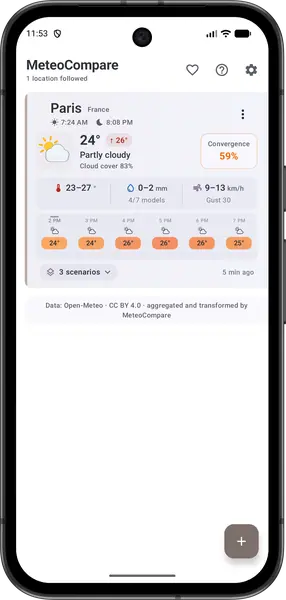
MeteoCompare is a free, open-source and ad-free weather app that compares multiple models instead of hiding uncertainty behind a single forecast.
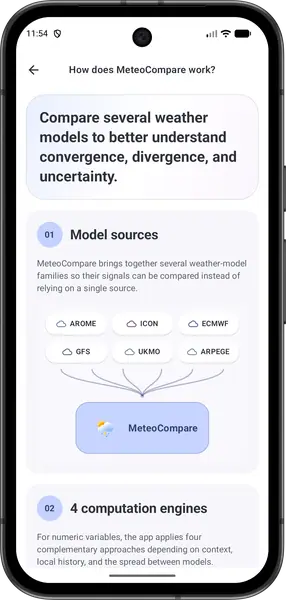
21 MODELS · UP TO 10 DAYS Compare 21 reference models: AROME and ARPEGE (Météo-France), ICON and ICON-D2 (DWD), GFS, HRRR and the new NOAA AIGFS, ECMWF IFS and AIFS, UKMO, GEM, the new JMA GSM, MET Nordic, KNMI/DMI HARMONIE, MeteoSwiss ICON-CH2, ACCESS and GRAPES.
Daily views now cover 10 days. Shorter-range models are shown only while their own data is available: MeteoCompare never invents or extends model output.
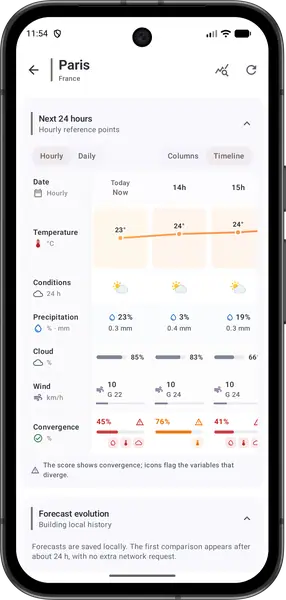
CHART VIEW AND VISUALS The new Chart View lets you explore up to 10 days hour by hour on a 240-hour timeline. You also get:
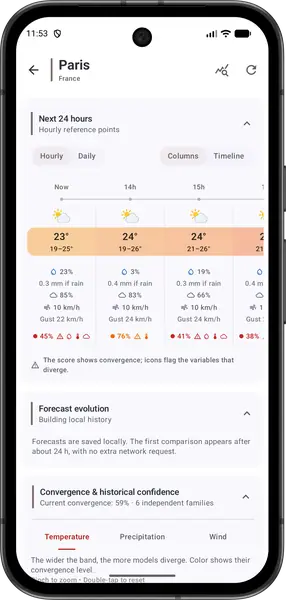
- Today summary and hourly timeline;
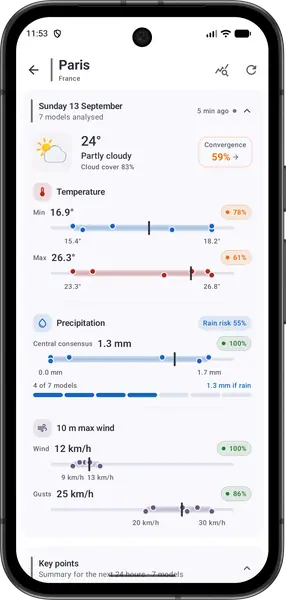
- min/max spread bands and model agreement levels;
- model-by-model tables;
- forecast evolution around 24 / 48 / 72 hours and the “Key takeaway” section;
- local model ranking;
- resizable home-screen widgets.
LOCAL WEATHER NOTIFICATIONS Notifications are optional and off by default. For selected favorite cities, MeteoCompare can show:
- a daily summary at the time you choose;
- an alert when models diverge strongly;
- a “Forecast revision” when the Key takeaway signal detects a meaningful temperature, rain or wind change.
Everything is computed on-device with WorkManager, with no push server. Events are deduplicated to avoid unnecessary repeated notifications.
TABLETS, FOLDABLES AND LARGE SCREENS On wide windows, MeteoCompare switches to a master/detail layout so the city list and forecast can remain visible side by side. The interface adapts to tablets, large foldables and resizable Android windows while keeping the compact phone layout.
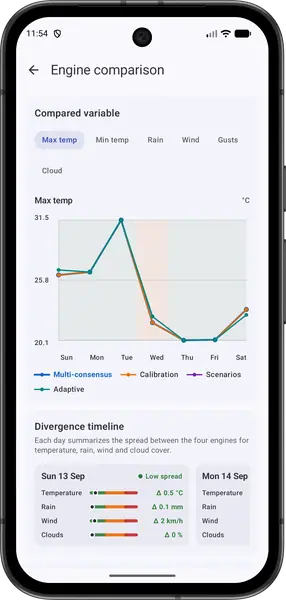
4 V3 FORECAST ENGINES Choose how the central forecast is calculated: Multi-consensus, Local calibration, Scenarios or Adaptive. A dedicated Engine Comparison page runs all four strategies on the same raw data so their differences stay visible.
UNDERSTAND UNCERTAINTY MeteoCompare keeps current model convergence separate from local historical reliability. Related models share voting weight so variants from the same numerical lineage cannot artificially increase confidence. Forecast evolution also shows how a forecast changed roughly 24, 48 and 72 hours ago.
SEA / COAST AND WARNINGS For compatible coastal cities: waves, swell, sea temperature and estimated tides. For cities in France, MeteoCompare also relays official Météo-France vigilance information. Marine information is indicative only and is not intended for navigation.
SUPPORT METEOCOMPARE MeteoCompare is developed without ads, subscriptions or premium features. If the app is useful to you, you can support development through Liberapay, GitHub Sponsors or Ko-Fi. Donations are optional and unlock no privileges: everyone gets the same app.
PRIVACY No account, no ads and no analytics SDK. Favorites, preferences, caches and history remain on the device. Weather and geocoding data are mainly provided by Open-Meteo.
MeteoCompare is free and open-source software licensed under Apache-2.0.
Novidades da versão 1.22.1
Redesigned Today Summary cloud dialog: four labeled 9-hour charts, persistent hour picker, consistent layer colors and per-model details. 74,537 deterministic regression scenarios with verified execution counts, integrity checks and GitHub Actions summaries for unit and Android tests. More robust Compose tests. Turkish localization.
Informações do arquivo APK
| Nome do pacote | com.meteocompare.app |
|---|---|
| Versão | 1.22.1 (código 55) |
| Android mínimo | Android 8.1 · feito para Android 16 |
| Arquiteturas | arm64-v8a, armeabi-v7a, x86, x86_64 |
| SHA-256 | d6a4d9dea4dc9fb44ff4ce78e085de568c098a7be17949dba612ece4b873893b |
| Assinatura | f7b0432751cd0d183c62a40beb989574b488b290f63889fc177c5f93dfee2ab3 |
| Licença | Apache-2.0 — licença livre permissiva: o código-fonte é público e reutilizável |
| Código-fonte | github.com/Pat0chat/meteocompare |
| Site oficial | pat0chat.github.io/meteocompare/ |
Permissões solicitadas
- Acesso à internet
- Ver o estado da rede
- Localização aproximada sensível
- Localização precisa (GPS) sensível
- Iniciar com o sistema
- Mostrar notificações
- Impedir o modo de espera
- Funcionar em segundo plano
Versões anteriores
- MeteoCompare 1.22.117 de novembro de 2026 · 5,3 MB
- MeteoCompare 1.21.011 de novembro de 2026 · 5,2 MB
- MeteoCompare 1.20.04 de novembro de 2026 · 5,1 MB
Como instalar o MeteoCompare APK
- Toque em Baixar APK acima e abra o arquivo quando o download terminar.
- Se o Android pedir, permita que o navegador instale apps desconhecidos.
- Toque em Instalar. O MeteoCompare aparecerá junto aos seus outros apps.
→ Como instalar um arquivo APK no Android (passo a passo)
→ "App não instalado": causas e soluções
Perguntas frequentes
O MeteoCompare é grátis?
Sim. O MeteoCompare é distribuído sob a licença Apache-2.0: grátis, sem assinatura e com código-fonte público.
Este arquivo APK é seguro?
O arquivo é o compilado e publicado pelo repositório F-Droid a partir do código-fonte público. A impressão digital SHA-256 aparece acima para você comparar depois do download. APK é perigoso? Como verificar um arquivo antes de instalar
O MeteoCompare funciona no meu celular?
É preciso ter pelo menos Android 8.1. O app também funciona sem os serviços do Google, inclusive em celulares Huawei recentes.