Pocket Sense APK
Private, offline money tracker in English and Arabic, in 100 currencies
Baixar APK v2.7.0 · 29,8 MB- Versão2.7.0
- Tamanho29,8 MB
- RequerAndroid 7.0
- Atualizado23/11/2026
- LicençaGPL-3.0-or-later
- PreçoGrátis
Sobre o Pocket Sense
Descrição fornecida pelo desenvolvedor (em inglês).
Pocket Sense tracks your income, spending, accounts, budgets, bills, loans and savings circles without signing up and without the internet. Everything stays on your phone in an encrypted database. It leaves only as an encrypted backup, or, if you turn on sync, encrypted to your own paired devices on your Wi-Fi.
Private by design
- No sign-in, no servers, no ads, no analytics. The network is used only to sync with your own devices on your local network, and only if you turn that on.
- Your data is encrypted with SQLCipher, using a key kept in the Android Keystore.
- Optional app lock with a 4–6 digit PIN, and fingerprint or face unlock.
- Hide amounts: every amount shows as ••• until you tap the eye. On by default.
Your currency, in English or Arabic
- Amounts in any of 100 currencies, each with its usual decimals: from JOD (12.500), SAR, AED and EGP to USD, EUR and MXN.
- Full Arabic interface, right to left, with Latin digits.
- Five looks for the whole app: Plain, Leather wallet, Coin nap, Pocket LCD and Receipt.
Features
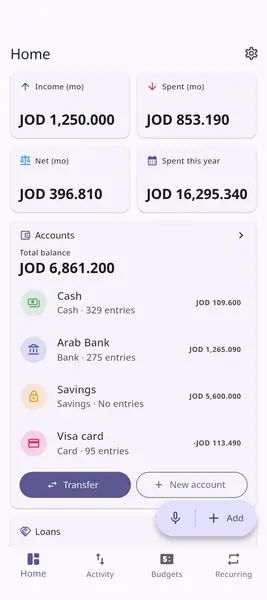
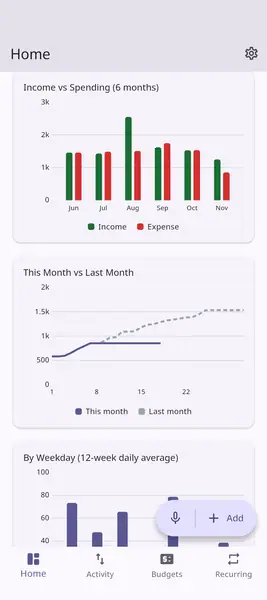
- Home: this month's income, spending and net, a 30-day spending chart, breakdowns by category and by merchant, income vs spending over 6 months, this month against last, spending by weekday, and the income and spending of any month you pick. You choose the order of its sections and hide what you don't need.
- Quick add: a home-screen widget and app-icon shortcuts for a new expense, income or voice entry.
- Balance widgets: your total balance and the day's spending, or one account's balance, on the home screen, in four pixel-art styles. Amounts show only if you turn them on.
- Activity: add, edit, search and filter transactions, each with a description, merchant and category or subcategory.
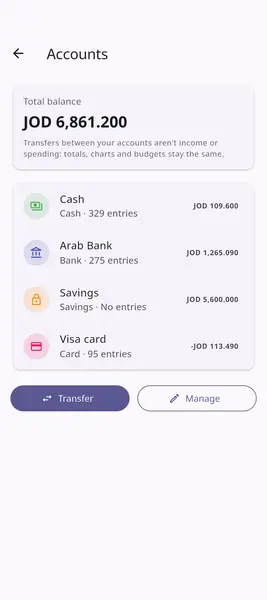
- Accounts: cash, bank, savings, cards and e-wallets, each with its balance, and transfers between them that don't count as spending.
- Merchants: keep a list in Settings. The merchant field searches it as you type and adds names it doesn't find.
- Voice entry (English): say "Spent 3.5 on lunch at Reem yesterday" and check the filled-in form.
- Budgets: weekly or monthly limits per category, with progress and over-budget warnings. A category's budget includes its subcategories.
- Recurring: bills, subscriptions and salary with due dates and a reminder at the time you pick, posted as transactions in one tap, and a month calendar of what's due.
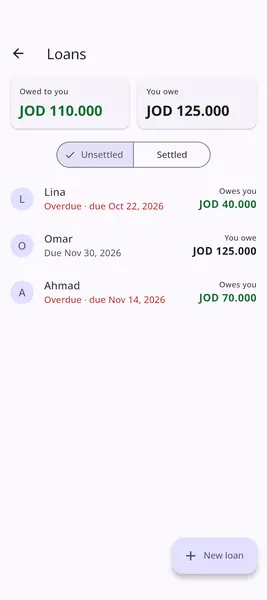
- Loans: money you lend or borrow, per person, with partial repayments and due dates. Each payment is also a normal entry, so your totals follow the cash.
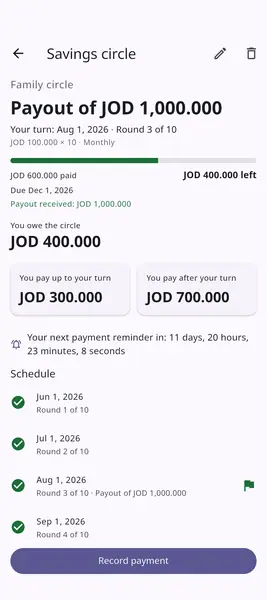
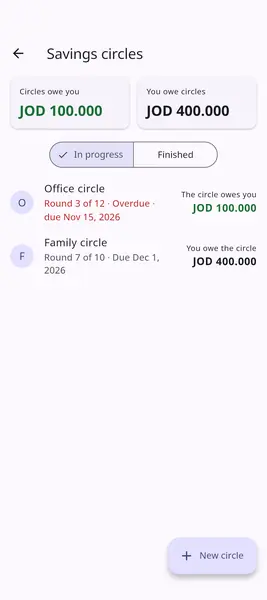
- Savings circles (جمعيات): your payment each round, your turn and payout, the schedule, and whether the circle owes you or you owe it, with a reminder before each payment.
- Backup: export everything to a password-encrypted file (or plain JSON if you choose), or back up automatically once a day, and import it on another phone.
- CSV: import and export transactions, categories and merchants as spreadsheet files, with a preview before anything is added.
- Sync: pair your phone with your computer or another phone, and keep the same data on both over your Wi-Fi. No server, no internet.
Voice entry uses your phone's speech recognizer. On most phones that is a separate app with its own privacy terms; the sentence itself is interpreted inside Pocket Sense.
Novidades da versão 2.7.0
- New: subcategories, such as Fuel and Taxi under Transport, with starters on new installs.
- New: five app styles, balance widgets, and a calendar on Recurring.
- New: filter Activity by category, merchant or account; add from Home; E-Wallet accounts; 100 currencies; unencrypted backups.
- Fixed: deleting a budget on a phone; New account no longer wraps on narrow phones.
- Update all your paired devices: sync needs the same version on each.
Informações do arquivo APK
| Nome do pacote | ace.software.pocketsense |
|---|---|
| Versão | 2.7.0 (código 5113) |
| Android mínimo | Android 7.0 · feito para Android 16 |
| Arquiteturas | x86_64 |
| SHA-256 | ecdd8f7d9ccf18f218feb80b098e904e39116ebfc2a51633fea79515202790d6 |
| Assinatura | 511ce20e8711c8d4001d9be45c8ec3b7c81969afdce062425b440f2abd6f0daa |
| Licença | GPL-3.0-or-later — licença livre copyleft: o código é público e versões modificadas devem continuar livres |
| Código-fonte | github.com/software-ace/PocketSense |
Permissões solicitadas
- Acesso à internet
- Microfone sensível
- Digital / biometria
- Mostrar notificações
- Iniciar com o sistema
- Impressão digital
- Vibrar
Mais 1 permissão(ões) técnica(s)
CHANGE_WIFI_MULTICAST_STATE
Versões anteriores
- Pocket Sense 2.7.023 de novembro de 2026 · 29,8 MB
- Pocket Sense 2.7.023 de novembro de 2026 · 27,7 MB
- Pocket Sense 2.7.023 de novembro de 2026 · 24,1 MB
- Pocket Sense 2.6.017 de novembro de 2026 · 29,4 MB
- Pocket Sense 2.6.017 de novembro de 2026 · 27,4 MB
- Pocket Sense 2.6.017 de novembro de 2026 · 23,8 MB
- Pocket Sense 2.5.013 de novembro de 2026 · 29,2 MB
- Pocket Sense 2.5.013 de novembro de 2026 · 27,2 MB
- Pocket Sense 2.5.013 de novembro de 2026 · 23,7 MB
Como instalar o Pocket Sense APK
- Toque em Baixar APK acima e abra o arquivo quando o download terminar.
- Se o Android pedir, permita que o navegador instale apps desconhecidos.
- Toque em Instalar. O Pocket Sense aparecerá junto aos seus outros apps.
→ Como instalar um arquivo APK no Android (passo a passo)
→ "App não instalado": causas e soluções
Perguntas frequentes
O Pocket Sense é grátis?
Sim. O Pocket Sense é distribuído sob a licença GPL-3.0-or-later: grátis, sem assinatura e com código-fonte público.
Este arquivo APK é seguro?
O arquivo é o compilado e publicado pelo repositório F-Droid a partir do código-fonte público. A impressão digital SHA-256 aparece acima para você comparar depois do download. APK é perigoso? Como verificar um arquivo antes de instalar
O Pocket Sense funciona no meu celular?
É preciso ter pelo menos Android 7.0. O app também funciona sem os serviços do Google, inclusive em celulares Huawei recentes.