CodeCatcher APK
Filter Sms Messages and Automate Your Device
APK herunterladen v1.0.131 · 2,4 MB- Version1.0.131
- Größe2,4 MB
- BenötigtAndroid 7.0
- Aktualisiert30.1.2025
- LizenzGPL-3.0-or-later
- PreisKostenlos
Über CodeCatcher
Beschreibung des Entwicklers (auf Englisch).
Codecatcher: Automate Your Phone With Sms
Do you ever need to quickly copy SMS codes for websites or forward them to friends or family? Do you want to listen codes instead of reading from phone? CodeCatcher has your back, making all your SMS actions a breeze. Codecatcher automatize your device by your settings. Let your device work for you! This handy little app automatically filters your incoming messages and does exactly what you need with them—no more manual copying or forwarding. Codecatcher listens SMS messages and if a any own your filter matches, run your actions.
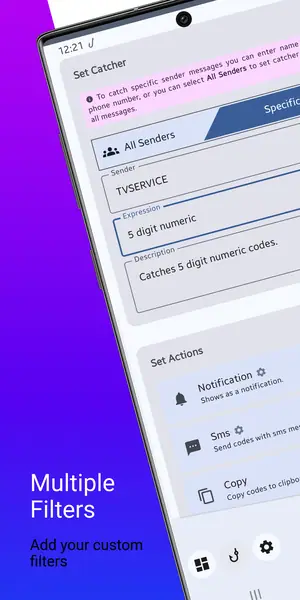
With Codecatcher you can set up limitless different filter for different senders and different formats. Can be set different actions for each filter. You can send forward shipment codes to your family members. Listen your 2 factor authentication codes.
What CodeCatcher Can Do:
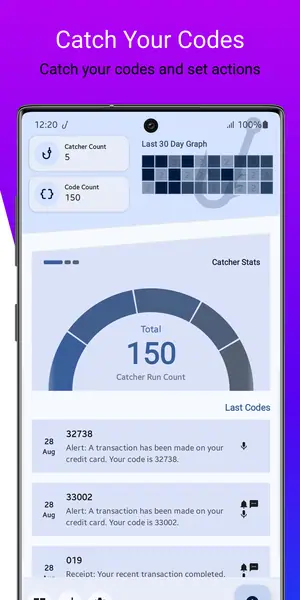
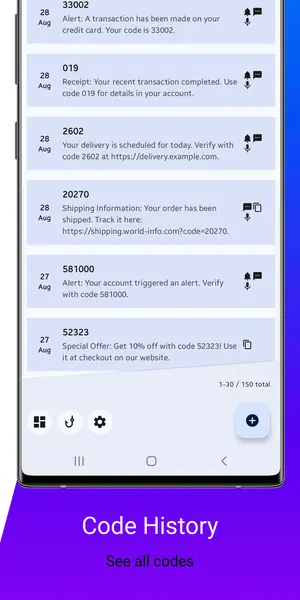
- Show History: Codecatcher can be show your filtered code history by sender and date to see all of them in one screen.
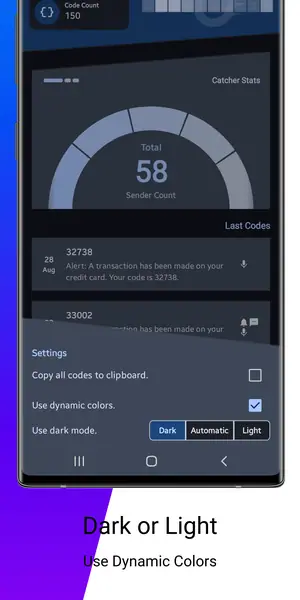
- Little Stats: You can clearly see latest sender history or specific filter history from app.
- Quick Notifications: Get your SMS codes right in your notification bar. You can even customize the notifications so you can spot the code at a glance.
- Auto-Forward SMS: Want to send an SMS code to someone? CodeCatcher can automatically forward it to any phone number. It uses your carrier’s SMS service, so the recipient doesn’t need any special app. It’s a super easy way to share codes with others.
- Text-to-Speech (TTS): Need to hear your SMS codes instead of reading them? CodeCatcher can read them out loud using your phone’s built-in TTS. Perfect when you’re on the go or driving!
- Copy to Clipboard: CodeCatcher can automatically copy your SMS codes to the clipboard so you can paste them wherever you need, saving you time.
Codecatcher knows you want privacy!
- Full Offline: CodeCatcher works completely offline. Your messages and data stay on your phone—nothing is stored or shared anywhere or anyone.
- No Data Collection: We don’t collect any data or track how you use the app. Everything stays private, and SMS forwarding happens only with your permission. We love hearing back. We don't want some fancy graphs. Just comment on store.
Why Use CodeCatcher? CodeCatcher is your go-to tool for taking the hassle out of managing SMS codes. It’s small, simple, and designed to make your life easier.
Dark Mode Available Codecatcher can be used in dark. Also dynamic theme is available.
Informationen zur APK-Datei
| Paketname | co.ec.cnsyn.codecatcher |
|---|---|
| Version | 1.0.131 (Code 131) |
| Mindestens | Android 7.0 · ausgelegt für Android 14 |
| Architekturen | arm64-v8a, armeabi-v7a, x86, x86_64 |
| SHA-256 | 166d4cb9b0f7a5c1468a71bd04c424b84e0c282471794b0cadd97b172de3d17f |
| Signatur | 84f46d19e38d5197f4082bc58f186114efe8799d3ebe31f6e9b094d0b6195e55 |
| Lizenz | GPL-3.0-or-later — freie Copyleft-Lizenz: Der Code ist öffentlich und veränderte Versionen müssen frei bleiben |
| Quellcode | github.com/headersalreadysent/tinycodecatcher |
| Offizielle Website | codecatcher.cansayan.com/ |
Berechtigungen
- SMS empfangen sensibel
- SMS senden sensibel
- Benachrichtigungen anzeigen
- Beim Start ausführen
- Im Hintergrund laufen
2 weitere technische Berechtigung(en)
MODIFY_AUDIO_SETTINGS SCHEDULE_EXACT_ALARM
Ältere Versionen
- CodeCatcher 1.0.13130. Januar 2025 · 2,4 MB
- CodeCatcher 1.0.1259. Dezember 2024 · 2,4 MB
- CodeCatcher 1.0.11121. November 2024 · 2,5 MB
So installieren Sie CodeCatcher APK
- Tippen Sie oben auf APK herunterladen und öffnen Sie die Datei nach dem Download.
- Wenn Android fragt, erlauben Sie Ihrem Browser, unbekannte Apps zu installieren.
- Tippen Sie auf Installieren. CodeCatcher erscheint dann bei Ihren anderen Apps.
→ APK-Datei auf Android installieren (Schritt für Schritt)
→ „App nicht installiert“: Ursachen und Lösungen
Häufige Fragen
Ist CodeCatcher kostenlos?
Ja. CodeCatcher steht unter der Lizenz GPL-3.0-or-later: kostenlos, ohne Abo, und der Quellcode ist öffentlich.
Ist diese APK-Datei sicher?
Die Datei wurde vom F-Droid-Repository aus dem öffentlichen Quellcode erstellt und veröffentlicht. Ihr SHA-256-Fingerabdruck steht oben, Sie können ihn nach dem Download vergleichen. Ist eine APK gefährlich? So prüfen Sie eine Datei vor der Installation
Läuft CodeCatcher auf meinem Handy?
Sie benötigen mindestens Android 7.0. Die App funktioniert auch ohne Google-Dienste, also auch auf aktuellen Huawei-Handys.