
CodeCatcher APK
Filter Sms Messages and Automate Your Device
Download APK v1.0.131 · 2.4 MB- Version1.0.131
- Size2.4 MB
- RequiresAndroid 7.0
- Updated1/30/2025
- LicenceGPL-3.0-or-later
- PriceFree
About CodeCatcher
Codecatcher: Automate Your Phone With Sms
Do you ever need to quickly copy SMS codes for websites or forward them to friends or family? Do you want to listen codes instead of reading from phone? CodeCatcher has your back, making all your SMS actions a breeze. Codecatcher automatize your device by your settings. Let your device work for you! This handy little app automatically filters your incoming messages and does exactly what you need with them—no more manual copying or forwarding. Codecatcher listens SMS messages and if a any own your filter matches, run your actions.
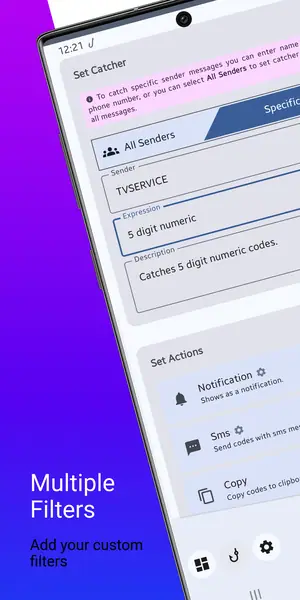
With Codecatcher you can set up limitless different filter for different senders and different formats. Can be set different actions for each filter. You can send forward shipment codes to your family members. Listen your 2 factor authentication codes.
What CodeCatcher Can Do:
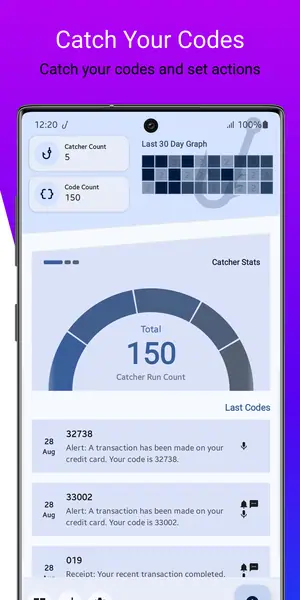
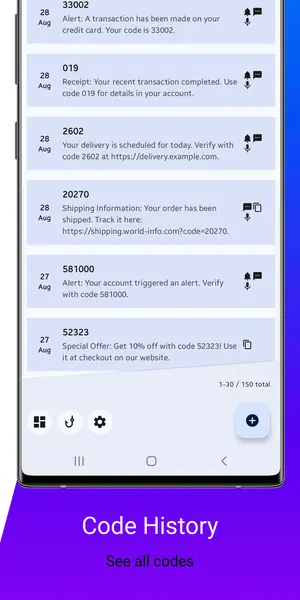
- Show History: Codecatcher can be show your filtered code history by sender and date to see all of them in one screen.
- Little Stats: You can clearly see latest sender history or specific filter history from app.
- Quick Notifications: Get your SMS codes right in your notification bar. You can even customize the notifications so you can spot the code at a glance.
- Auto-Forward SMS: Want to send an SMS code to someone? CodeCatcher can automatically forward it to any phone number. It uses your carrier’s SMS service, so the recipient doesn’t need any special app. It’s a super easy way to share codes with others.
- Text-to-Speech (TTS): Need to hear your SMS codes instead of reading them? CodeCatcher can read them out loud using your phone’s built-in TTS. Perfect when you’re on the go or driving!
- Copy to Clipboard: CodeCatcher can automatically copy your SMS codes to the clipboard so you can paste them wherever you need, saving you time.
Codecatcher knows you want privacy!
- Full Offline: CodeCatcher works completely offline. Your messages and data stay on your phone—nothing is stored or shared anywhere or anyone.
- No Data Collection: We don’t collect any data or track how you use the app. Everything stays private, and SMS forwarding happens only with your permission. We love hearing back. We don't want some fancy graphs. Just comment on store.
Why Use CodeCatcher? CodeCatcher is your go-to tool for taking the hassle out of managing SMS codes. It’s small, simple, and designed to make your life easier.
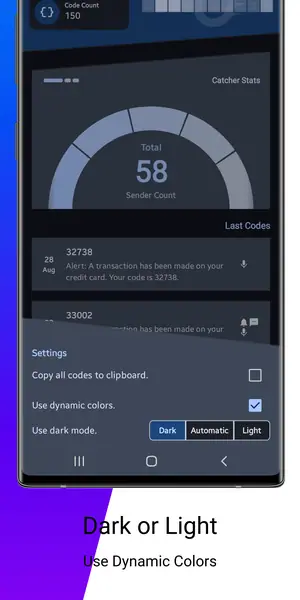
Dark Mode Available Codecatcher can be used in dark. Also dynamic theme is available.
APK file information
| Package name | co.ec.cnsyn.codecatcher |
|---|---|
| Version | 1.0.131 (code 131) |
| Minimum Android | Android 7.0 · targets Android 14 |
| Architectures | arm64-v8a, armeabi-v7a, x86, x86_64 |
| SHA-256 | 166d4cb9b0f7a5c1468a71bd04c424b84e0c282471794b0cadd97b172de3d17f |
| Signature | 84f46d19e38d5197f4082bc58f186114efe8799d3ebe31f6e9b094d0b6195e55 |
| Licence | GPL-3.0-or-later — copyleft free licence: the code is public and modified versions must stay free |
| Source code | github.com/headersalreadysent/tinycodecatcher |
| Official website | codecatcher.cansayan.com/ |
Permissions
- Receive SMS sensitive
- Send SMS sensitive
- Show notifications
- Start at boot
- Run in the background
2 other technical permission(s)
MODIFY_AUDIO_SETTINGS SCHEDULE_EXACT_ALARM
Older versions
- CodeCatcher 1.0.131January 30, 2025 · 2.4 MB
- CodeCatcher 1.0.125December 9, 2024 · 2.4 MB
- CodeCatcher 1.0.111November 21, 2024 · 2.5 MB
How to install CodeCatcher APK
- Tap Download APK above, then open the file once the download has finished.
- If Android asks, allow your browser to install unknown apps.
- Tap Install. CodeCatcher then appears with your other apps.
Having trouble? Read our guides how to install an APK on Android and "App not installed": how to fix it.
Frequently asked questions
Is CodeCatcher free?
Yes. CodeCatcher is distributed under the GPL-3.0-or-later licence: free, no subscription, and its source code is public.
Is this APK file safe?
The file is the one built and published by the F-Droid repository from the public source code. Its SHA-256 fingerprint is shown above, so you can compare it after downloading. How to check an APK.
Will CodeCatcher work on my phone?
You need at least Android 7.0. The app also works without Google services, so it runs on recent Huawei phones too.