Night Light APK
Minimal night light, flash or screen, settings, 26 languages.
APK herunterladen v1.20.0 · 4,7 MB- Version1.20.0
- Größe4,7 MB
- BenötigtAndroid 8.0
- Aktualisiert23.11.2026
- LizenzGPL-3.0-or-later
- PreisKostenlos
Über Night Light
Beschreibung des Entwicklers (auf Englisch).
What's new in version 1.20.0
- Accent color: the "Toward black" slider is replaced by two sliders, Saturation and Brightness. Pastel, beige or brown tones are now possible, and the swatches update to preview the result.
- Text on the accent color switches between white and black for the best contrast.
- Small screens: spacing tightens automatically to avoid needless scrolling; the time format now fits on a single line.
Turn your phone into a simple night light, with no ads and no trackers.
Features:
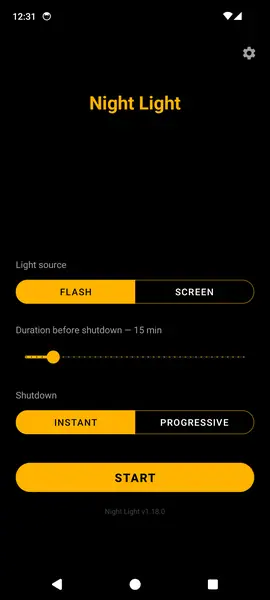
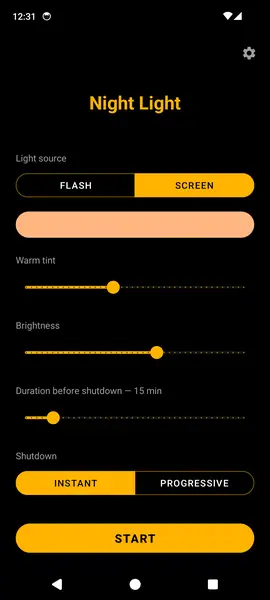
- Two light sources: the camera flash, or the screen with an adjustable warm tint.
- Adjustable duration before automatic shutdown (1 to 120 minutes).
- Instant or progressive (fade) shutdown, with adjustable fade duration.
- Fully pure-black (OLED) interface, to save battery and avoid glare.
- A tap brings back the controls (remaining time, Stop button).
- Once the timer ends, the app closes itself so the phone can go to sleep normally.
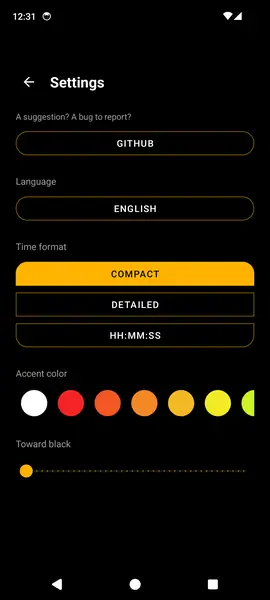
Settings screen:
- Time display format: compact, detailed, or HH:MM:SS.
- UI accent color: palette of hues and white, with adjustable saturation and brightness (pastel, brown...).
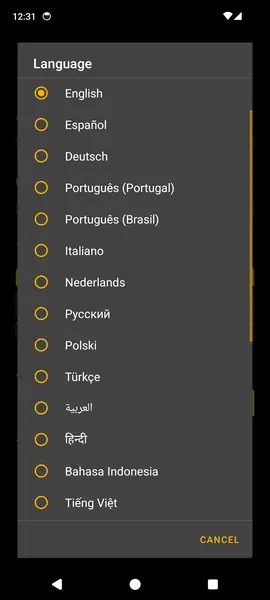
- App language: 26 languages available, independent of the system language.
No Internet permission, no telemetry, fully free software (GPL-3.0).
Neu in Version 1.20.0
- Accent color: the "Toward black" slider is replaced by two sliders, Saturation and Brightness. Pastel, beige or brown tones are now possible, and the swatches update to preview the result.
- Text on the accent color switches between white and black for the best contrast.
- Small screens: spacing tightens automatically to avoid needless scrolling; the time format now fits on a single line.
Informationen zur APK-Datei
| Paketname | io.github.pic38.veilleuse |
|---|---|
| Version | 1.20.0 (Code 25) |
| Mindestens | Android 8.0 · ausgelegt für Android 14 |
| Architekturen | Alle (universell) |
| SHA-256 | bdfcd7e9fb78165a8ac1291d6edbcd8d810c896374ace21fdd0c1ad709fda001 |
| Signatur | 84a4da3db290db13c64cf5ab2c3b649e918734733e1b9f632cede343f3f2d85e |
| Lizenz | GPL-3.0-or-later — freie Copyleft-Lizenz: Der Code ist öffentlich und veränderte Versionen müssen frei bleiben |
| Quellcode | github.com/pic38/Veilleuse |
Berechtigungen
Keine besonderen Berechtigungen.
Ältere Versionen
- Night Light 1.20.023. November 2026 · 4,7 MB
- Night Light 1.19.017. September 2026 · 4,7 MB
- Night Light 1.18.114. September 2026 · 4,7 MB
So installieren Sie Night Light APK
- Tippen Sie oben auf APK herunterladen und öffnen Sie die Datei nach dem Download.
- Wenn Android fragt, erlauben Sie Ihrem Browser, unbekannte Apps zu installieren.
- Tippen Sie auf Installieren. Night Light erscheint dann bei Ihren anderen Apps.
→ APK-Datei auf Android installieren (Schritt für Schritt)
→ „App nicht installiert“: Ursachen und Lösungen
Häufige Fragen
Ist Night Light kostenlos?
Ja. Night Light steht unter der Lizenz GPL-3.0-or-later: kostenlos, ohne Abo, und der Quellcode ist öffentlich.
Ist diese APK-Datei sicher?
Die Datei wurde vom F-Droid-Repository aus dem öffentlichen Quellcode erstellt und veröffentlicht. Ihr SHA-256-Fingerabdruck steht oben, Sie können ihn nach dem Download vergleichen. Ist eine APK gefährlich? So prüfen Sie eine Datei vor der Installation
Läuft Night Light auf meinem Handy?
Sie benötigen mindestens Android 8.0. Die App funktioniert auch ohne Google-Dienste, also auch auf aktuellen Huawei-Handys.