Night Light APK
Minimal night light, flash or screen, settings, 26 languages.
Scarica l'APK v1.20.0 · 4,7 MB- Versione1.20.0
- Dimensione4,7 MB
- RichiedeAndroid 8.0
- Aggiornata23/11/2026
- LicenzaGPL-3.0-or-later
- PrezzoGratis
Informazioni su Night Light
Descrizione fornita dallo sviluppatore (in inglese).
What's new in version 1.20.0
- Accent color: the "Toward black" slider is replaced by two sliders, Saturation and Brightness. Pastel, beige or brown tones are now possible, and the swatches update to preview the result.
- Text on the accent color switches between white and black for the best contrast.
- Small screens: spacing tightens automatically to avoid needless scrolling; the time format now fits on a single line.
Turn your phone into a simple night light, with no ads and no trackers.
Features:
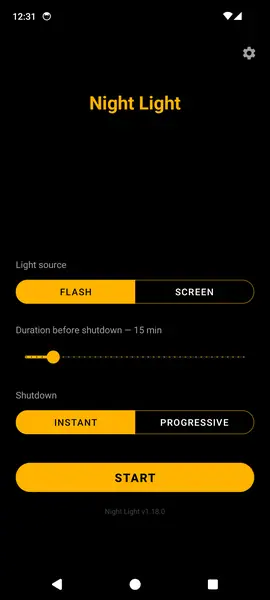
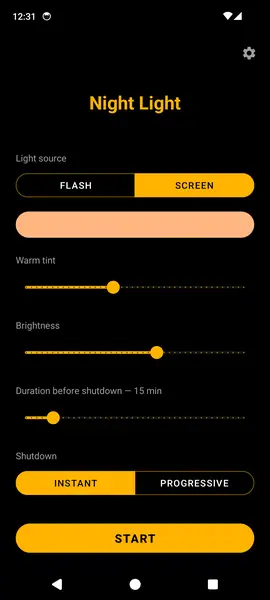
- Two light sources: the camera flash, or the screen with an adjustable warm tint.
- Adjustable duration before automatic shutdown (1 to 120 minutes).
- Instant or progressive (fade) shutdown, with adjustable fade duration.
- Fully pure-black (OLED) interface, to save battery and avoid glare.
- A tap brings back the controls (remaining time, Stop button).
- Once the timer ends, the app closes itself so the phone can go to sleep normally.
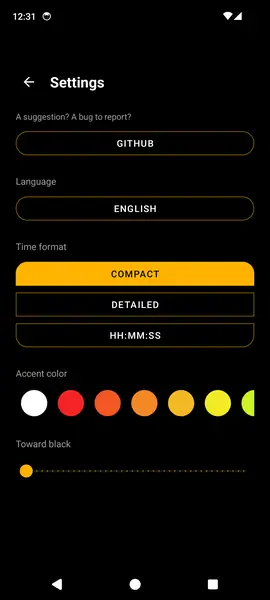
Settings screen:
- Time display format: compact, detailed, or HH:MM:SS.
- UI accent color: palette of hues and white, with adjustable saturation and brightness (pastel, brown...).
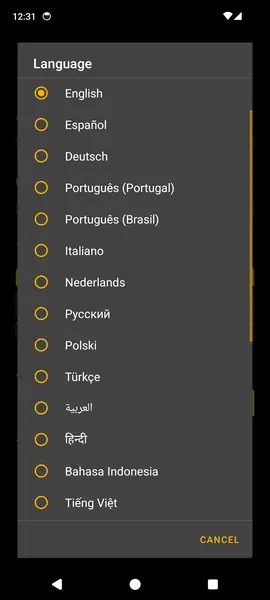
- App language: 26 languages available, independent of the system language.
No Internet permission, no telemetry, fully free software (GPL-3.0).
Novità della versione 1.20.0
- Accent color: the "Toward black" slider is replaced by two sliders, Saturation and Brightness. Pastel, beige or brown tones are now possible, and the swatches update to preview the result.
- Text on the accent color switches between white and black for the best contrast.
- Small screens: spacing tightens automatically to avoid needless scrolling; the time format now fits on a single line.
Informazioni sul file APK
| Nome del pacchetto | io.github.pic38.veilleuse |
|---|---|
| Versione | 1.20.0 (codice 25) |
| Android minimo | Android 8.0 · pensata per Android 14 |
| Architetture | Tutte (universale) |
| SHA-256 | bdfcd7e9fb78165a8ac1291d6edbcd8d810c896374ace21fdd0c1ad709fda001 |
| Firma | 84a4da3db290db13c64cf5ab2c3b649e918734733e1b9f632cede343f3f2d85e |
| Licenza | GPL-3.0-or-later — licenza libera copyleft: il codice è pubblico e le versioni modificate devono restare libere |
| Codice sorgente | github.com/pic38/Veilleuse |
Autorizzazioni richieste
Nessuna autorizzazione particolare.
Versioni precedenti
- Night Light 1.20.023 novembre 2026 · 4,7 MB
- Night Light 1.19.017 settembre 2026 · 4,7 MB
- Night Light 1.18.114 settembre 2026 · 4,7 MB
Come installare Night Light APK
- Tocca Scarica l'APK qui sopra, poi apri il file al termine del download.
- Se Android lo chiede, consenti al browser di installare app sconosciute.
- Tocca Installa. Night Light comparirà insieme alle altre app.
→ Come installare un file APK su Android (passo passo)
→ «App non installata»: cause e soluzioni
Domande frequenti
Night Light è gratis?
Sì. Night Light è distribuita con licenza GPL-3.0-or-later: gratuita, senza abbonamento e con codice sorgente pubblico.
Questo file APK è sicuro?
Il file è quello compilato e pubblicato dal repository F-Droid a partire dal codice sorgente pubblico. L'impronta SHA-256 è indicata qui sopra: puoi confrontarla dopo il download. Un APK è pericoloso? Come verificare un file prima di installarlo
Night Light funziona sul mio telefono?
Serve almeno Android 8.0. L'app funziona anche senza i servizi Google, quindi anche sui telefoni Huawei recenti.