
Seca Contacts APK
Private contacts: coloured profiles, duplicate merging, no Internet access
APK herunterladen v0.1.0-beta14 · 3,0 MB- Version0.1.0-beta14
- Größe3,0 MB
- BenötigtAndroid 12
- Aktualisiert23.11.2026
- LizenzGPL-3.0-or-later
- PreisKostenlos
Über Seca Contacts
Beschreibung des Entwicklers (auf Englisch).
An address book that cannot phone home.
Seca Contacts has no Internet permission at all, so your contacts cannot leave this phone through it. They stay in Android’s own address book, where DAVx⁵ or any sync of your choice can still reach them.
One of three apps — Contacts, Phone and Messages — sharing one Material 3 Expressive design. Android 12 or newer, with or without Google, at its best on GrapheneOS. In English, French, German, Spanish and Polish.
Your contacts stay on your phone
- No Internet permission: the app cannot send anything anywhere.
- Contacts stay in Android's own address book, where DAVx⁵ or any sync of your choice can reach them.
- Works with GrapheneOS Contact Scopes.
Organised the way you live
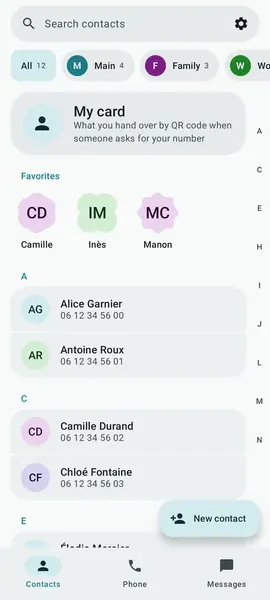
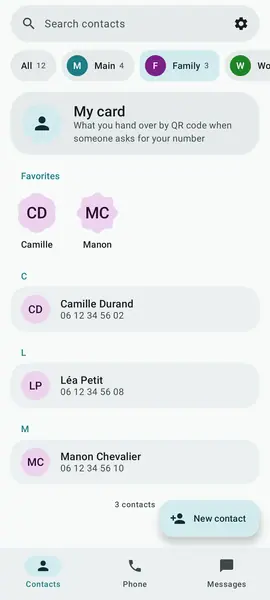
- Coloured profiles (Family, Work…), whose colour carries over to Seca Phone and Seca Messages.
- Favourites, instant search, fast scrolling by letter.
- Duplicates found by name or number, merged without losing anything.
- Your own card, shared as a QR code.
Also
- vCard import and export.
- Password-encrypted backup.
- App lock, and a hidden preview in recent apps.
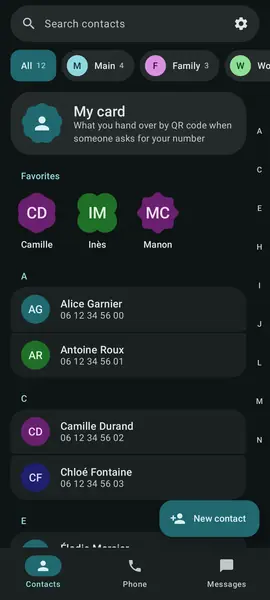
- Wallpaper colours or Seca palettes, dark theme.
No ads, no trackers, no account. Open source.
Neu in Version 0.1.0-beta14
Sort the list by first name or by surname. The choice is Seca's own now, so it means the same on every phone. Choose which accounts are drawn: turn off the one WhatsApp writes and the numbers it doubled go with it. A middle name and a nickname, and the search finds someone by the nickname you actually call them. Pick the app's language in its own settings, for phones that hide Android's. One dialog, used by all of them, in place of thirty-one.
Informationen zur APK-Datei
| Paketname | com.seca.contacts |
|---|---|
| Version | 0.1.0-beta14 (Code 14) |
| Mindestens | Android 12 · ausgelegt für Android 16 |
| Architekturen | arm64-v8a, armeabi-v7a, x86, x86_64 |
| SHA-256 | 8f8cd46ac5c907f4d019688e50d1b63193efb6a98149be6229fdadfaeaef0b3b |
| Signatur | 2fdea7b46beffe16459bb4dcdd34db5e0cb912274a5eb628e4b0d8a596211790 |
| Lizenz | GPL-3.0-or-later — freie Copyleft-Lizenz: Der Code ist öffentlich und veränderte Versionen müssen frei bleiben |
| Quellcode | github.com/arditore/Seca |
Berechtigungen
- Kontakte lesen sensibel
- Fingerabdruck / Biometrie
- Kontakte ändern sensibel
- Telefonstatus sensibel
- Benachrichtigungen anzeigen
- Beim Start ausführen
1 weitere technische Berechtigung(en)
READ_PHONE_NUMBERS
Ältere Versionen
- Seca Contacts 0.1.0-beta1423. November 2026 · 3,0 MB
- Seca Contacts 0.1.0-beta1317. November 2026 · 3,0 MB
- Seca Contacts 0.1.0-beta109. November 2026 · 2,9 MB
So installieren Sie Seca Contacts APK
- Tippen Sie oben auf APK herunterladen und öffnen Sie die Datei nach dem Download.
- Wenn Android fragt, erlauben Sie Ihrem Browser, unbekannte Apps zu installieren.
- Tippen Sie auf Installieren. Seca Contacts erscheint dann bei Ihren anderen Apps.
→ APK-Datei auf Android installieren (Schritt für Schritt)
→ „App nicht installiert“: Ursachen und Lösungen
Häufige Fragen
Ist Seca Contacts kostenlos?
Ja. Seca Contacts steht unter der Lizenz GPL-3.0-or-later: kostenlos, ohne Abo, und der Quellcode ist öffentlich.
Ist diese APK-Datei sicher?
Die Datei wurde vom F-Droid-Repository aus dem öffentlichen Quellcode erstellt und veröffentlicht. Ihr SHA-256-Fingerabdruck steht oben, Sie können ihn nach dem Download vergleichen. Ist eine APK gefährlich? So prüfen Sie eine Datei vor der Installation
Läuft Seca Contacts auf meinem Handy?
Sie benötigen mindestens Android 12. Die App funktioniert auch ohne Google-Dienste, also auch auf aktuellen Huawei-Handys.