
Seca Contacts APK
Private contacts: coloured profiles, duplicate merging, no Internet access
Download APK v0.1.0-beta14 · 3.0 MB- Version0.1.0-beta14
- Size3.0 MB
- RequiresAndroid 12
- Updated11/23/2026
- LicenceGPL-3.0-or-later
- PriceFree
About Seca Contacts
An address book that cannot phone home.
Seca Contacts has no Internet permission at all, so your contacts cannot leave this phone through it. They stay in Android’s own address book, where DAVx⁵ or any sync of your choice can still reach them.
One of three apps — Contacts, Phone and Messages — sharing one Material 3 Expressive design. Android 12 or newer, with or without Google, at its best on GrapheneOS. In English, French, German, Spanish and Polish.
Your contacts stay on your phone
- No Internet permission: the app cannot send anything anywhere.
- Contacts stay in Android's own address book, where DAVx⁵ or any sync of your choice can reach them.
- Works with GrapheneOS Contact Scopes.
Organised the way you live
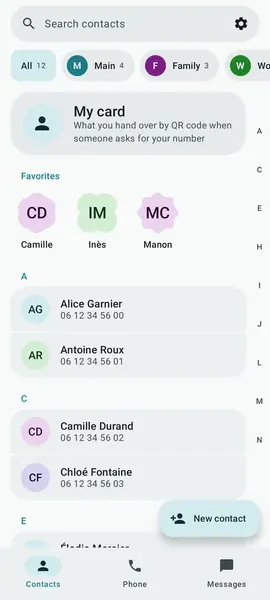
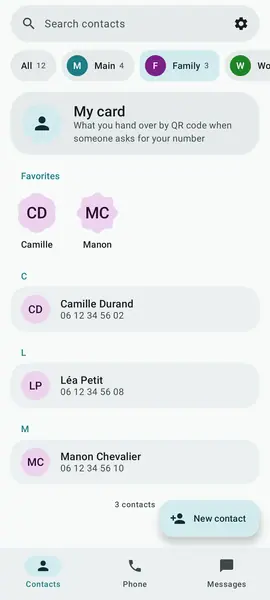
- Coloured profiles (Family, Work…), whose colour carries over to Seca Phone and Seca Messages.
- Favourites, instant search, fast scrolling by letter.
- Duplicates found by name or number, merged without losing anything.
- Your own card, shared as a QR code.
Also
- vCard import and export.
- Password-encrypted backup.
- App lock, and a hidden preview in recent apps.
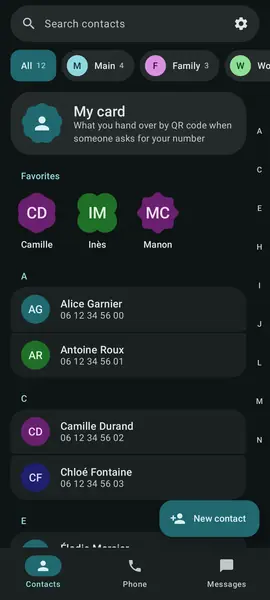
- Wallpaper colours or Seca palettes, dark theme.
No ads, no trackers, no account. Open source.
What's new in version 0.1.0-beta14
Sort the list by first name or by surname. The choice is Seca's own now, so it means the same on every phone. Choose which accounts are drawn: turn off the one WhatsApp writes and the numbers it doubled go with it. A middle name and a nickname, and the search finds someone by the nickname you actually call them. Pick the app's language in its own settings, for phones that hide Android's. One dialog, used by all of them, in place of thirty-one.
APK file information
| Package name | com.seca.contacts |
|---|---|
| Version | 0.1.0-beta14 (code 14) |
| Minimum Android | Android 12 · targets Android 16 |
| Architectures | arm64-v8a, armeabi-v7a, x86, x86_64 |
| SHA-256 | 8f8cd46ac5c907f4d019688e50d1b63193efb6a98149be6229fdadfaeaef0b3b |
| Signature | 2fdea7b46beffe16459bb4dcdd34db5e0cb912274a5eb628e4b0d8a596211790 |
| Licence | GPL-3.0-or-later — copyleft free licence: the code is public and modified versions must stay free |
| Source code | github.com/arditore/Seca |
Permissions
- Read contacts sensitive
- Fingerprint / biometrics
- Edit contacts sensitive
- Phone status sensitive
- Show notifications
- Start at boot
1 other technical permission(s)
READ_PHONE_NUMBERS
Older versions
- Seca Contacts 0.1.0-beta14November 23, 2026 · 3.0 MB
- Seca Contacts 0.1.0-beta13November 17, 2026 · 3.0 MB
- Seca Contacts 0.1.0-beta10November 9, 2026 · 2.9 MB
How to install Seca Contacts APK
- Tap Download APK above, then open the file once the download has finished.
- If Android asks, allow your browser to install unknown apps.
- Tap Install. Seca Contacts then appears with your other apps.
Having trouble? Read our guides how to install an APK on Android and "App not installed": how to fix it.
Frequently asked questions
Is Seca Contacts free?
Yes. Seca Contacts is distributed under the GPL-3.0-or-later licence: free, no subscription, and its source code is public.
Is this APK file safe?
The file is the one built and published by the F-Droid repository from the public source code. Its SHA-256 fingerprint is shown above, so you can compare it after downloading. How to check an APK.
Will Seca Contacts work on my phone?
You need at least Android 12. The app also works without Google services, so it runs on recent Huawei phones too.