
Agenda Tech APK
Private offline calendar: encrypted, zero network, encrypted backups.
Download APK v1.3.4 · 10.6 MB- Version1.3.4
- Size10.6 MB
- RequiresAndroid 8.0
- Updated11/4/2026
- LicenceApache-2.0
- PriceFree
About Agenda Tech
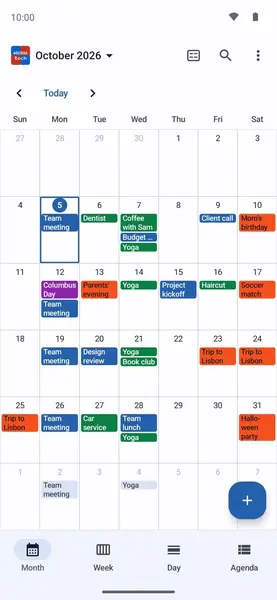
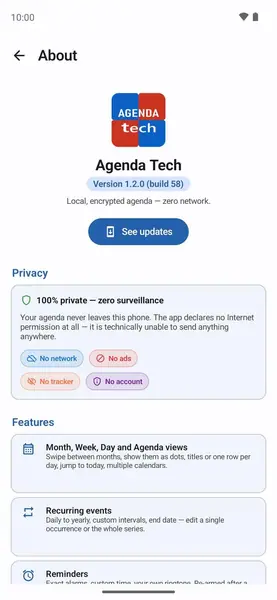
Agenda Tech is a calendar for Android that keeps everything on your device. No cloud, no account, no ads, no trackers. It declares no internet permission at all, so it is technically unable to send anything anywhere — and you can check that yourself in Android's app settings.
It exists so that your calendar never has to live anywhere but on your phone. A calendar says a lot about a person: their doctors, their lawyers, their job interviews, who they meet and when.
Features
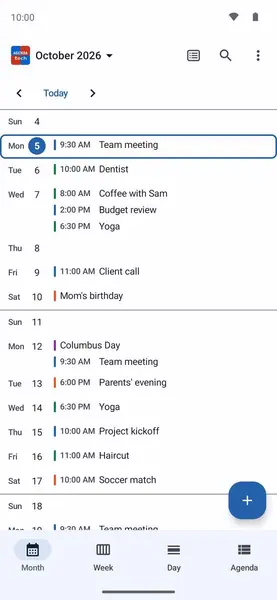
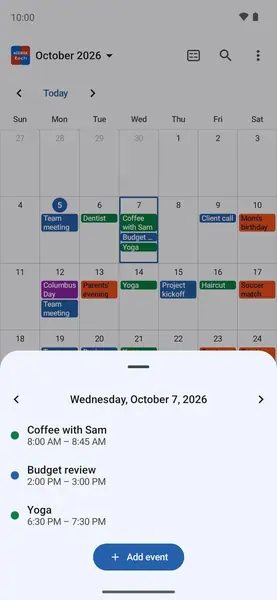
- Four views — Month (swipe between months; dots, titles in the grid or one row per day, pinch to switch), Week, Day and Agenda list
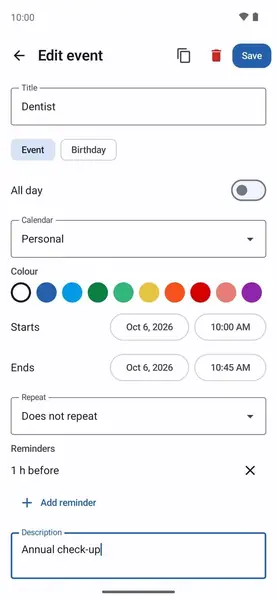
- Events — all-day, description, per-event colour, postal address and GPS coordinates that open in your maps app (with no location permission); deleted by mistake? "Undo" brings it back
- Share — send an event as text or as an .ics file to the app of your choice
- Public holidays — those of nine European countries and the United States, worked out on the phone, off by default
- Recurring events (RFC 5545) — daily, weekly on chosen days, monthly, yearly; ending after N occurrences or on a date; edit or delete a single occurrence
- Reminders — exact alarms, re-armed after a reboot, free delay, your own sound, and a "snooze 10 min" button on the notification
- Encrypted backup — export your whole calendar to a password-protected .atbak file (PBKDF2-HMAC-SHA256 at 600,000 iterations + AES-256-GCM). Keep it anywhere, cloud included: it stays unreadable without your password
- Search — by title, description, place, address or city; accents and case don't matter
- Import from your device calendar — copies what the phone's own calendar apps have already synced onto it, read-only, without any network
- .ics import / export (RFC 5545) through the system file picker
- Optional PIN and biometric lock
- Home-screen widgets, dark theme, in English, French, German, Italian and Spanish
Privacy
- No INTERNET permission. Not "we promise not to" — the app cannot
- Encrypted at rest: SQLCipher (AES-256), master key sealed by the Android KeyStore
- Screenshots blocked (FLAG_SECURE), excluded from Android cloud backups
- Apache 2.0 — every promise on this page is checkable line by line
Limits, honestly
- Not a sync. Importing copies what is on the phone; an event created here does not travel back to the original calendar. That is the price of zero network, and it is deliberate
- No CalDAV, no shared calendars, no invitations — all of it needs a network. You can send an event, not share a calendar
- The encrypted backup is the bridge between your devices, and it is a manual one
What's new in version 1.3.4
v1.3.4 — Selected text stays in the app
- The selection toolbar no longer offers
Translate or another app's text actions, on any Android version: they received the selected text of an event. Cut, Copy, Paste and Select all remain.
- Terms and privacy policy clarified:
liability, and what happens to an e-mail sent to the publisher.
APK file information
| Package name | com.filestech.agenda_tech |
|---|---|
| Version | 1.3.4 (code 63) |
| Minimum Android | Android 8.0 · targets Android 15 |
| Architectures | arm64-v8a, armeabi-v7a, x86, x86_64 |
| SHA-256 | 72000533232179a620582440b82b7da62347c9a17ec21d6f5b966fc93d024c56 |
| Signature | 538bff8ab3162017038d031909fd4e06159f30a3371867f9e1d1bc146c9a1d04 |
| Licence | Apache-2.0 — permissive free licence: the source code is public and reusable |
| Source code | github.com/gitubpatrice/AGENDA-TECH |
| Official website | files-tech.com/agenda-tech.php |
Permissions
- Read calendar sensitive
- Show notifications
- Vibrate
- Start at boot
- Fingerprint / biometrics
- Fingerprint
- Keep the device awake
- Run in the background
2 other technical permission(s)
SCHEDULE_EXACT_ALARM USE_EXACT_ALARM
Older versions
- Agenda Tech 1.3.4November 4, 2026 · 10.6 MB
- Agenda Tech 1.3.3October 27, 2026 · 10.6 MB
- Agenda Tech 1.3.0October 15, 2026 · 10.6 MB
How to install Agenda Tech APK
- Tap Download APK above, then open the file once the download has finished.
- If Android asks, allow your browser to install unknown apps.
- Tap Install. Agenda Tech then appears with your other apps.
Having trouble? Read our guides how to install an APK on Android and "App not installed": how to fix it.
Frequently asked questions
Is Agenda Tech free?
Yes. Agenda Tech is distributed under the Apache-2.0 licence: free, no subscription, and its source code is public.
Is this APK file safe?
The file is the one built and published by the F-Droid repository from the public source code. Its SHA-256 fingerprint is shown above, so you can compare it after downloading. How to check an APK.
Will Agenda Tech work on my phone?
You need at least Android 8.0. The app also works without Google services, so it runs on recent Huawei phones too.