
CajuScan APK
Record invoices in the Cashew app by scanning the QR code on Portuguese invoices
Download APK v1.0.11 · 23.8 MB- Version1.0.11
- Size23.8 MB
- RequiresAndroid 7.0
- Updated11/23/2026
- LicenceMIT
- PriceFree
About CajuScan
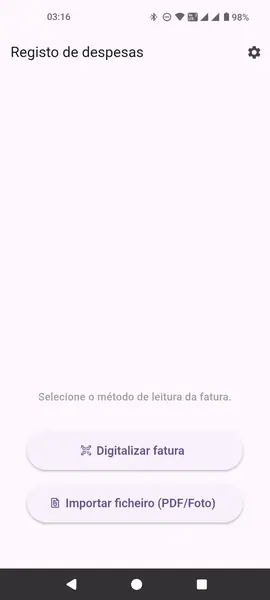
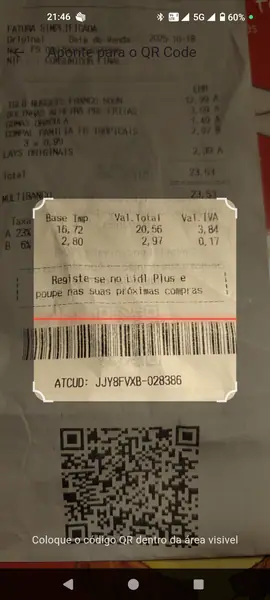
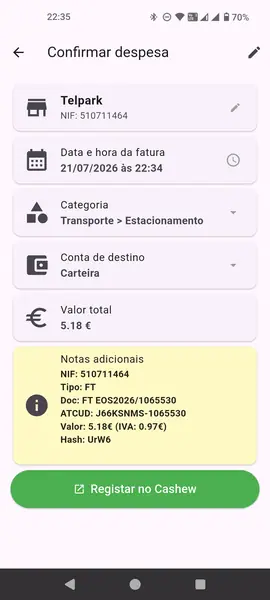
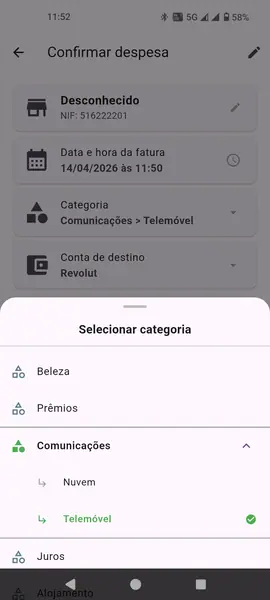
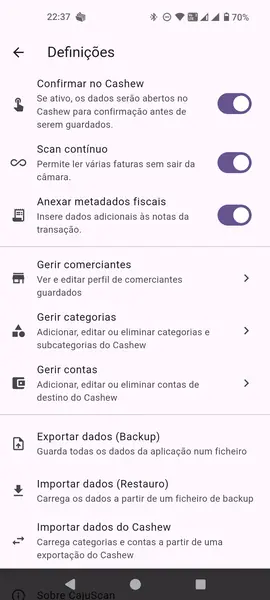
CajuScan is a mobile Android application, developed in Flutter, that simplifies expense recording in Portugal. The app allows you to scan the QR Code (ATCUD) present on Portuguese invoices, automatically extract transaction data, and send it to the financial management app Cashew.
The goal is to automate the manual process of entering expenses, saving time and reducing errors.
Features:
- Scan ATCUD QR Codes from Portuguese invoices
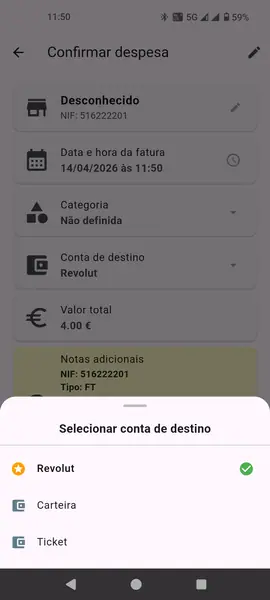
- Automatic data extraction (amount, date, vendor, etc.)
- Integration with the Cashew app for financial tracking
- Simple, usability-focused interface
Developed with privacy in mind: no tracking, no ads, no data sent to external servers.
Open source under MIT license — contributions are welcome!
APK file information
| Package name | com.marotoweb.cajuscan_app |
|---|---|
| Version | 1.0.11 (code 133) |
| Minimum Android | Android 7.0 · targets Android 16 |
| Architectures | x86_64 |
| SHA-256 | 004627bb1b79bddf833eda88d56c394dff3fd094da503c50305c10d678063341 |
| Signature | b1bd4eb13022a25b6b0ac9b079ea255feac109d7a613c9448c287ee822ab19b2 |
| Licence | MIT — permissive free licence: the source code is public and reusable |
| Source code | github.com/marotoweb/cajuscan_app |
Permissions
- Camera sensitive
- Microphone sensitive
- Write to storage
- Read storage
Older versions
- CajuScan 1.0.11November 23, 2026 · 23.8 MB
- CajuScan 1.0.11November 23, 2026 · 22.3 MB
- CajuScan 1.0.11November 23, 2026 · 19.9 MB
- CajuScan 1.0.10November 4, 2026 · 23.4 MB
- CajuScan 1.0.10November 4, 2026 · 21.9 MB
- CajuScan 1.0.10November 4, 2026 · 19.5 MB
- CajuScan 1.0.9August 3, 2026 · 59.8 MB
- CajuScan 1.0.8June 22, 2026 · 57.6 MB
- CajuScan 1.0.7June 12, 2026 · 57.2 MB
How to install CajuScan APK
- Tap Download APK above, then open the file once the download has finished.
- If Android asks, allow your browser to install unknown apps.
- Tap Install. CajuScan then appears with your other apps.
Having trouble? Read our guides how to install an APK on Android and "App not installed": how to fix it.
Frequently asked questions
Is CajuScan free?
Yes. CajuScan is distributed under the MIT licence: free, no subscription, and its source code is public.
Is this APK file safe?
The file is the one built and published by the F-Droid repository from the public source code. Its SHA-256 fingerprint is shown above, so you can compare it after downloading. How to check an APK.
Will CajuScan work on my phone?
You need at least Android 7.0. The app also works without Google services, so it runs on recent Huawei phones too.