Calculator M3 APK
Clean, private calculator — no tracking, no ads, optional on-device AI.
Download APK v1.8.2 · 14.1 MB- Version1.8.2
- Size14.1 MB
- RequiresAndroid 8.0
- Updated11/20/2026
- LicenceGPL-3.0-only
- PriceFree
About Calculator M3
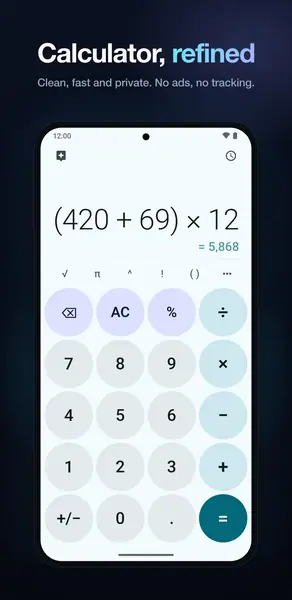
Every calculation you make is your business — not Big Tech's. Calculator M3 is a beautifully designed calculator built with Material 3 that works entirely offline for everyday math, with zero data collection, zero analytics, and zero tracking.
Unlike other calculators, this app doesn't phone home. No usage tracking, no telemetry, no ad frameworks buried in the code. It does math — and an optional, fully on-device AI math solver — and nothing else.
✓ Full expression evaluation ✓ Live result preview ✓ Scientific functions ✓ Calculation history ✓ Material 3 dynamic theming ✓ 18 languages, following your device language ✓ Works offline (with an optional on-device AI math solver)
🔢 FULL EXPRESSION EVALUATION
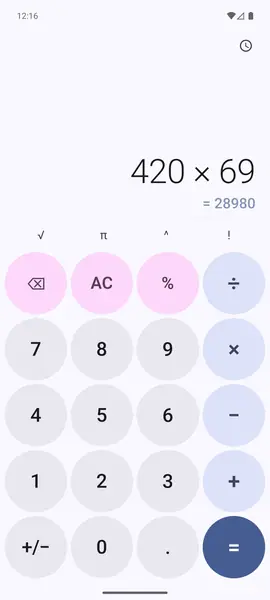
Type complete mathematical expressions with proper operator precedence (PEMDAS) and parentheses up to 20 levels deep. See the result update in real-time as you type.
- Full PEMDAS operator precedence
- Parentheses with 20 levels of nesting
- Live result preview as you type
- Tap anywhere in the expression to edit
- High-precision BigDecimal arithmetic
- Engineering notation for large numbers
🔬 SCIENTIFIC FUNCTIONS
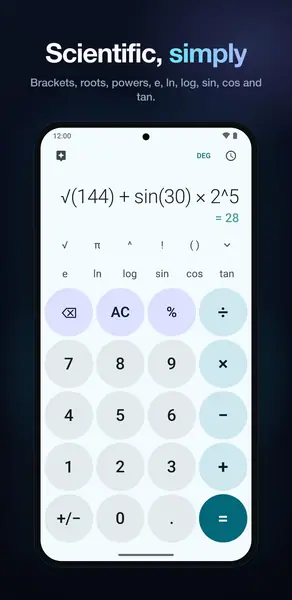
- Square root (√)
- Pi (π) constant
- Power (^) exponentiation
- Factorial (!) for 0–99, and for fractions via the Gamma function
- e and logarithms (ln, log)
- sin, cos and tan, in degrees or radians
- Percent (%) with consumer-style support
- Implicit multiplication (2π, 3√2, etc.)
📜 CALCULATION HISTORY
- Stores up to 100 recent calculations
- Persists across app restarts
- Tap entries to reload them
- Clear history when needed
📷 AI MATH SOLVER (OPTIONAL)
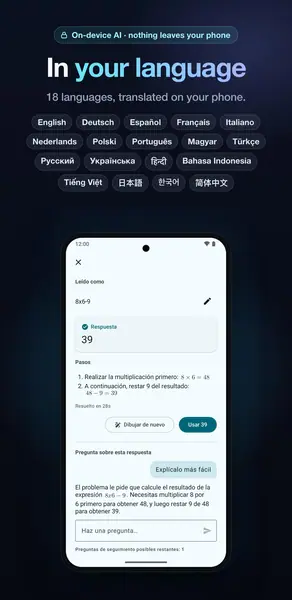
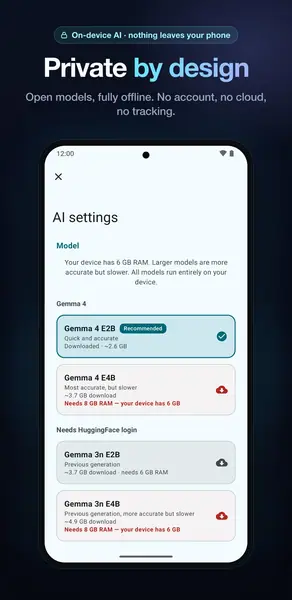
Photograph handwritten math, write it on screen, or type a problem — word problems too — and an on-device AI model solves it step by step. Nothing is sent to any server.
- Tap the AI button (top-left): Camera, Gallery, Write or Type
- Needs a 6 GB+ device and a one-time model download (2.6–4.9 GB)
- Plain arithmetic you type is answered instantly by the calculator
- Ask up to two follow-up questions about an answer
- AI history keeps every answer on your device; delete it any time
- A number goes into the calculator only if it agrees with the model's working
- Fast, Balanced or Accurate speed settings
- Answers in English, or translated into your language on the phone (Mozilla's open translation models, a one-time 15–38 MB download)
- Open models (Gemma 4, Gemma 3n), fully on-device, GPU-accelerated
- Internet only once, to download the model — Wi-Fi by default
- Don't want it? Turn off "Show AI button" in AI settings
🎨 MATERIAL 3 DESIGN
- Material You dynamic colors (Android 12+)
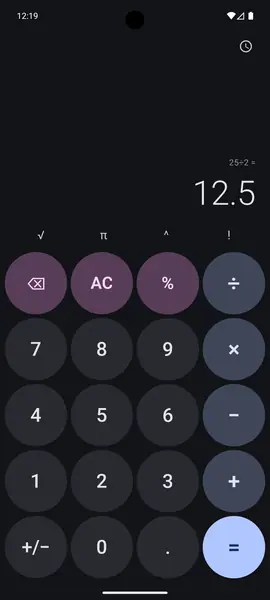
- Automatic light and dark mode
- Smooth button press animations
- Haptic feedback
- Adaptive layout for portrait, landscape, and foldable devices
- Auto-sizing display for long expressions
🛡️ PRIVACY & OPEN SOURCE
- 100% open source (GPL v3)
- No tracking, analytics, or ads
- No data collection of any kind
- The calculator itself needs no network at all
- Internet is used only if you opt in to download an AI model — never to send your data
- Your calculations and photos stay on your device, period
📱 WORKS ON ALL DEVICES
- Phones in portrait and landscape
- Foldable devices (Pixel Fold, Galaxy Z Fold)
- Tablets
- Responsive button sizing and layout
What's new in version 1.8.2
- AI Math Solver is no longer experimental: Camera, Gallery, Write (by hand) or Type (word problems too)
- Step-by-step answers, up to two follow-up questions, and an AI history
- Answers in your language, translated on the phone by Mozilla's open models
- New keys: brackets, e, ln, log, sin, cos, tan (degrees or radians), x! of fractions
- √ after + − × ÷ starts a new root: 9 + √4 = 11
- Scrolling while the AI writes no longer jumps
- Fixes for scans, history, input and light mode
APK file information
| Package name | com.vagujhelyigergely.calculatorm3 |
|---|---|
| Version | 1.8.2 (code 20) |
| Minimum Android | Android 8.0 · targets Android 15 |
| Architectures | arm64-v8a |
| SHA-256 | 190df36642b1072f4f0f5baf5999fc35fd8fdbee29a60cdcd1cddcaff2b6cea4 |
| Signature | 49646ed216aa6e8f23326999052f6704b6e9228be310b56b6e8b3ab8113bae04 |
| Licence | GPL-3.0-only — copyleft free licence: the code is public and modified versions must stay free |
| Source code | github.com/gergelyvagujhelyi/CalculatorM3 |
Permissions
- Internet access
- View network status
- Run in the background
- Show notifications
- Keep the device awake
- Start at boot
Older versions
- Calculator M3 1.8.2November 20, 2026 · 14.1 MB
- Calculator M3 1.7.0November 11, 2026 · 13.1 MB
- Calculator M3 1.5.2July 1, 2026 · 12.8 MB
How to install Calculator M3 APK
- Tap Download APK above, then open the file once the download has finished.
- If Android asks, allow your browser to install unknown apps.
- Tap Install. Calculator M3 then appears with your other apps.
Having trouble? Read our guides how to install an APK on Android and "App not installed": how to fix it.
Frequently asked questions
Is Calculator M3 free?
Yes. Calculator M3 is distributed under the GPL-3.0-only licence: free, no subscription, and its source code is public.
Is this APK file safe?
The file is the one built and published by the F-Droid repository from the public source code. Its SHA-256 fingerprint is shown above, so you can compare it after downloading. How to check an APK.
Will Calculator M3 work on my phone?
You need at least Android 8.0. The app also works without Google services, so it runs on recent Huawei phones too.