
DPIMech APK
Open sites your provider blocks with DPI – only for the apps you choose, no root
Download APK v0.5.0 · 2.8 MB- Version0.5.0
- Size2.8 MB
- RequiresAndroid 8.0
- Updated11/20/2026
- LicenceGPL-3.0-or-later
- PriceFree
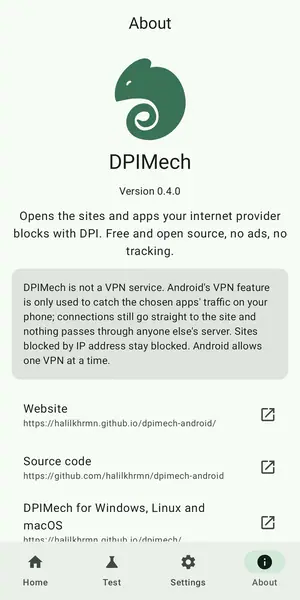
About DPIMech
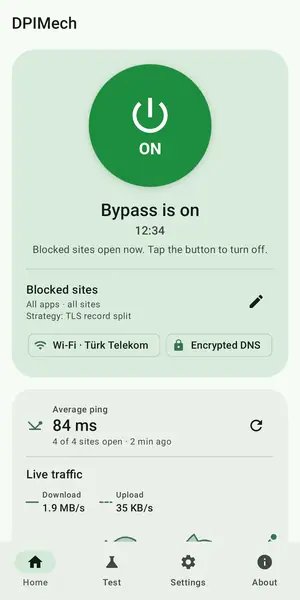
Some internet providers block sites and apps (Discord, Roblox, YouTube…) with DPI (deep packet inspection). DPIMech gets around it on your phone with ByeDPI, which changes how the first packets of a connection look so the provider's filter does not recognise them.
Not a VPN service. Android's VPN feature is only used to catch traffic on the phone. Every connection still goes straight to the site: nothing passes through anyone else's server, your IP address is not hidden, and sites blocked by IP address stay blocked.
Features:
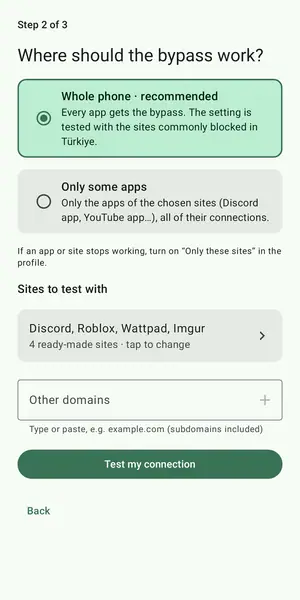
- Setup wizard: pick the sites, DPIMech tests your connection and turns on the setting that works.
- Whole phone or only the apps you pick. Strategies are tested with your sites, then work for all of the apps' connections. In whole-phone mode every app's DNS goes to the DNS server chosen in Settings.
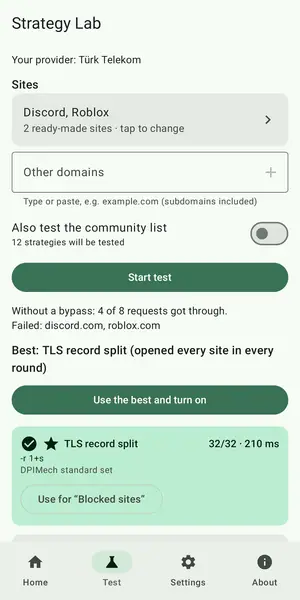
- Strategy Lab: tests strategies against real sites with confirmation rounds and shows which one works on your provider.
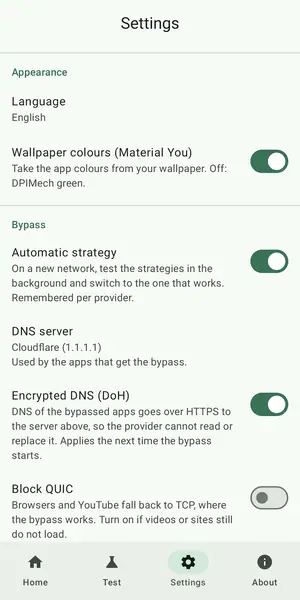
- Automatic strategy: on a new network it finds and remembers what works there.
- Encrypted DNS (DNS over HTTPS) for the bypassed apps, and an optional QUIC block so browsers and YouTube use TCP.
- Home screen with live traffic, average ping of your sites and DNS counts; the notification shows the same.
- Widgets (one per profile if you like), launcher shortcuts that turn a profile on and open its app, Quick Settings tile.
- Strategies shared with the desktop app (Windows, Linux, macOS), updated without a new release, plus a community list.
- DNS blocking check, watchdog that restarts the engine, logs and problem report.
- No root, no Google services, no ads, no analytics. English, Türkçe, Русский, فارسی, العربية.
Network use: to know which provider a network belongs to (for the per-network strategy), DPIMech asks ipwho.is, which sees your IP address. This happens on each new network only with the automatic strategy, otherwise only when you run a test, and can be turned off in Settings. Strategy and site lists come from GitHub; encrypted DNS goes to the DNS server you choose.
Android allows one VPN at a time, so another VPN or a VPN-based ad blocker cannot run together with DPIMech.
The engines are built from source inside the app: ByeDPI and hev-socks5-tunnel. Community strategies from ByeDPIManager.
What's new in version 0.5.0
New DNS choice: "System DNS", the network's own resolver (Private DNS still applies). With DNS over HTTPS on, if the chosen server does not answer on your network, DPIMech now switches to the network's own DNS by itself and tells you once, so apps keep resolving names where third-party DNS is blocked.
APK file information
| Package name | io.github.halilkhrmn.dpimech |
|---|---|
| Version | 0.5.0 (code 6) |
| Minimum Android | Android 8.0 · targets Android 16 |
| Architectures | arm64-v8a, armeabi-v7a, x86, x86_64 |
| SHA-256 | 696769a786b44d6aa3e4bb02d5be06f0a08f7f50db8f8399c8482e9b43c397ab |
| Signature | dd5e5e13f10e026a494c95c7e23a0b8fca475af71c710d690069a32495ed26ca |
| Licence | GPL-3.0-or-later — copyleft free licence: the code is public and modified versions must stay free |
| Source code | github.com/halilkhrmn/dpimech-android |
| Official website | halilkhrmn.github.io/dpimech-android/ |
Permissions
- See installed apps sensitive
- Start at boot
- Internet access
- View network status
- Run in the background
- Show notifications
2 other technical permission(s)
REQUEST_IGNORE_BATTERY_OPTIMIZATIONS POST_PROMOTED_NOTIFICATIONS
Older versions
- DPIMech 0.5.0November 20, 2026 · 2.8 MB
- DPIMech 0.3.0November 13, 2026 · 2.7 MB
How to install DPIMech APK
- Tap Download APK above, then open the file once the download has finished.
- If Android asks, allow your browser to install unknown apps.
- Tap Install. DPIMech then appears with your other apps.
Having trouble? Read our guides how to install an APK on Android and "App not installed": how to fix it.
Frequently asked questions
Is DPIMech free?
Yes. DPIMech is distributed under the GPL-3.0-or-later licence: free, no subscription, and its source code is public.
Is this APK file safe?
The file is the one built and published by the F-Droid repository from the public source code. Its SHA-256 fingerprint is shown above, so you can compare it after downloading. How to check an APK.
Will DPIMech work on my phone?
You need at least Android 8.0. The app also works without Google services, so it runs on recent Huawei phones too.




