
Finan+ APK
Offline, encrypted personal finance manager (Brazilian Portuguese)
Download APK v1.13.0 · 7.5 MB- Version1.13.0
- Size7.5 MB
- RequiresAndroid 8.0
- Updated11/17/2026
- LicenceGPL-3.0-or-later
- PriceFree

About Finan+
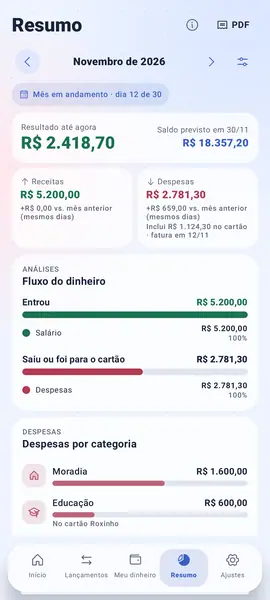
Finan+ is a simple, lightweight and private personal finance app. It works fully offline: your data stays on your device, with no account and no external server.
Note: the app interface is in Brazilian Portuguese and amounts are in Brazilian reais (R$).
Features
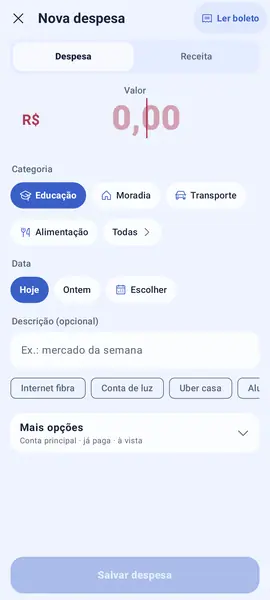
- Quick entry for income and expenses: a large amount, category and date chips, and Undo after saving
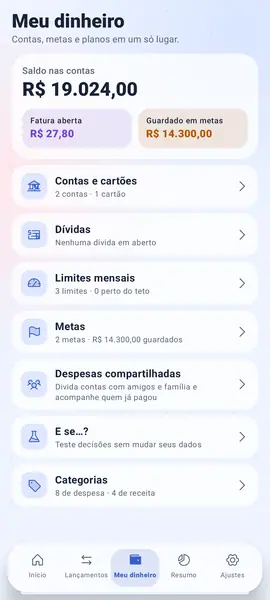
- Accounts and credit cards: each card shows its open bill, limit usage and due date, with alerts when the limit is almost used
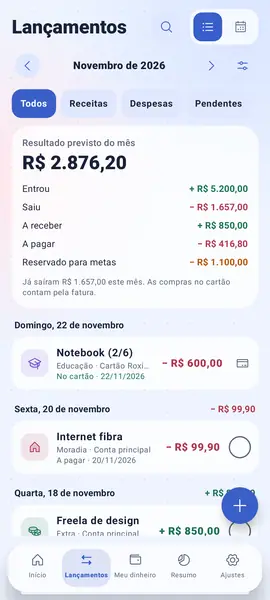
- Installments, recurring transactions, bills to pay and to receive
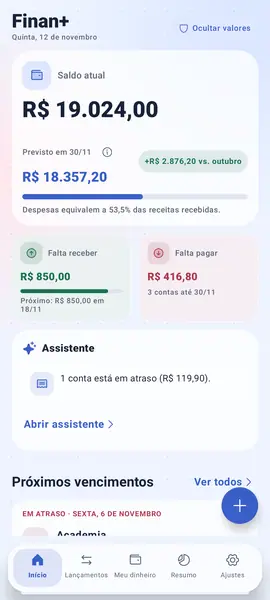
- Current balance and end-of-month forecast, calculated the same way on every screen, plus a calendar with each day's balance
- Each month's balance on its own or carried over from previous months, as you prefer
- Shared expenses: split a bill with friends or family (equally or by each person's amount), see who owes what, record partial payments, attach the receipt and send a PDF statement or a Finan+ image via WhatsApp
- Monthly limits per category and savings goals: saving into a goal takes the money out of the account without counting it as an expense, with an alert when a goal will miss its deadline
- Debts: loans and financing in installments, with the next installment and how much is left
- "What if…?" simulator to save, plan a purchase or pay off a debt early, without touching your data
- Read a bill or boleto: amount and due date from a PDF (password-protected too), the boleto line or a Pix code
- Reports with charts and PDF report export
- On-device assistant: suggests categories from descriptions, summarizes the month, gives saving tips and answers quick questions, always explaining why
- Balance widget and daily due-date reminders
- 7 themes, including Gruvbox, OLED, Tokyo Night and Nord, with an optional glass effect
- Network access (optional): use Finan+ in your computer's browser on the same Wi-Fi, with the data staying on the phone. HTTPS with the phone's own certificate, a code and confirmation on the phone
- JSON backup and restore (compatible with Finan+ web and Finan+ for Linux) and CSV export
- Automatic backup: one copy a day, encrypted with a password, to a folder you choose (phone, SD card, Google Drive, Nextcloud…)
Privacy and security
- Data encrypted with AES-256-GCM, key kept in the Android Keystore
- PIN and/or strong biometric lock, with auto-lock
- Screenshots blocked by default and an option to hide amounts
- Discreet notifications and widget when the app is protected
- No ads, no trackers, no account, no sign-up
- The network permission is only for local network access: off until you turn it on, works only on your home Wi-Fi and turns itself off after 10 minutes of inactivity. The app never connects to the internet
Finan+ is free software, licensed under the GNU GPL v3 or later.
What's new in version 1.13.0
Transfer between accounts: a new option in the + button and in My money › Accounts and cards. The amount leaves one account and enters the other without counting as income or expense, and stays out of the Summary, limits and reports. Both sides show in the list in a neutral color; editing or deleting one side changes both. Backup, CSV and network access keep the transfer.
APK file information
| Package name | com.finanplus |
|---|---|
| Version | 1.13.0 (code 22) |
| Minimum Android | Android 8.0 · targets Android 15 |
| Architectures | arm64-v8a, armeabi-v7a, x86, x86_64 |
| SHA-256 | d0733ab085fece79492c7639dadc2c2a8b1cbd1e1a2cb056a397d33b8daed308 |
| Signature | 37d35726969a852c146a42d1f68cd753f9839629a05160fe805de2f4c2d854a8 |
| Licence | GPL-3.0-or-later — copyleft free licence: the code is public and modified versions must stay free |
| Source code | github.com/finanplus-web/finan_plus_android |
Permissions
- Show notifications
- Fingerprint / biometrics
- Internet access
- View network status
- Run in the background
- Fingerprint
- Keep the device awake
- Start at boot
Older versions
- Finan+ 1.13.0November 17, 2026 · 7.5 MB
- Finan+ 1.11.0November 6, 2026 · 7.4 MB
- Finan+ 1.7.0October 29, 2026 · 7.1 MB
How to install Finan+ APK
- Tap Download APK above, then open the file once the download has finished.
- If Android asks, allow your browser to install unknown apps.
- Tap Install. Finan+ then appears with your other apps.
Having trouble? Read our guides how to install an APK on Android and "App not installed": how to fix it.
Frequently asked questions
Is Finan+ free?
Yes. Finan+ is distributed under the GPL-3.0-or-later licence: free, no subscription, and its source code is public.
Is this APK file safe?
The file is the one built and published by the F-Droid repository from the public source code. Its SHA-256 fingerprint is shown above, so you can compare it after downloading. How to check an APK.
Will Finan+ work on my phone?
You need at least Android 8.0. The app also works without Google services, so it runs on recent Huawei phones too.