
Grace Launcher APK
A simple launcher with an app list, calendar agenda and music controls
Download APK v1.2.4 · 10.9 MB- Version1.2.4
- Size10.9 MB
- RequiresAndroid 9
- Updated11/17/2026
- LicenceGPL-3.0-only
- PriceFree
About Grace Launcher
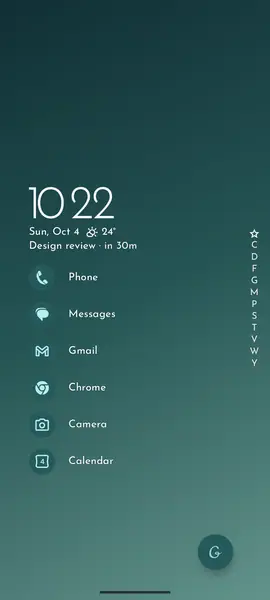
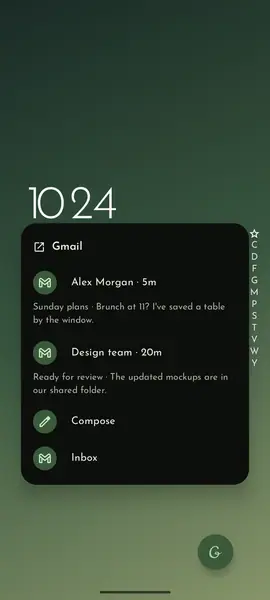
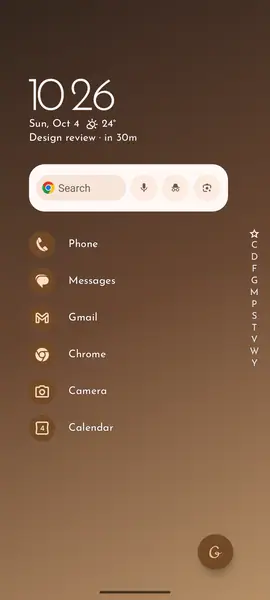
Grace Launcher is a free and open-source Android launcher with a clean, list-based home screen.
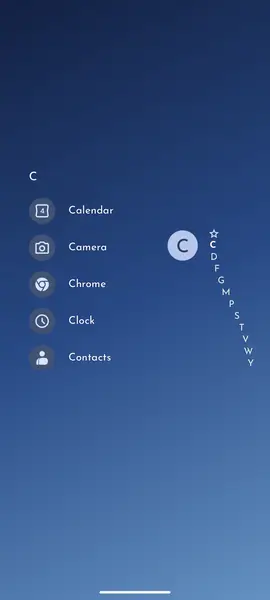
- Keep your favorite apps close and browse with the alphabet rail.
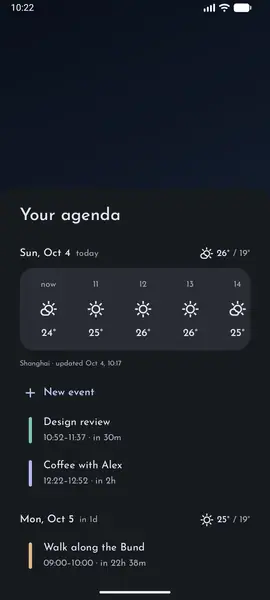
- View upcoming calendar events and notifications.
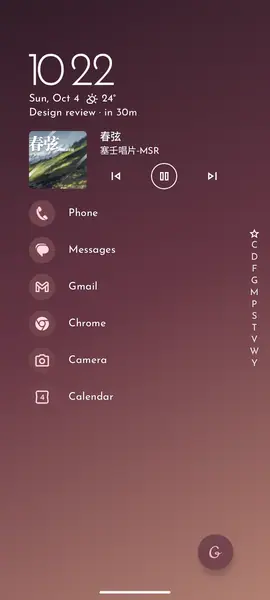
- Control your music from the home screen.
- Customize colors, icons and folders with Material You.
- See the weather with Breezy Weather, installed and configured separately.
No ads or tracking. Grace Launcher does not request Internet access. Calendar and notification access are optional and enable the corresponding features.
Requires Android 9 or later.
What's new in version 1.2.4
Grace Launcher 1.2.4
- Added Tasks.org integration.
- Agenda Page now displays more details in hourly weather forecasts.
- Added support for placing one widget on Agenda Page.
- Added per-app language selection on Android 13 and later.
- Fixed minor UI issues, including home screen clock margins and font colors across Settings pages.
- Fixed animations in right-to-left (RTL) layouts.
APK file information
| Package name | com.galaxyrio.gracelauncher |
|---|---|
| Version | 1.2.4 (code 16) |
| Minimum Android | Android 9 · targets API 37 |
| Architectures | arm64-v8a, armeabi-v7a, x86, x86_64 |
| SHA-256 | b273e9ce3a05a307421a9d51cfcd2f471fe06f3adb65349f23837499ec7a3907 |
| Signature | fe5a57db862791d5c953ac51c1d776a235eaf00f35fafa3b95ddf0d94ad15e4f |
| Licence | GPL-3.0-only — copyleft free licence: the code is public and modified versions must stay free |
| Source code | github.com/Galaxy-rio/GraceLauncher |
Permissions
- Read calendar sensitive
- Read contacts sensitive
- Fingerprint / biometrics
- See installed apps sensitive
5 other technical permission(s)
PACKAGE_USAGE_STATS EXPAND_STATUS_BAR ACCESS_HIDDEN_PROFILES BIND_APPWIDGET REQUEST_DELETE_PACKAGES
Older versions
- Grace Launcher 1.2.4November 17, 2026 · 10.9 MB
- Grace Launcher 1.2.3November 11, 2026 · 10.5 MB
- Grace Launcher 1.2.2November 4, 2026 · 9.8 MB
How to install Grace Launcher APK
- Tap Download APK above, then open the file once the download has finished.
- If Android asks, allow your browser to install unknown apps.
- Tap Install. Grace Launcher then appears with your other apps.
Having trouble? Read our guides how to install an APK on Android and "App not installed": how to fix it.
Frequently asked questions
Is Grace Launcher free?
Yes. Grace Launcher is distributed under the GPL-3.0-only licence: free, no subscription, and its source code is public.
Is this APK file safe?
The file is the one built and published by the F-Droid repository from the public source code. Its SHA-256 fingerprint is shown above, so you can compare it after downloading. How to check an APK.
Will Grace Launcher work on my phone?
You need at least Android 9. The app also works without Google services, so it runs on recent Huawei phones too.





