
Jitsi Meet APK
Instant video conferences efficiently adapting to your scale
Download APK v26.0.0 · 18.6 MB- Version26.0.0
- Size18.6 MB
- RequiresAndroid 8.0
- Updated4/19/2026
- LicenceApache-2.0
- PriceFree
About Jitsi Meet
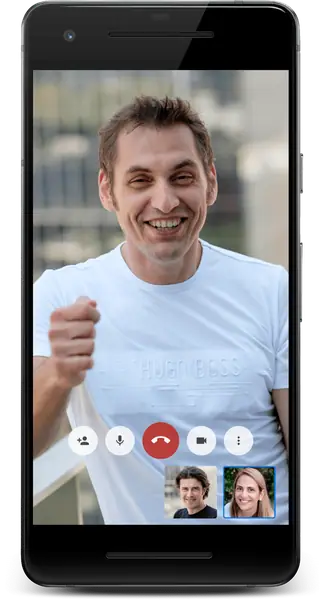
Jitsi Meet lets you stay in touch with all your teams, be they family, friends, or colleagues. Instant video conferences, efficiently adapting to your scale.
- Unlimited users: There are no artificial restrictions on the number of users or conference participants. Server power and bandwidth are the only limiting factors.
- No account needed.
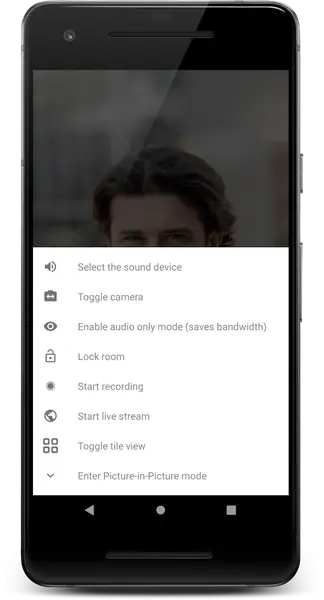
- Lock-protected rooms: Control the access to your conferences with a password.
- Encrypted by default.
- High quality: Audio and video are delivered with the clarity and richness of Opus and VP8.
- Web browser ready: No downloads are required of your friends to join the conversation. Jitsi Meet works directly within their browsers as well. Simply share your conference URL with others to get started.
- 100% open source: Powered by awesome communities from all over the world. And your friends at 8x8.
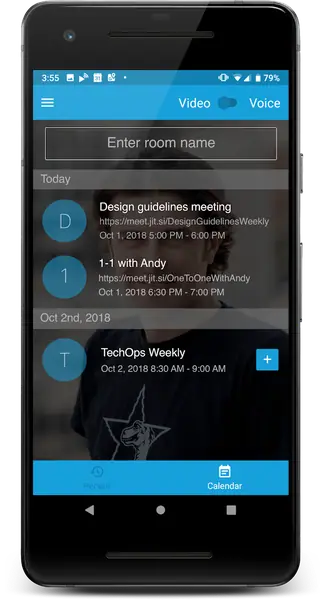
- Invite by pretty URLs: You can meet at the easy to remember https://MySite.com/OurConf of your choice instead of joining the hard to remember rooms with seemingly random sequences of numbers and letters in their names.
APK file information
| Package name | org.jitsi.meet |
|---|---|
| Version | 26.0.0 (code 26000004) |
| Minimum Android | Android 8.0 · targets Android 15 |
| Architectures | x86_64 |
| SHA-256 | 72aab4912b08431a2340fc1fb1f181be3a07e8b7ac607e0bb9e4c3814c2e4248 |
| Signature | 41605393b4a087feb25d13e91f421c7d1a1a9146251fc2be992fc1b30b3181f6 |
| Licence | Apache-2.0 — permissive free licence: the source code is public and reusable |
| Source code | github.com/jitsi/jitsi-meet |
| Official website | jitsi.org/jitsi-meet/ |
Permissions
- View network status
- Bluetooth
- Camera sensitive
- Internet access
- Microphone sensitive
- Keep the device awake
- View Wi-Fi status
- Run in the background
- Show notifications
- Edit calendar sensitive
- Read calendar sensitive
2 other technical permission(s)
MANAGE_OWN_CALLS MODIFY_AUDIO_SETTINGS
Older versions
- Jitsi Meet 26.0.0April 19, 2026 · 18.6 MB
- Jitsi Meet 26.0.0April 19, 2026 · 18.7 MB
- Jitsi Meet 26.0.0April 19, 2026 · 18.5 MB
- Jitsi Meet 26.0.0April 19, 2026 · 16.6 MB
- Jitsi Meet 25.6.1November 12, 2025 · 18.6 MB
- Jitsi Meet 25.6.1November 12, 2025 · 18.7 MB
- Jitsi Meet 25.6.1November 12, 2025 · 18.5 MB
- Jitsi Meet 25.6.1November 12, 2025 · 16.6 MB
- Jitsi Meet 25.5.1October 5, 2025 · 18.6 MB
- Jitsi Meet 25.5.1October 5, 2025 · 18.7 MB
- Jitsi Meet 25.5.1October 5, 2025 · 18.5 MB
- Jitsi Meet 25.5.1October 5, 2025 · 16.6 MB
How to install Jitsi Meet APK
- Tap Download APK above, then open the file once the download has finished.
- If Android asks, allow your browser to install unknown apps.
- Tap Install. Jitsi Meet then appears with your other apps.
Having trouble? Read our guides how to install an APK on Android and "App not installed": how to fix it.
Frequently asked questions
Is Jitsi Meet free?
Yes. Jitsi Meet is distributed under the Apache-2.0 licence: free, no subscription, and its source code is public.
Is this APK file safe?
The file is the one built and published by the F-Droid repository from the public source code. Its SHA-256 fingerprint is shown above, so you can compare it after downloading. How to check an APK.
Will Jitsi Meet work on my phone?
You need at least Android 8.0. The app also works without Google services, so it runs on recent Huawei phones too.