Life Dashboard Companion APK
Health Connect and screen time to Home Assistant, MQTT or webhooks. No account.
Download APK v1.31.0 · 6.0 MB- Version1.31.0
- Size6.0 MB
- RequiresAndroid 8.0
- Updated11/23/2026
- LicenceMIT
- PriceFree
About Life Dashboard Companion
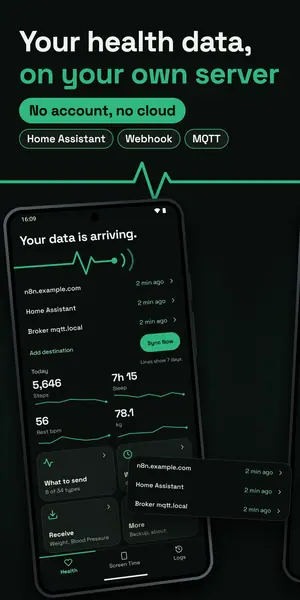
Send Health Connect and screen time from your Android phone to Home Assistant, MQTT or your own server. No account, and the developer receives none of your data. No analytics or tracking SDKs.
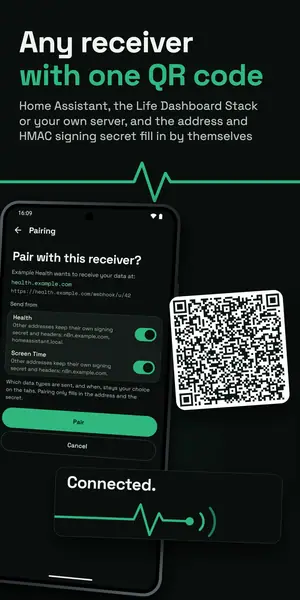
Pair by scanning one QR code, and get 34 Health Connect types and all your history.
Works with any app that writes to Health Connect, such as Samsung Health, Google Health (Fitbit and Pixel Watch), Garmin Connect, Oura, Withings and Gadgetbridge.
Your data goes only to the addresses you enter. The app contacts no other server.
Home Assistant:
- The Life Dashboard integration, installed through the Marketplace or HACS. Scan the QR code it shows and you're paired, with no broker and no YAML. Every synced day lands in Home Assistant's long-term statistics on its own date, so a backfill fills in about the last year.
- Receive, with the integration: a scale or blood pressure monitor connected to Home Assistant sends its readings to the app, which writes them into Health Connect (weight, height, body composition, blood pressure). You switch it on per type.
- MQTT Discovery, for a setup that already runs a broker: 25 of the 34 types plus screen time as sensors under one device, with optional TLS and login.
Health Connect:
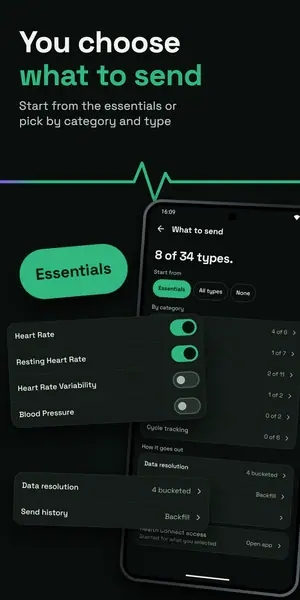
- 34 types: steps, sleep with stages, heart rate, HRV, speed, blood pressure, blood glucose, VO2 max, skin temperature, cycle tracking and more.
- Every record carries its source app and a stable ID, so a duplicate is easy to drop. Daily totals come from Health Connect itself, so a walk recorded by both phone and watch counts once.
- Edits and deletions are sent too, not only new records. When a change can't be sent, the payload says so.
- Optional data resolution: send dense series such as heart rate as one summary per 1, 5, 15 or 60 minutes.
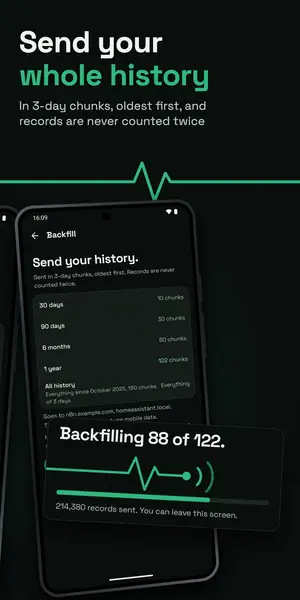
- Backfill of all your history runs in the background and picks up where it left off.
Screen time:
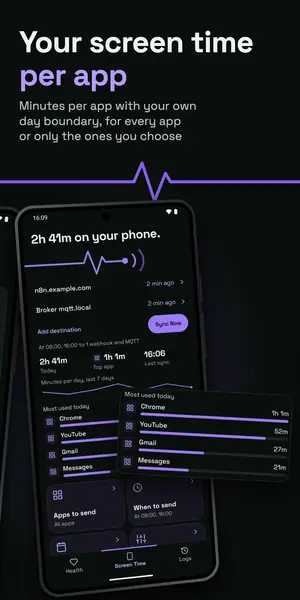
- Time per app, next to your health data, with a day boundary you choose.
- Send every app, all but some, or only the ones you pick. An app left out never leaves the phone, though the day's total still counts its time.
Webhooks:
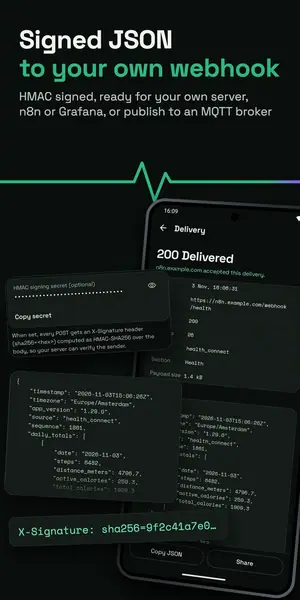
- Your own webhook gets every record in full, including single meals, cycle tracking entries and workout details, which are events rather than sensor values.
- Several URLs, each with its own headers and optional HMAC-SHA256 signing secret, and client certificates (mTLS) for a server behind a reverse proxy.
- Automatic retries, plus an outbox that keeps undelivered syncs until your server is back.
Automation:
- Syncs every 15 minutes or more, or at fixed times, on the days you pick, with quiet hours.
- Widget (Sync Status), Quick Settings tile (Sync Life Dashboard) and an intent for Tasker and MacroDroid.
- A notification when syncs fail several times in a row.
See what happened:
- Logs of the last 100 deliveries, with filters.
- A preview of the payload before it goes out, a test per address, and an export as CSV or JSON.
Also: settings backup and restore (encrypted when secrets are included), in eleven languages.
GitHub releases are built by public CI and carry verifiable build provenance, and the build is reproducible, so F-Droid ships the same signed APK.
Optionally, the separate self-hosted Life Dashboard Stack stores your data in Postgres with Grafana dashboards, and its read-only MCP server lets an AI model that you run yourself read your history. The app itself contains no AI.
Health data needs Android 9 or newer with Health Connect (built into Android 14 and later, an app from Google Play on Android 9 to 13). Screen time works on Android 8.0 and newer.
Home Assistant, Grafana and other products named here are trademarks of their owners. They are not included with this app, and their owners have no connection to it.
Life Dashboard Companion is not a medical device and does not diagnose, treat, cure or prevent any medical condition. Ask a healthcare professional for medical advice, diagnosis or treatment.
What's new in version 1.31.0
Improved
- The Google Play version asks for a rating at a better moment: when a backfill you started has finished, or after a day in which every sync arrived. Never right after a failed delivery.
- The GitHub and F-Droid versions ask once for a star on GitHub. Don't show again removes it for good.
- The MQTT client is updated to 1.4.2.
Full release notes: https://github.com/owen282000/life-dashboard-companion-app/releases/tag/1.31.0
APK file information
| Package name | com.owen282000.lifedashboard |
|---|---|
| Version | 1.31.0 (code 13100) |
| Minimum Android | Android 8.0 · targets Android 16 |
| Architectures | arm64-v8a, armeabi-v7a, x86, x86_64 |
| SHA-256 | 9d10ec7b7b5094c25a28afa1611c2f2b7b7479a3549ed353b3b350c96bdfc7f0 |
| Signature | 271406d5baf790506e914d82aca2533336ae083d01c79fbacb0015f42e4ff61f |
| Licence | MIT — permissive free licence: the source code is public and reusable |
| Source code | github.com/owen282000/life-dashboard-companion-app |
| Official website | owen282000.com/life-dashboard/android/ |
Permissions
- Internet access
- Show notifications
- Camera sensitive
- Keep the device awake
- View network status
- Start at boot
- Run in the background
44 other technical permission(s)
health.READ_STEPS health.READ_SLEEP health.READ_HEART_RATE health.READ_SPEED health.READ_DISTANCE health.READ_ACTIVE_CALORIES_BURNED health.READ_TOTAL_CALORIES_BURNED health.READ_WEIGHT health.READ_HEIGHT health.READ_BLOOD_PRESSURE health.READ_BLOOD_GLUCOSE health.READ_OXYGEN_SATURATION health.READ_BODY_TEMPERATURE health.READ_RESPIRATORY_RATE health.READ_RESTING_HEART_RATE health.READ_EXERCISE health.READ_HYDRATION health.READ_NUTRITION health.READ_MINDFULNESS health.READ_BODY_FAT health.READ_LEAN_BODY_MASS health.READ_BONE_MASS health.READ_BODY_WATER_MASS health.READ_HEART_RATE_VARIABILITY health.READ_MENSTRUATION health.READ_BASAL_METABOLIC_RATE health.READ_VO2_MAX health.READ_SKIN_TEMPERATURE health.READ_BASAL_BODY_TEMPERATURE health.READ_INTERMENSTRUAL_BLEEDING health.READ_OVULATION_TEST health.READ_CERVICAL_MUCUS health.READ_SEXUAL_ACTIVITY health.READ_HEALTH_DATA_IN_BACKGROUND health.READ_HEALTH_DATA_HISTORY health.WRITE_WEIGHT health.WRITE_HEIGHT health.WRITE_BODY_FAT health.WRITE_LEAN_BODY_MASS health.WRITE_BONE_MASS health.WRITE_BODY_WATER_MASS health.WRITE_BLOOD_PRESSURE PACKAGE_USAGE_STATS REQUEST_IGNORE_BATTERY_OPTIMIZATIONS
Older versions
- Life Dashboard Companion 1.31.0November 23, 2026 · 6.0 MB
- Life Dashboard Companion 1.30.1November 13, 2026 · 6.0 MB
- Life Dashboard Companion 1.30.0November 9, 2026 · 6.0 MB
How to install Life Dashboard Companion APK
- Tap Download APK above, then open the file once the download has finished.
- If Android asks, allow your browser to install unknown apps.
- Tap Install. Life Dashboard Companion then appears with your other apps.
Having trouble? Read our guides how to install an APK on Android and "App not installed": how to fix it.
Frequently asked questions
Is Life Dashboard Companion free?
Yes. Life Dashboard Companion is distributed under the MIT licence: free, no subscription, and its source code is public.
Is this APK file safe?
The file is the one built and published by the F-Droid repository from the public source code. Its SHA-256 fingerprint is shown above, so you can compare it after downloading. How to check an APK.
Will Life Dashboard Companion work on my phone?
You need at least Android 8.0. The app also works without Google services, so it runs on recent Huawei phones too.