
Meditate APK
Meditation timer with session log, stats, and Nextcloud sync
Download APK v26.11.1 · 25.2 MB- Version26.11.1
- Size25.2 MB
- RequiresAndroid 8.0
- Updated11/11/2026
- LicenceGPL-3.0-or-later
- PriceFree
About Meditate
Meditate is a friendly meditation timer that helps you build a consistent practice — with no accounts, no telemetry, and your data under your own control.
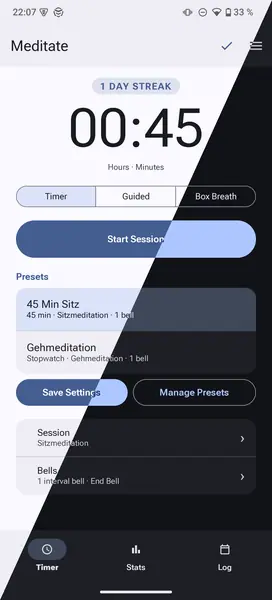
Timer
- Countdown, stopwatch, and Box Breath modes
- Box Breath: pick a pattern (4-4-4-4, 4-7-8-0, …) or dial in
each phase, with a calm dot tracing the square as you breathe
- Guided mode: import your own audio files, bells ring when the
track ends
- Starting bell, interval bells (fixed, periodic, or randomised),
end bell — sound, vibration, or both, with your own audio and custom vibration patterns
- Presets for your regular sits, plus a home-screen widget for
one-tap starts
Log & Stats
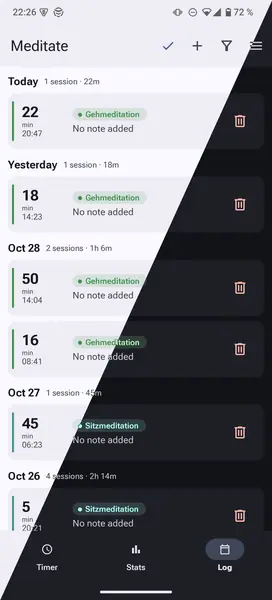
- Date-grouped session log with labels and notes, swipe to
delete with undo
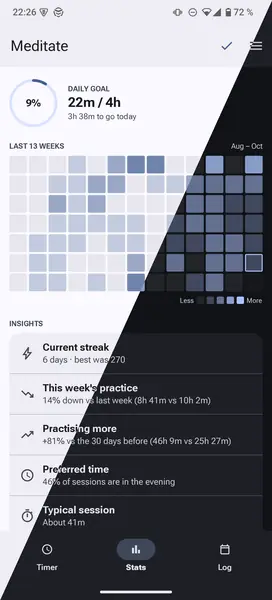
- Daily-goal ring, 13-week contribution heatmap, bar/line charts,
per-label totals and insights
- CSV export and import, Insight Timer import
Sync
- Optional sync between your devices via your own Nextcloud —
also works with the GNOME/Linux version of Meditate, which shares the same core
- Offline-first: everything works without a network; sync merges
changes whenever you're back online
Privacy
Sessions live in a local database on your device. The only network connection is to the Nextcloud server you configure — there is no other server, no analytics, and no tracking.
What's new in version 26.11.1
- Session and Bells on their own pages
- Starred guided files in your own order
- Opens with the mode and guided file you used last
- Widget starts starred guided files
- Time left and progress on the lock screen
- Import from Meditation Assistant
- Daily goal from one minute
- Tap the sync symbol for its status
- Experimental: face down pauses, shake saves
- Thanks to @leonp5, @markushhh, @voidplayer and @drebs!
APK file information
| Package name | io.github.janekbt.Meditate |
|---|---|
| Version | 26.11.1 (code 261101) |
| Minimum Android | Android 8.0 · targets Android 14 |
| Architectures | arm64-v8a |
| SHA-256 | 47328d38a5a1d9a77244b195ffaba6c1a9db3933a7445869fde453e605f52c6a |
| Signature | 4b2e69c3c52a2b9d5e63b2f301df9773cd95f740860ef7dd680b986cbca59970 |
| Licence | GPL-3.0-or-later — copyleft free licence: the code is public and modified versions must stay free |
| Source code | github.com/janekbt/MeditationApp |
Permissions
- Run in the background
- Show notifications
- Vibrate
- Keep the device awake
- Internet access
Older versions
- Meditate 26.11.1November 11, 2026 · 25.2 MB
- Meditate 26.11.0November 4, 2026 · 25.4 MB
- Meditate 26.10.2October 22, 2026 · 23.8 MB
How to install Meditate APK
- Tap Download APK above, then open the file once the download has finished.
- If Android asks, allow your browser to install unknown apps.
- Tap Install. Meditate then appears with your other apps.
Having trouble? Read our guides how to install an APK on Android and "App not installed": how to fix it.
Frequently asked questions
Is Meditate free?
Yes. Meditate is distributed under the GPL-3.0-or-later licence: free, no subscription, and its source code is public.
Is this APK file safe?
The file is the one built and published by the F-Droid repository from the public source code. Its SHA-256 fingerprint is shown above, so you can compare it after downloading. How to check an APK.
Will Meditate work on my phone?
You need at least Android 8.0. The app also works without Google services, so it runs on recent Huawei phones too.