
MedTimer APK
MedTimer: Med & Pill Reminder
Medication and pill reminder with log, fully offline and privacy focused
Download APK v1.26.5 · 12.9 MB- Version1.26.5
- Size12.9 MB
- RequiresAndroid 9
- Updated11/20/2026
- LicenceMIT
- PriceFree
About MedTimer
Med reminders and history with full offline privacy
Stay In Control of Your Medications with MedTimer
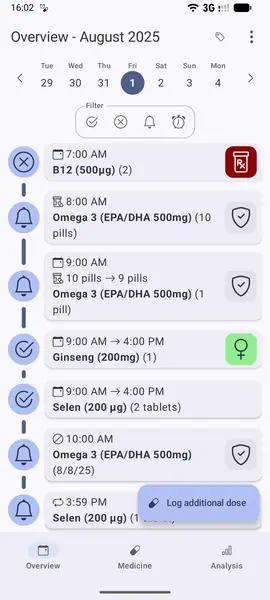
MedTimer is an open-source medication reminder app designed to help you manage your medications and pills effectively and with full control of your sensitive data.
Flexible & Personalized Reminders:
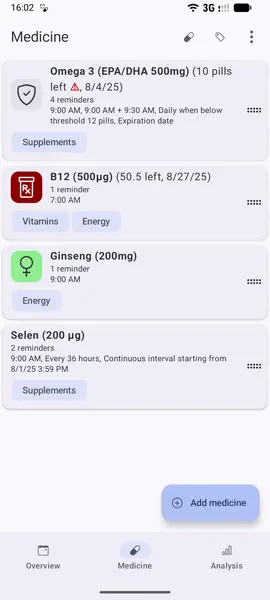
- Manage unlimited medications with customizable reminders per medication (including simple defaults for daily reminders).
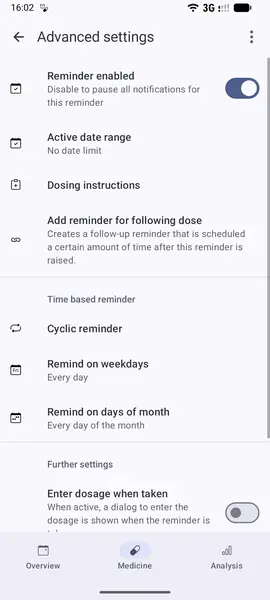
- Create flexible reminders with breaks and specific days (e.g. for birth control pills).
- Weekend mode: Delay reminders to a defined time on chosen days.
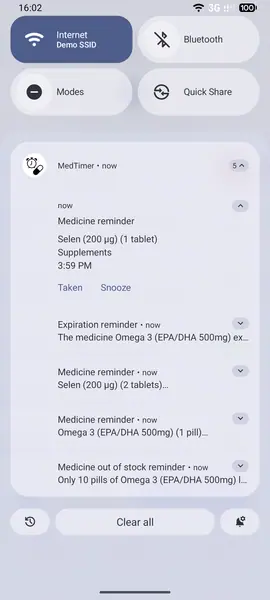
- Snooze notifications for later reminders or be reminded repeatedly.
- Location-based snooze: be re-notified when arriving home after snoozing.
- Add extra doses on the fly.
- Create interval based reminders, reminders following each other in intervals or interval reminders constrained with a start and end time per day.
- Use alarm type reminders to ensure notification even when the device is set to silent mode.
Simple & Secure Data Management:
- Confirm or dismiss reminders to record medication adherence accurately.
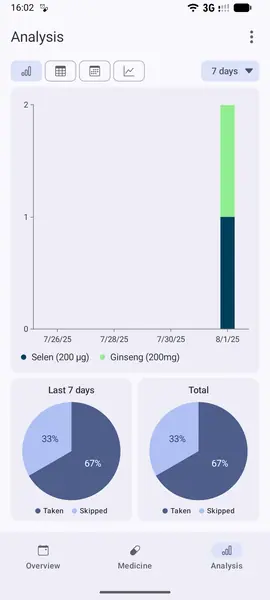
- Get an overview of past doses in a chart and a tabular view.
- Export your medication history as a CSV file for easy record-keeping or sharing with healthcare professionals.
- Backup and restore your medication list as JSON file.
- Medication stock tracking and out of stock reminders.
- Tag and filter your medication.
Privacy & Offline Accessibility:
- All data is stored securely on your device, ensuring complete privacy and offline accessibility.
- No internet connection required – your medication reminders are always available.
MedTimer is a free app without ads.
See the project page on GitHub: https://github.com/Futsch1/medTimer
Feature graphic was created with https://hotpot.ai
APK file information
| Package name | com.futsch1.medtimer |
|---|---|
| Version | 1.26.5 (code 192) |
| Minimum Android | Android 9 · targets Android 16 |
| Architectures | arm64-v8a, armeabi-v7a, x86, x86_64 |
| SHA-256 | 236fd1e8370bfea66443b0e07b0035677538d4c7a222f9f66eb7e951bd663dc3 |
| Signature | 69bc7c72e499045b44c87fc8463f599472deb408c48de38de8554ae7754b9d84 |
| Licence | MIT — permissive free licence: the source code is public and reusable |
| Source code | github.com/Futsch1/medTimer |
Permissions
- Show notifications
- Start at boot
- Vibrate
- Fingerprint / biometrics
- Fingerprint
4 other technical permission(s)
SCHEDULE_EXACT_ALARM ACCESS_NOTIFICATION_POLICY USE_FULL_SCREEN_INTENT REQUEST_IGNORE_BATTERY_OPTIMIZATIONS
Older versions
- MedTimer 1.26.5November 20, 2026 · 12.9 MB
- MedTimer 1.26.4November 1, 2026 · 12.9 MB
- MedTimer 1.26.3October 29, 2026 · 12.9 MB
How to install MedTimer APK
- Tap Download APK above, then open the file once the download has finished.
- If Android asks, allow your browser to install unknown apps.
- Tap Install. MedTimer then appears with your other apps.
Having trouble? Read our guides how to install an APK on Android and "App not installed": how to fix it.
Frequently asked questions
Is MedTimer free?
Yes. MedTimer is distributed under the MIT licence: free, no subscription, and its source code is public.
Is this APK file safe?
The file is the one built and published by the F-Droid repository from the public source code. Its SHA-256 fingerprint is shown above, so you can compare it after downloading. How to check an APK.
Will MedTimer work on my phone?
You need at least Android 9. The app also works without Google services, so it runs on recent Huawei phones too.