N-Zik APK
Multilingual YT Music client with optional Glass effect (BETA)
Download APK v8.7.3-r64 · 56.8 MB- Version8.7.3-r64
- Size56.8 MB
- RequiresAndroid 7.0
- Updated11/23/2026
- LicenceGPL-3.0-only
- PriceFree
About N-Zik
A multilingual YouTube Music frontend for Android, focused on performance, UI/UX refinements, feature expansion, and long-term support.
AI Usage: I use generative AI for code (via BMAD Method), reviewed and tested before shipping.
✨ WHY N-ZIK? No ads, background playback, offline caching, customizable UI - free, always.
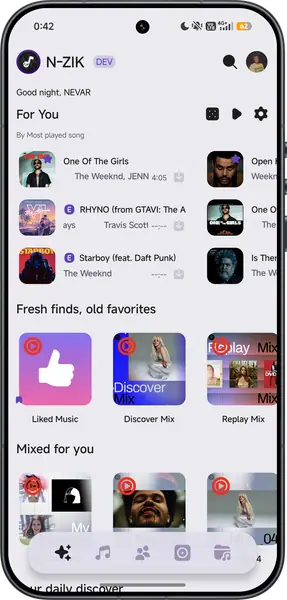
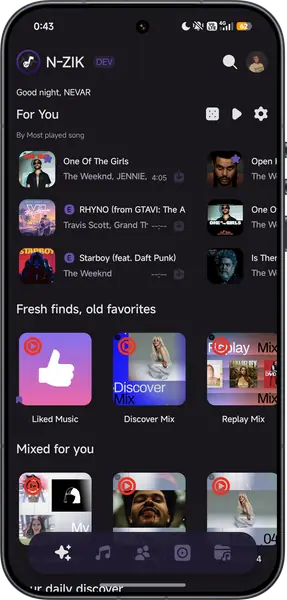
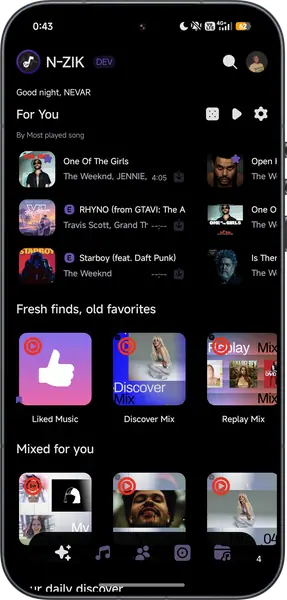
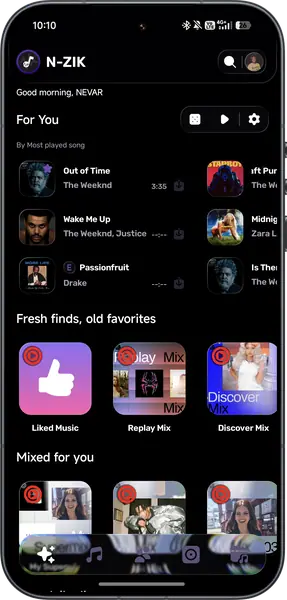
🎨 Customizable UI
- Jetpack Compose interface
- Themes: AMOLED, Deep Dark, Crisp Light + tinted accents
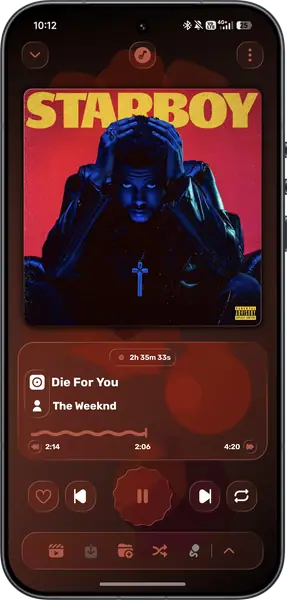
- 3D Carousel Player, home widgets, unified player and mini-player
- Artist profiles, Discovery and moods, collapsible home headers
🎨 Theme Store (BETA)
- Browse and download community themes, preview them in Normal and Glass, and choose which appearance settings to apply.
- Create local themes or share your designs with the community. Import and export themes as ZIP files.
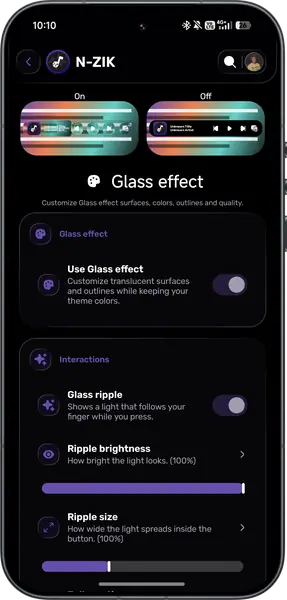
🫧 Glass Effect (BETA, optional) Disabled on fresh installs. Enable in Settings: native, contour-only or Glass by category, with adjustable quality. May increase rendering work and battery use; reduce quality or disable if needed. Glass credits: Square / Convx Project (GPL-3.0); Kyant0 AndroidLiquidGlass / Backdrop (Apache-2.0).
🎵 Audio Experience
- Premium quality via YouTube Music Premium, applied automatically
- Synced lyrics with editing and real-time translation
- Song recognition (Shazam-like), voice search, audio visualizer
- Pro controls: speed, pitch, normalization, crossfade, volume boost, bass boost, reverb
- Audio Bar waveform seekbar for precise navigation
💾 Offline, Metadata & Privacy
- Smart caching and downloads for tracks and playlists, with selectable download quality
- FFmpeg-powered export with full metadata (downloadable on first use; unavailable on 32-bit x86 devices)
- In-app metadata editor (AAC/Opus, cover art)
- Local listening stats and history
- Auto-backup with custom intervals and retention
🔗 Integrations
- Switch between Google accounts and YouTube channels. Each N-Zik profile uses one active YouTube Music channel for recommendations and playback.
- YouTube sign-in for recommendations and video playback, plus an experimental two-way sync engine
- Last.fm scrobbling with Now Playing and love/unlove
- MusicBrainz artist and album insights
- Discord Rich Presence, including advanced mode with live preview
- Invidious integration for alternative YouTube streaming
- Playlist import/export: RiPlay, Spotify, YouTube Music, N-Zik
👥 Listen Together
- Join or host live listening sessions with other users via code or invite link
🗓️ Rewind
- Yearly and monthly listening recaps with auto-generated Rewind playlists
📱 Play Anywhere: Android Auto, Automotive, TV, and Tablets
🛠️ Power User Features
- Multi-profile: isolated database and settings per profile
- Auto-resume on Bluetooth connect, persistent queue, auto-fill queue
- Smart trash, hidden songs, dislike system, parental control
- Proxy support, network quality adaptation, log export
- Rescue Center, maintenance screen, onboarding, app shortcuts
- OTA updates from GitHub, sleep timer, background playback
📦 Available Builds
- Release64/Beta64 (
com.nevar.nzik): Complete build, 64-bit devices only - Release32/Beta32 (
com.nevar.nzik): Complete build, 32-bit devices only - Minified64 (
com.nevar.nzik): Lightweight R8 build, for low-end devices (64-bit) - Minified32 (
com.nevar.nzik): Lightweight R8 build (32-bit) - FOSS (
com.nevar.nzik.foss): Without auto-updater, for F-Droid (all architectures) - Dev64/Dev32 (
com.nevar.nzik.dev): Development builds, testing only
No build bundles FFmpeg: it is a downloadable extension (installed on first use, managed in Settings → Extensions). Only FOSS is on F-Droid.
Historical project credits include ViMusic.
What's new in version 8.7.3-r64
Hotfix:
- Fixed player theme colors and Glass contrast.
- Improved music-video matching and unavailable-video feedback.
- Theme publishing requires an approved creator profile.
- Added cancellable previews with consistent Pixel sizing.
- Stock previews load online and follow app modes.
- Updated compact and static image loaders; wavy indicators unchanged.
- Removed extra mini-player space below Updater actions.
- Fixed native sheets and Romanian battery percentages.
- Fixed History deep links.
APK file information
| Package name | com.nevar.nzik.foss |
|---|---|
| Version | 8.7.3-r64 (code 100) |
| Minimum Android | Android 7.0 · targets API 37 |
| Architectures | arm64-v8a, armeabi-v7a, x86, x86_64 |
| SHA-256 | f9c170612b596f0bdd5019fcaee3f612222753d14f3d014adf904c7f58aca7cc |
| Signature | b473991ec08a17996a9ef2405934ce35d333ea38135ebfc1b6f4d2ab953132aa |
| Licence | GPL-3.0-only — copyleft free licence: the code is public and modified versions must stay free |
| Source code | github.com/N-Zik-Group/N-Zik |
| Official website | n-zik.vercel.app/ |
Permissions
- Internet access
- Show notifications
- Start at boot
- Keep the device awake
- Run in the background
- Read music
- Read storage
- Write to storage
- Microphone sensitive
- Connect via Bluetooth
- Bluetooth
- View network status
- Install other apps sensitive
- Camera sensitive
4 other technical permission(s)
REQUEST_IGNORE_BATTERY_OPTIMIZATIONS ACCESS_LOCAL_NETWORK MODIFY_AUDIO_SETTINGS BLUETOOTH_ADMIN
Older versions
- N-Zik 8.7.3-r64November 23, 2026 · 56.8 MB
- N-Zik 8.7.2-r64November 20, 2026 · 60.1 MB
- N-Zik 8.6.0-r64November 9, 2026 · 52.1 MB
How to install N-Zik APK
- Tap Download APK above, then open the file once the download has finished.
- If Android asks, allow your browser to install unknown apps.
- Tap Install. N-Zik then appears with your other apps.
Having trouble? Read our guides how to install an APK on Android and "App not installed": how to fix it.
Frequently asked questions
Is N-Zik free?
Yes. N-Zik is distributed under the GPL-3.0-only licence: free, no subscription, and its source code is public.
Is this APK file safe?
The file is the one built and published by the F-Droid repository from the public source code. Its SHA-256 fingerprint is shown above, so you can compare it after downloading. How to check an APK.
Will N-Zik work on my phone?
You need at least Android 7.0. The app also works without Google services, so it runs on recent Huawei phones too.