Notenkladde APK
Photograph and import sheet music, read it while you play, write notes on it
Download APK v2.1 · 35.7 MB- Version2.1
- Size35.7 MB
- RequiresAndroid 10
- Updated11/1/2026
- LicenceApache-2.0
- PriceFree
About Notenkladde
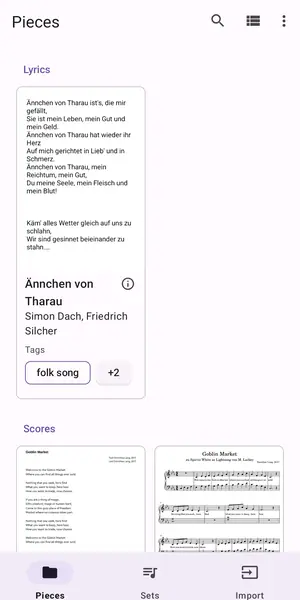
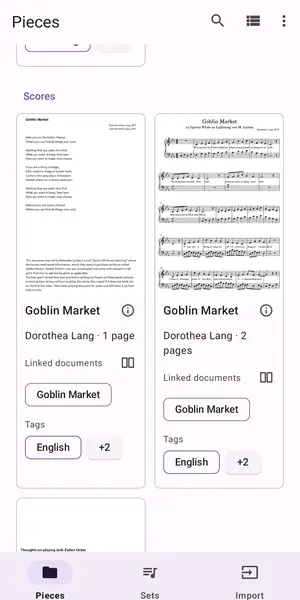
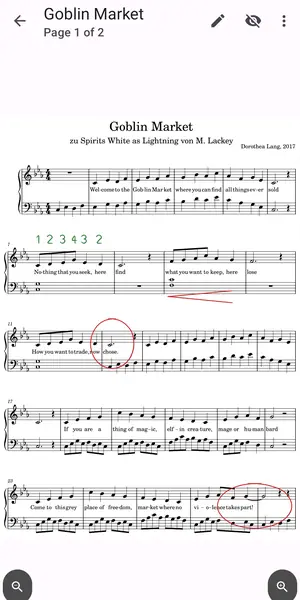
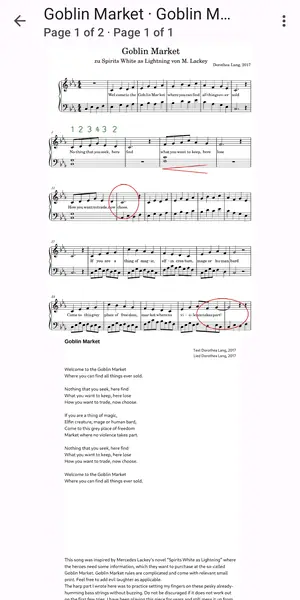
Notenkladde photographs and imports sheet music and shows it for reading while you play, with your handwritten notes. All your music stays in one folder that you can take to any device.
- Photograph pages: the app straightens and crops them. A piece can have many pages.
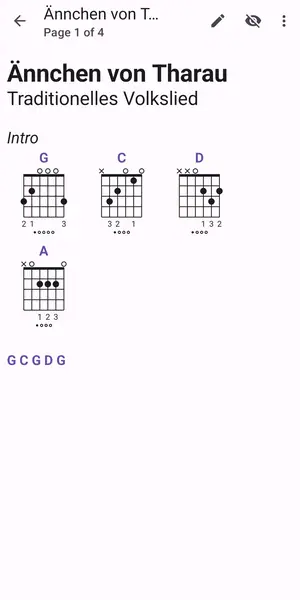
- Import PDF and MusicXML scores and song lyrics (ChordPro, Markdown or plain text).
- Read without distractions: one, two or three pages side by side; MusicXML scores and lyrics are laid out anew for your screen. Turn pages with a tap at the edge or with a Bluetooth page turn pedal.
- Read two works together, such as a score and its lyrics, on one screen, each turning on its own.
- Chords stand above the words, with chord diagrams for guitar, ukulele or piano.
- Write on the music with a stylus or a finger, on layers such as “Fingering” or “Teacher”, each in its own colour. Your notes stay in place at every zoom.
- Keep the details of each piece: composer or author, dates, tags, license, work number, publications and linked works.
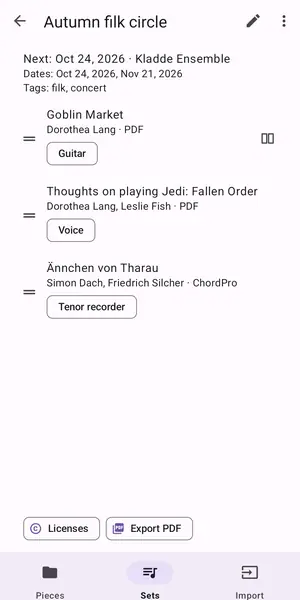
- Put pieces together in sets for concerts and rehearsals, with their dates, who you play with and the instrument for each piece.
- Make a PDF of pieces or of a set, with a table of contents, to print or share.
Your folder, your files: the music is kept as ordinary files (photos, PDF, MusicXML, lyrics), its details in an open JSON file, so other programs can use them too. Rename the folder, back it up or take it to another device. No account, no internet access, no ads.
Made for every language and script, right to left included. The app speaks English, German, French, Spanish, Hebrew and Japanese.
What's new in version 2.1
- Runs on Android 10 and newer, also on 32-bit devices
- Highlight bars of a MusicXML score and play them once or again and again
- ChordPro songs the desktop program read off lyrics sheets are shown as their main version
APK file information
| Package name | de.musivum.notenkladde |
|---|---|
| Version | 2.1 (code 3) |
| Minimum Android | Android 10 · targets API 37 |
| Architectures | arm64-v8a, armeabi-v7a, x86_64 |
| SHA-256 | 0d4c35262eca0f53c160fc8ec1bcc56a643d791cc60fe9ecef5befc8b1aa750c |
| Signature | b72006b0ef8a279c5f89ac3531f0fa40cc36fda1259ad0f3f12a1ba9a03014a5 |
| Licence | Apache-2.0 — permissive free licence: the source code is public and reusable |
| Source code | gitlab.com/Dorothea_Lang/notenkladde |
Permissions
No special permissions.
Older versions
- Notenkladde 2.1November 1, 2026 · 35.7 MB
- Notenkladde 2.0October 29, 2026 · 28.6 MB
- Notenkladde 1.0October 15, 2026 · 28.3 MB
How to install Notenkladde APK
- Tap Download APK above, then open the file once the download has finished.
- If Android asks, allow your browser to install unknown apps.
- Tap Install. Notenkladde then appears with your other apps.
Having trouble? Read our guides how to install an APK on Android and "App not installed": how to fix it.
Frequently asked questions
Is Notenkladde free?
Yes. Notenkladde is distributed under the Apache-2.0 licence: free, no subscription, and its source code is public.
Is this APK file safe?
The file is the one built and published by the F-Droid repository from the public source code. Its SHA-256 fingerprint is shown above, so you can compare it after downloading. How to check an APK.
Will Notenkladde work on my phone?
You need at least Android 10. The app also works without Google services, so it runs on recent Huawei phones too.





