
Noty APK
Noty - Notes in Notification
Pin your notes to notifications — always visible, never forgotten.
Download APK v1.0.7 · 2.7 MB- Version1.0.7
- Size2.7 MB
- RequiresAndroid 8.0
- Updated11/11/2026
- LicenceGPL-3.0-only
- PriceFree
About Noty
Never forget a task again. Noty keeps your notes exactly where you look dozens of times a day — your notification shade.
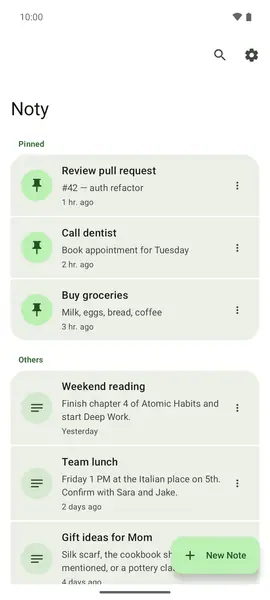
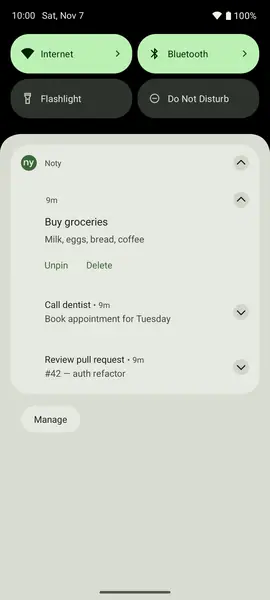
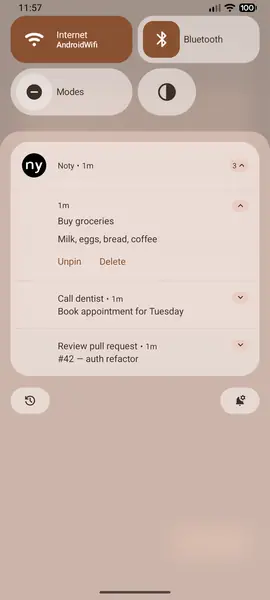
Write a note, and it instantly appears as a persistent notification in your status bar. It stays there until you're done with it. No need to open any app, set a reminder, or remember to check a list.
KEY FEATURES
📌 Persistent Notifications Every note you create appears as a notification that stays in your status bar. Your notes are always one swipe away.
🔄 Survives Everything Notes are restored automatically after a phone restart. The app runs a lightweight background service to keep your notifications alive even after you close the app.
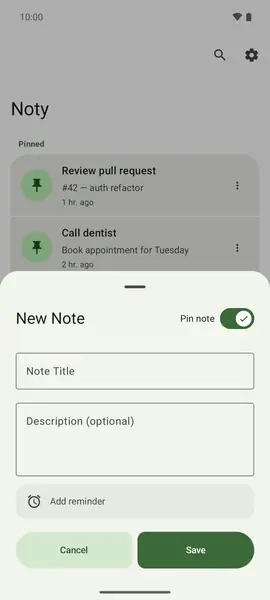
✏️ Add, Edit, Delete — Instantly Create notes with a title and optional description. Edit or delete any note with a tap. A confirmation step prevents accidental deletions.
📌 Pin or Unpin Anytime Choose which notes appear as notifications. Pin a note and it shows up in your status bar, locked in place until you remove it. Unpin it and it quietly moves back to the app — no notification, no clutter. Switch between pinned and unpinned at any time, directly from the notification or from the app.
⚡ Quick Settings Tile Add a "Quick Note" tile to your Quick Settings panel. Tap it to jump straight to the add-note screen, without hunting for the app.
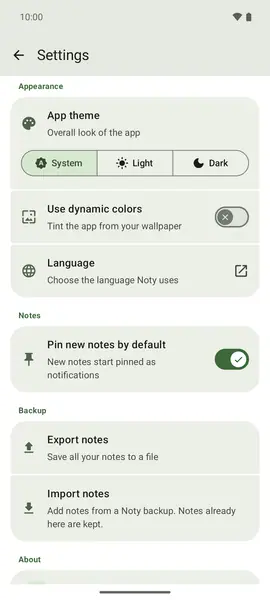
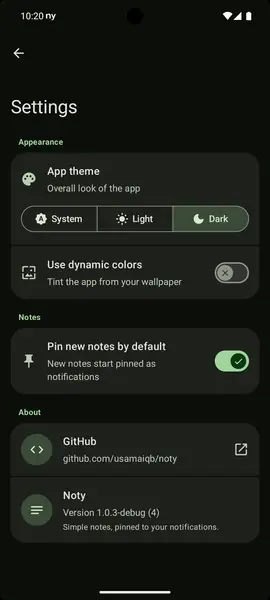
🎨 Material You Design Noty uses Material 3 with dynamic color — on Android 12 and above, the app automatically matches your wallpaper's color palette. Light, Dark, and System themes are all supported and persist across sessions.
⚙️ Make It Yours Open Settings to switch themes, toggle wallpaper-based dynamic color on Android 12 and above, pick Noty's language separately from your phone's on Android 13 and above, and choose whether new notes start out pinned. Your choices are remembered between launches.
🔍 Search Your Notes Quickly filter your notes by title or description with the built-in search bar.
⏰ Reminders Set a one-time reminder on any note with a date and time picker. Noty fires a notification right on time using exact alarms, so you never miss it.
💾 Back Up and Restore Export all your notes to a file, then import them on a new phone or after reinstalling. Importing merges with the notes you already have: nothing is overwritten unless the backup holds a newer edit.
🔒 100% Private Noty is entirely local. No accounts, no cloud, no network access. Your notes never leave your device unless you export them yourself.
PERMISSIONS EXPLAINED
- Notifications — required to show your notes as persistent notifications
- Run at Startup — used to restore your notes and reschedule reminders after your phone restarts
- Foreground Service — allows Noty to keep notifications active in the background
- Exact Alarms — used to deliver note reminders at the exact time you set
No ads. No in-app purchases. No data collection.
What's new in version 1.0.7
- Back up and restore your notes with a file
- Notes show when they were last edited, newest first
- Clear notice when notifications are off, and when a save fails
- Dismissing a notification can no longer delete a note
- Smoother, springier animations
APK file information
| Package name | com.noty.app |
|---|---|
| Version | 1.0.7 (code 8) |
| Minimum Android | Android 8.0 · targets Android 16 |
| Architectures | arm64-v8a, armeabi-v7a, x86, x86_64 |
| SHA-256 | 47f5827a200d1622f59c1e349a03af96d20b0e3b323a377643294588cf63616d |
| Signature | c11291804cfff1c4df08bd523792f64c84e03c276ab47732d9fc3e3f62f78d92 |
| Licence | GPL-3.0-only — copyleft free licence: the code is public and modified versions must stay free |
| Source code | github.com/usamaiqb/noty |
Permissions
- Show notifications
- Start at boot
- Run in the background
1 other technical permission(s)
SCHEDULE_EXACT_ALARM
Older versions
- Noty 1.0.7November 11, 2026 · 2.7 MB
- Noty 1.0.6November 1, 2026 · 2.6 MB
- Noty 1.0.5October 14, 2026 · 2.8 MB
How to install Noty APK
- Tap Download APK above, then open the file once the download has finished.
- If Android asks, allow your browser to install unknown apps.
- Tap Install. Noty then appears with your other apps.
Having trouble? Read our guides how to install an APK on Android and "App not installed": how to fix it.
Frequently asked questions
Is Noty free?
Yes. Noty is distributed under the GPL-3.0-only licence: free, no subscription, and its source code is public.
Is this APK file safe?
The file is the one built and published by the F-Droid repository from the public source code. Its SHA-256 fingerprint is shown above, so you can compare it after downloading. How to check an APK.
Will Noty work on my phone?
You need at least Android 8.0. The app also works without Google services, so it runs on recent Huawei phones too.





