
osm2gmaps APK
Convert coordinates and map links between formats, services and apps
Download APK v0.12.0 · 2.2 MB- Version0.12.0
- Size2.2 MB
- RequiresAndroid 8.0
- Updated11/11/2026
- LicenceGPL-3.0-only
- PriceFree
About osm2gmaps
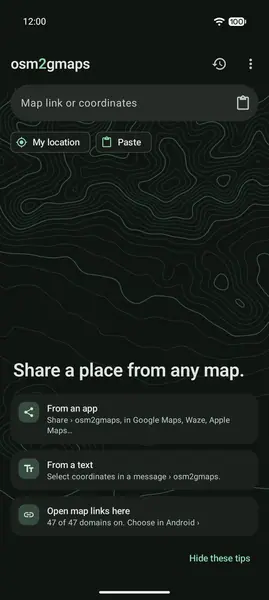
osm2gmaps finds a place from whatever you have: coordinates, a grid reference, a plus code, a map link, a photo or an address. It gives you that place in every useful form: coordinates in the format you need, or the place in the map app you use.
Every way to write a position
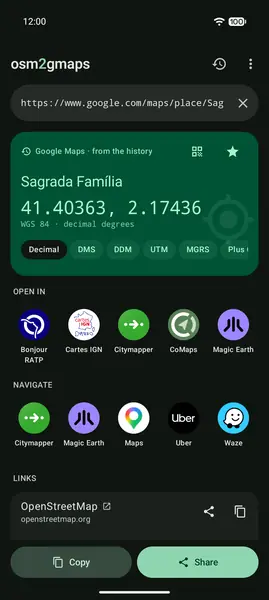
- Decimal degrees, degrees-minutes-seconds, degrees and decimal minutes, UTM, MGRS, plus codes, geohash and Maidenhead locators.
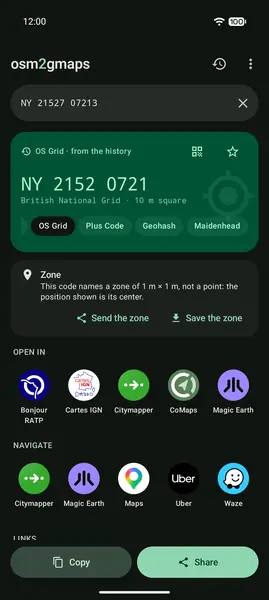
- National grids, shown only where they are used: British National Grid, Irish Grid, Swiss LV95, Dutch RD, French Lambert 93 and DFCI, Swedish SWEREF 99 TM.
- Pick a format with one tap and copy it with another. Hide the ones you never use.
- Reads coordinates however they are written: N/S/E/W or signs, symbols or spaces, GeoJSON and WKT, longitude first when it is obvious. Also reads Irish ITM and Swiss LV03.
- When a code can be read several ways (a locator or a geohash, two grids), shows the other readings.
- Completes local plus codes ("V75V+8Q Paris") with OpenStreetMap.
From any map, to any map
- Reads places from Google Maps, Apple Maps, OpenStreetMap, Organic Maps, CoMaps, OsmAnd, Waze, HERE WeGo, Bing, Yandex, 2GIS, Magic Earth, Mapy.com, Baidu, Amap, Tencent, Kagi Maps, Yahoo! Japan, cartes.app, Min karta, Wikipedia and more.
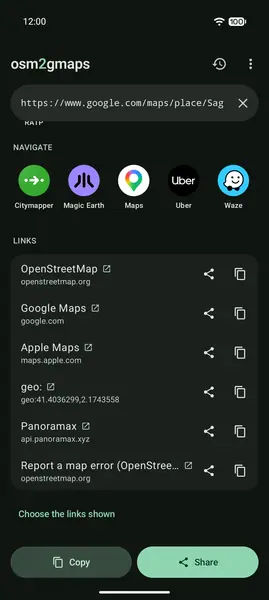
- Opens the place or starts navigation in your map app, gives it as a link for more than 20 services, or as a QR code for another phone.
- Corrects the offset of Chinese map coordinates (GCJ-02, BD-09).
- Moves your bookmarks from one map app to another, with their lists, notes, tracks and routes: from a Google Takeout archive or a list from Organic Maps, CoMaps, OsmAnd or HERE WeGo, to Organic Maps, CoMaps, OsmAnd, Cartes IGN, Magic Earth, or a KMZ, GPX, KML, GeoJSON or Google My Maps file.
- Shows the places of a shared Google Maps list, and saves them all.
Quick to use
- Paste, share text or a photo, select text in any app, search an address, or use your current position.
- Shows the place on OpenStreetMap's map when you ask.
- Choose what happens when you open a map link: show the place, open it in your map app, or copy or share it.
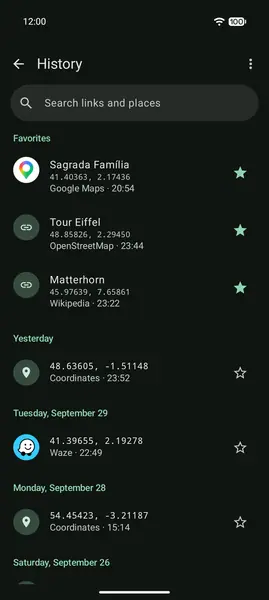
- Keeps a history of your places, with favourites, exported to GPX, KML or JSON.
Private by design
- No ads, no trackers, no account. Coordinates are converted on your phone.
- The app never contacts Google, Apple or other proprietary services, except what3words with your own key. Short links go through an open-source resolver that you turn on, and can host yourself.
- Asks before contacting OpenStreetMap or Wikipedia directly, unless you allow it in the settings.
- Reproducible builds: F-Droid checks that the app is built from this source code.
What's new in version 0.12.0
v0.12.0:
- Google Maps lists: see a shared list's places, save them all
- Street View, Amap and Baidu links
- Asks before contacting OpenStreetMap or Wikipedia directly; resolver: just this once or always
- Retries when the network fails, and can be cancelled
- Opens more map links (countries, Yandex, 2GIS, Mapy.com, plus.codes); finds plus codes in text
- A link that only names a place: search it or open it in a map app
- Complete French and Catalan translations
APK file information
| Package name | net.retiolus.osm2gmaps |
|---|---|
| Version | 0.12.0 (code 44) |
| Minimum Android | Android 8.0 · targets Android 16 |
| Architectures | arm64-v8a, armeabi-v7a, x86, x86_64 |
| SHA-256 | 3b39d37fa62d80985a6d488ec64a5850b7847234325b551cbb8f30d2825430fb |
| Signature | de5e0d510225feb1fc6a15c5d3ce47674193f82c04d9ed80c075426afe662550 |
| Licence | GPL-3.0-only — copyleft free licence: the code is public and modified versions must stay free |
| Source code | codeberg.org/retiolus/osm2gmaps |
Permissions
- Internet access
- View network status
- Approximate location sensitive
- Precise location (GPS) sensitive
1 other technical permission(s)
ACCESS_MEDIA_LOCATION
Older versions
- osm2gmaps 0.12.0November 11, 2026 · 2.2 MB
- osm2gmaps 0.11.0October 25, 2026 · 2.1 MB
- osm2gmaps 0.10.0October 18, 2026 · 2.1 MB
How to install osm2gmaps APK
- Tap Download APK above, then open the file once the download has finished.
- If Android asks, allow your browser to install unknown apps.
- Tap Install. osm2gmaps then appears with your other apps.
Having trouble? Read our guides how to install an APK on Android and "App not installed": how to fix it.
Frequently asked questions
Is osm2gmaps free?
Yes. osm2gmaps is distributed under the GPL-3.0-only licence: free, no subscription, and its source code is public.
Is this APK file safe?
The file is the one built and published by the F-Droid repository from the public source code. Its SHA-256 fingerprint is shown above, so you can compare it after downloading. How to check an APK.
Will osm2gmaps work on my phone?
You need at least Android 8.0. The app also works without Google services, so it runs on recent Huawei phones too.