
Practice Suite APK
The Swiss army knife of musicians
Download APK v2.1.6 · 61.4 MB- Version2.1.6
- Size61.4 MB
- RequiresAndroid 7.0
- Updated11/17/2026
- LicenceAGPL-3.0-or-later
- PriceFree
About Practice Suite
Practice Suite is the ultimate music practice tool for musicians of all levels. With its comprehensive features, you can stay on beat, in tune, and track your progress in one convenient app.
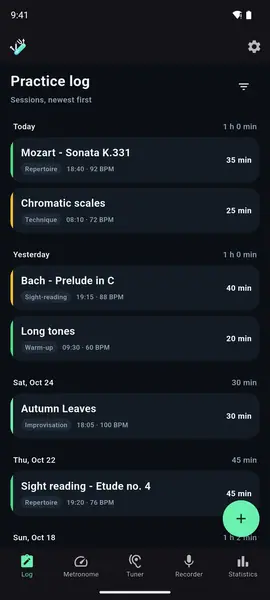
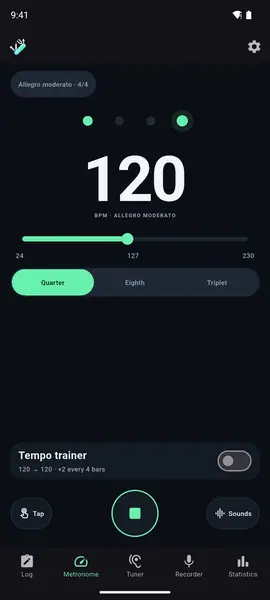
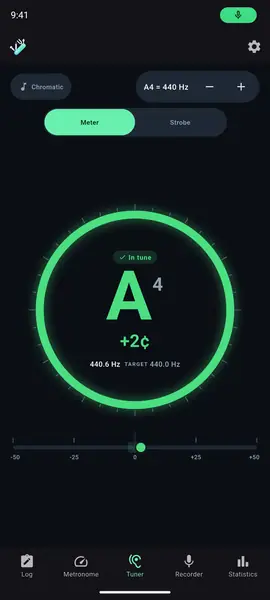
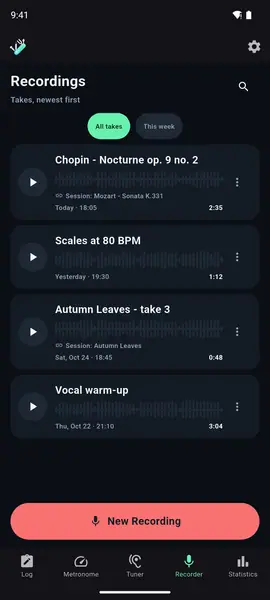
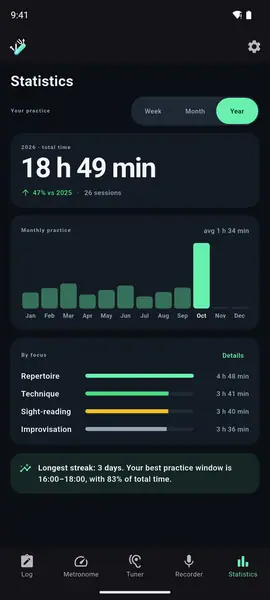
The Metronome feature allows you to set your desired tempo and time signature, ensuring that you stay on beat and in time while practicing. The Tuner feature uses your device's microphone to accurately tune your instrument, helping you to play in perfect pitch. The Recorder feature allows you to record your practice sessions and play them back, so you can listen to your progress and identify areas for improvement. With the built-in Log feature, you can keep track of your practice sessions, set goals, and monitor your progress over time. Practice reminders nudge you daily, weekly or on any interval you choose, at a time that suits you. The app also provides detailed statistics, so you can see how much time you've spent practicing and how you've improved over time.
The app is designed to be user-friendly and easy to navigate, so you can focus on your practice and not on figuring out the app. It's available for both iOS and Android devices.
Whether you're just starting to learn an instrument or you're a seasoned professional looking to fine-tune your skills, Practice Suite is the perfect tool to help you achieve your goals. Download now and see your progress soar!
What's new in version 2.1.6
Added
- Practice reminders: daily, weekly or every N days.
- Settings warns when notifications are blocked.
- Practice log: list or calendar view.
- Tuner modes: Solo room, Ensemble, Noisy stage.
- "Listening…" when unsure; pin a string to lock it.
Changed
- Recorder quality and tuner mode moved to sheets.
- Other instruments lower confidence only.
Fixed
- No more jumping, subharmonics or octave errors.
- Semitone error at 48 kHz fixed.
- No more going quiet on a loud stage.
APK file information
| Package name | com.berkersen.practicesuite |
|---|---|
| Version | 2.1.6 (code 135) |
| Minimum Android | Android 7.0 · targets Android 16 |
| Architectures | arm64-v8a, armeabi-v7a, x86_64 |
| SHA-256 | acc4c2c51d4a78eb74e0e0bca7c634e0db2cd69c74aabf5ef6bf55eac771c7a7 |
| Signature | 43f98cd3389321b0085bbf6ea5b9c6b5878ddb1db81845173d0d4f390a6b328c |
| Licence | AGPL-3.0-or-later — copyleft free licence: the code is public and modified versions must stay free |
| Source code | codeberg.org/Berker/practice_suite |
Permissions
- Read storage
- Write to storage
- Microphone sensitive
- Run in the background
- Show notifications
- Vibrate
- Start at boot
- Keep the device awake
- Bluetooth
1 other technical permission(s)
MODIFY_AUDIO_SETTINGS
Older versions
- Practice Suite 2.1.6November 17, 2026 · 61.4 MB
- Practice Suite 2.1.5October 29, 2026 · 58.5 MB
- Practice Suite 2.1.4October 27, 2026 · 58.5 MB
How to install Practice Suite APK
- Tap Download APK above, then open the file once the download has finished.
- If Android asks, allow your browser to install unknown apps.
- Tap Install. Practice Suite then appears with your other apps.
Having trouble? Read our guides how to install an APK on Android and "App not installed": how to fix it.
Frequently asked questions
Is Practice Suite free?
Yes. Practice Suite is distributed under the AGPL-3.0-or-later licence: free, no subscription, and its source code is public.
Is this APK file safe?
The file is the one built and published by the F-Droid repository from the public source code. Its SHA-256 fingerprint is shown above, so you can compare it after downloading. How to check an APK.
Will Practice Suite work on my phone?
You need at least Android 7.0. The app also works without Google services, so it runs on recent Huawei phones too.





