
Quillpad APK
Markdown notes, task lists, Nextcloud sync and more. A fork of the Quillnote app
Download APK v1.5.16 · 4.3 MB- Version1.5.16
- Size4.3 MB
- RequiresAndroid 7.0
- Updated11/17/2026
- LicenceGPL-3.0-only
- PriceFree
About Quillpad
Quillpad is a fork of an original app called Quillnote. Quillpad is fully free and open-source. It will never show you ads, ask you for unnecessary permissions or upload your notes anywhere without you knowing.
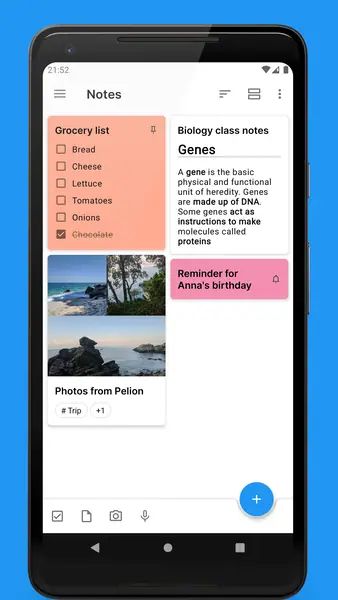
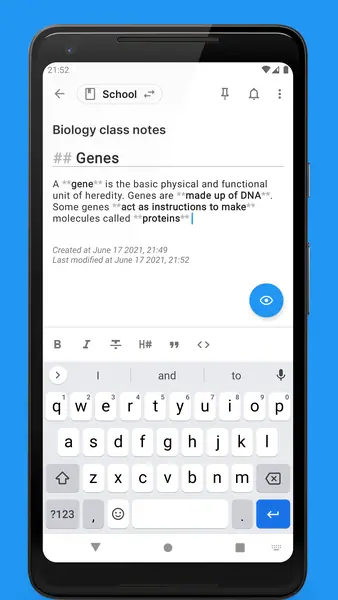
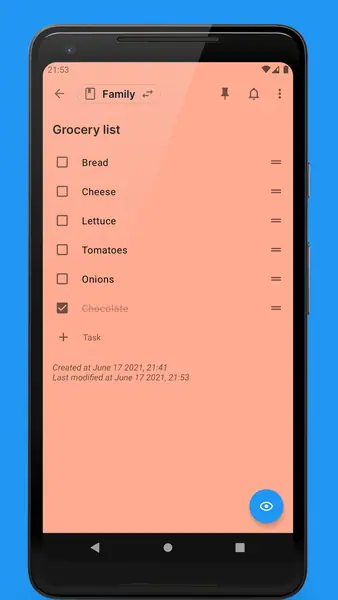
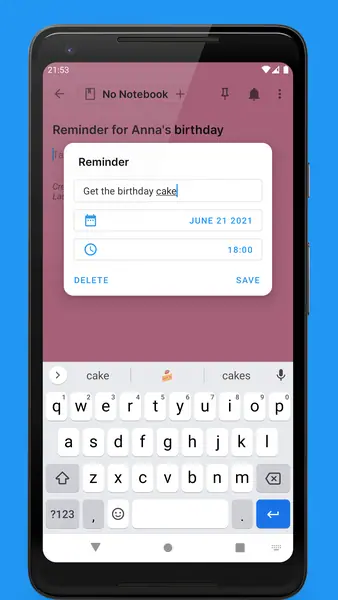
Take beautiful markdown notes whenever you feel inspired, place them in notebooks and tag them accordingly. Stay organized by making task lists, set reminders and keep everything in one place by attaching related files.
With Quillpad, you can:
- Take notes with Markdown support
- Make task lists
- Pin your favorite notes to the top
- Hide notes you do not want others to see
- Set reminders for events you do not want to miss
- Add voice recordings and other file attachments
- Group related notes in notebooks
- Add tags to notes
- Archive notes you want out of your way
- Search through notes
- Sync with Nextcloud (requires the Nextcloud Notes app installed on the Nextcloud server used for syncing)
- Backup your notes to a zip file which you can restore at a later time
- Toggle between Light and Dark mode
- Choose between multiple color schemes
APK file information
| Package name | io.github.quillpad |
|---|---|
| Version | 1.5.16 (code 58) |
| Minimum Android | Android 7.0 · targets API 37 |
| Architectures | arm64-v8a, armeabi-v7a, x86, x86_64 |
| SHA-256 | 2a04f693f760084058896551f7cb1dd6b6c0149ea8ddfabde8a09aeb8960996d |
| Signature | 3c2b48eeceed98e70a33d21d3e9ff6193343a1dddcbb9cc076b859d36cdeae6a |
| Licence | GPL-3.0-only — copyleft free licence: the code is public and modified versions must stay free |
| Source code | github.com/quillpad/quillpad |
| Official website | quillpad.github.io |
Permissions
- View network status
- Internet access
- Keep the device awake
- Start at boot
- Microphone sensitive
- Run in the background
- Show notifications
2 other technical permission(s)
SCHEDULE_EXACT_ALARM REORDER_TASKS
Older versions
- Quillpad 1.5.16November 17, 2026 · 4.3 MB
- Quillpad 1.5.15October 12, 2026 · 4.3 MB
- Quillpad 1.5.14September 5, 2026 · 5.0 MB
How to install Quillpad APK
- Tap Download APK above, then open the file once the download has finished.
- If Android asks, allow your browser to install unknown apps.
- Tap Install. Quillpad then appears with your other apps.
Having trouble? Read our guides how to install an APK on Android and "App not installed": how to fix it.
Frequently asked questions
Is Quillpad free?
Yes. Quillpad is distributed under the GPL-3.0-only licence: free, no subscription, and its source code is public.
Is this APK file safe?
The file is the one built and published by the F-Droid repository from the public source code. Its SHA-256 fingerprint is shown above, so you can compare it after downloading. How to check an APK.
Will Quillpad work on my phone?
You need at least Android 7.0. The app also works without Google services, so it runs on recent Huawei phones too.





