
Road Trip Radar APK
A map app prioritizing situational awareness and weather.
Download APK v1.15.0 · 62.2 MB- Version1.15.0
- Size62.2 MB
- RequiresAndroid 8.0
- Updated5/15/2026
- LicenceMIT
- PriceFree
About Road Trip Radar
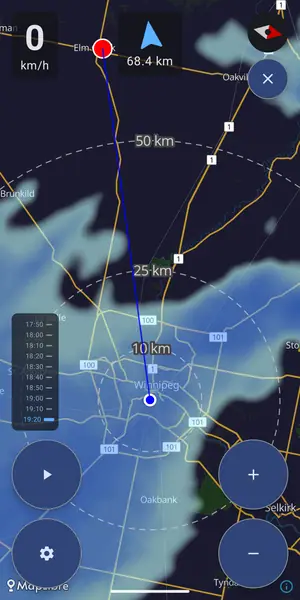
RoadTripRadar is a map app prioritizing situational awareness and weather. Live weather radar imagery on an interactive map, helping you see precipitation along your direction of travel at a glance.
Features:
- Distance rings centered on your location that adapt to zoom level.
- Navigate using bearing to your destination instead of rigid turn-by-turn instructions. Perfect for explorers and people who like to wander!
- Live animated weather radar from RainViewer with adjustable opacity and playback controls. Perfect for motorcyclists who want notice to reroute around a storm or gear up.
- Wind speed and direction
- Temperature and 1-hour trend
- Multiple map styles: Light, Dark, Auto, and custom colors for either.
- Speed readout with metric and imperial units, adjustable font size.
- Open source, no tracking, no accounts, no ads.
What's new in version 1.15.0
Added basic route management with multiple waypoints! Check it out next time you navigate to something! If you have a navigation point active, try adding another. You'll get the option to add it to your route or replace the existing nav point.
APK file information
| Package name | ca.voiditswarranty.roadtripradar |
|---|---|
| Version | 1.15.0 (code 32) |
| Minimum Android | Android 8.0 · targets Android 16 |
| Architectures | arm64-v8a, armeabi-v7a, x86, x86_64 |
| SHA-256 | c960f8c761b0f58f17f34249626b9ad2dc5d9994a4bb5d1f61ee18bc8bd52c04 |
| Signature | ba8b2252c87e01f7522037e764490903b733c84f6e68ae8394e076f8f82c7be4 |
| Licence | MIT — permissive free licence: the source code is public and reusable |
| Source code | github.com/digiexchris/RoadTripRadar |
| Official website | github.com/digiexchris/RoadTripRadar/wiki |
Permissions
- Internet access
- Approximate location sensitive
- Precise location (GPS) sensitive
- View network status
- View Wi-Fi status
Older versions
- Road Trip Radar 1.15.0May 15, 2026 · 62.2 MB
- Road Trip Radar 1.14.0May 10, 2026 · 61.9 MB
- Road Trip Radar 1.13.0April 19, 2026 · 61.9 MB
How to install Road Trip Radar APK
- Tap Download APK above, then open the file once the download has finished.
- If Android asks, allow your browser to install unknown apps.
- Tap Install. Road Trip Radar then appears with your other apps.
Having trouble? Read our guides how to install an APK on Android and "App not installed": how to fix it.
Frequently asked questions
Is Road Trip Radar free?
Yes. Road Trip Radar is distributed under the MIT licence: free, no subscription, and its source code is public.
Is this APK file safe?
The file is the one built and published by the F-Droid repository from the public source code. Its SHA-256 fingerprint is shown above, so you can compare it after downloading. How to check an APK.
Will Road Trip Radar work on my phone?
You need at least Android 8.0. The app also works without Google services, so it runs on recent Huawei phones too.