
Seca Phone APK
Private dialer: telemarketing filter, blocked profiles, SIM per contact
Download APK v0.1.0-beta14 · 3.0 MB- Version0.1.0-beta14
- Size3.0 MB
- RequiresAndroid 12
- Updated11/23/2026
- LicenceGPL-3.0-or-later
- PriceFree
About Seca Phone
A dialer that refuses telemarketers before your phone rings.
Seca Phone has no Internet permission at all, so your call history cannot leave this phone through it. Every call is screened on the device, against no list anybody else can see.
One of three apps — Contacts, Phone and Messages — sharing one Material 3 Expressive design. Android 12 or newer, with or without Google, at its best on GrapheneOS. In English, French, German, Spanish and Polish.
Your calls stay on your phone
- No Internet permission: the call history cannot go anywhere.
- Calls are screened entirely on the phone.
Screening
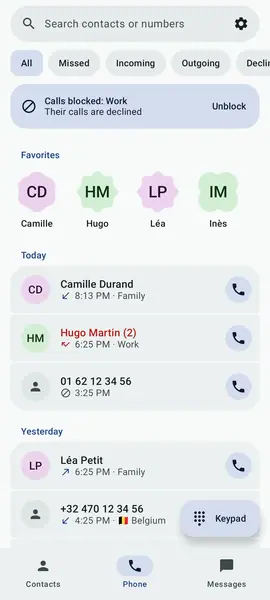
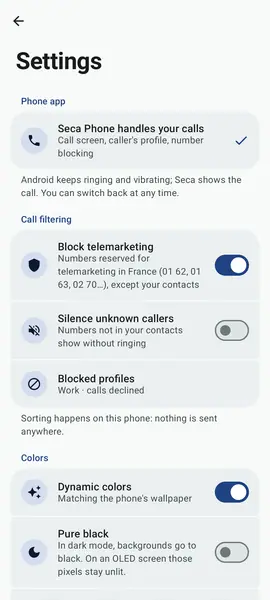
- Telemarketing blocked: numbers reserved for telemarketing in France (01 62, 01 63, 02 70…) are refused before ringing, except your contacts.
- Unknown callers on silent, if you wish.
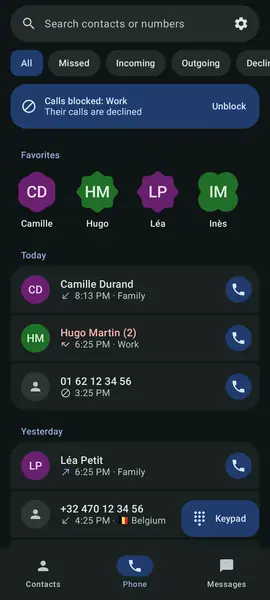
- Blocked profiles: contacts of a profile (Work…) cannot call for an hour, until tomorrow, or until you lift it. Refused or ringing silently, your choice.
Calling
- Call screen with the caller's photo and profile, speaker, Bluetooth, hold, call waiting, conference.
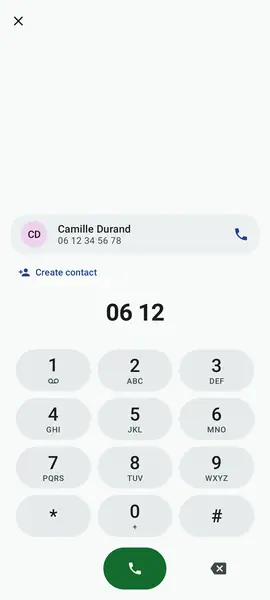
- T9 search and keypad suggestions.
- Dual SIM: pick the SIM on each call, remembered for each contact.
- Decline with a message, sent at once by Seca Messages.
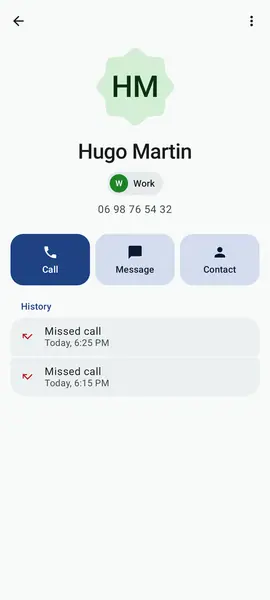
- History filtered by call type or by profile, favourites one tap away.
Also
- Wi-Fi and HD calls shown, voicemail, service codes.
- App lock (the call screen always stays reachable).
- Wallpaper colours or Seca palettes, dark theme.
No ads, no trackers, no account. Open source.
What's new in version 0.1.0-beta14
The screen goes dark against your ear again: the call screen was asking Android to keep it lit for the whole call, which fought the proximity sensor. When a caller's carrier sends a name, Seca shows it in place of an unknown number, on the call, in the history and in missed call notifications, with the number beneath. Contacts are never read for this. The favourites row shows the whole name. The call timer no longer restarts. Pick the app's language in its own settings.
APK file information
| Package name | com.seca.phone |
|---|---|
| Version | 0.1.0-beta14 (code 14) |
| Minimum Android | Android 12 · targets Android 16 |
| Architectures | arm64-v8a, armeabi-v7a, x86, x86_64 |
| SHA-256 | ccdf23065277cfdf57b6b5abc908f3dc15235172467c78bf97a4ffd1a33e9b70 |
| Signature | 2fdea7b46beffe16459bb4dcdd34db5e0cb912274a5eb628e4b0d8a596211790 |
| Licence | GPL-3.0-or-later — copyleft free licence: the code is public and modified versions must stay free |
| Source code | github.com/arditore/Seca |
Permissions
- Call log sensitive
- Read contacts sensitive
- Fingerprint / biometrics
- Make calls sensitive
- Phone status sensitive
- Show notifications
- Keep the device awake
- Run in the background
- Start at boot
2 other technical permission(s)
WRITE_CALL_LOG USE_FULL_SCREEN_INTENT
Older versions
- Seca Phone 0.1.0-beta14November 23, 2026 · 3.0 MB
- Seca Phone 0.1.0-beta13November 17, 2026 · 2.9 MB
- Seca Phone 0.1.0-beta10November 9, 2026 · 2.8 MB
How to install Seca Phone APK
- Tap Download APK above, then open the file once the download has finished.
- If Android asks, allow your browser to install unknown apps.
- Tap Install. Seca Phone then appears with your other apps.
Having trouble? Read our guides how to install an APK on Android and "App not installed": how to fix it.
Frequently asked questions
Is Seca Phone free?
Yes. Seca Phone is distributed under the GPL-3.0-or-later licence: free, no subscription, and its source code is public.
Is this APK file safe?
The file is the one built and published by the F-Droid repository from the public source code. Its SHA-256 fingerprint is shown above, so you can compare it after downloading. How to check an APK.
Will Seca Phone work on my phone?
You need at least Android 12. The app also works without Google services, so it runs on recent Huawei phones too.