
SMS Tech APK
Private SMS / MMS app with voice messages, encrypted vault, biometric unlock.
Download APK v1.30.1 · 12.1 MB- Version1.30.1
- Size12.1 MB
- RequiresAndroid 8.0
- Updated11/20/2026
- LicenceApache-2.0
- PriceFree
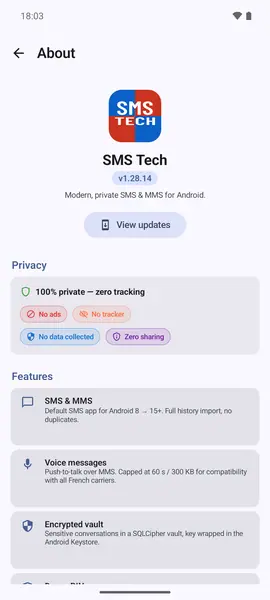
About SMS Tech
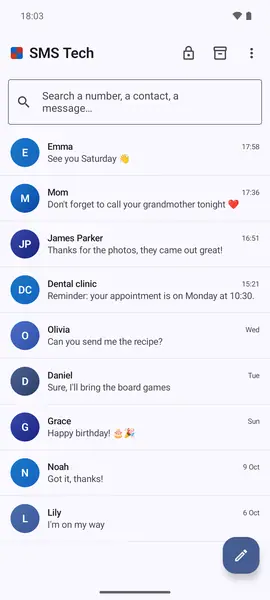
SMS Tech is an ad-free, tracker-free SMS / MMS app for Android. It replaces the stock messaging app while keeping every message on your device — no cloud, no analytics, no third-party SDK shipping your data anywhere.
Features
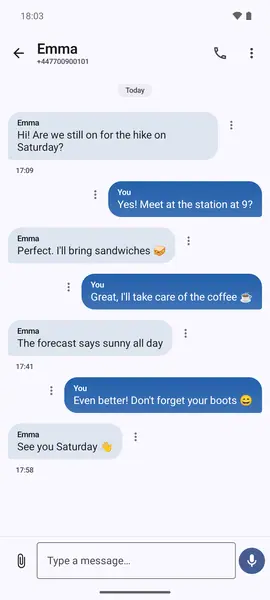
- SMS and MMS — full default-SMS-app support on Android 8 (API 26) through 15+
- Voice messages — push-to-talk recording sent as a real MMS, capped at 120 s / 280 KB so every carrier accepts it
- Encrypted vault — hide sensitive conversations behind SQLCipher, with the key wrapped in the Android Keystore. Toggle "Lock vault on leave" to re-lock it every time the app goes to background
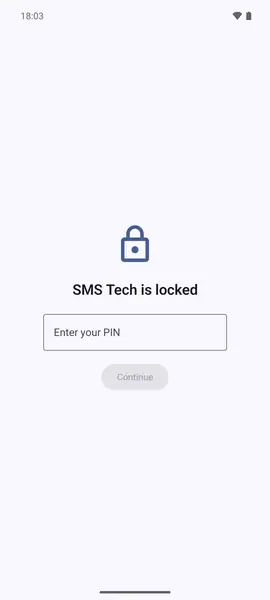
- Decoy PIN — a second PIN that opens the app in a decoy view where the vault stays invisible and inaccessible
- Emergency mode — hold the button for 3 s to send an alert SMS to your Safety Call contacts, with a single GPS fix if you granted location; without that permission the SMS still goes out, only without coordinates. Quick access to the emergency numbers of the country your phone is connected to, and shortcuts on the lockscreen notification. The emergency numbers open in the Phone app, ready to call: Android lets only it call them directly
- Biometric unlock — fingerprint or face, with a PIN fallback you set yourself
- Contextual reply — long-press a message, pick "Reply" and your composer shows a mini-quote so the recipient sees what you are answering
- Delegated translation — long-press a message and pick "Translate" to hand the text to whichever translation app you have installed (Google Translate, DeepL, Aves Translate …) through a system Intent. No translation model is bundled, and SMS Tech itself sends nothing anywhere
- Scheduled messages — write an SMS, pick a date and time, and it is sent at that moment even if the app is closed
- OS-wide blocked numbers — at first launch, SMS Tech mirrors the system blocklist (Phone app, Samsung Messages) and retroactively deletes the conversations that match; a conversation you block moves to its own folder
- Attachment picker — Photo, Video, File, Contact card. Photos are automatically re-encoded as JPEG to fit MMS carrier caps. Tap a photo to view it in the app (zoom, animated GIFs)
- Full-text search across every conversation, with FTS4 indexing
- Export a conversation as a PDF for archival
- Encrypted local backup using a passphrase distinct from your unlock PIN
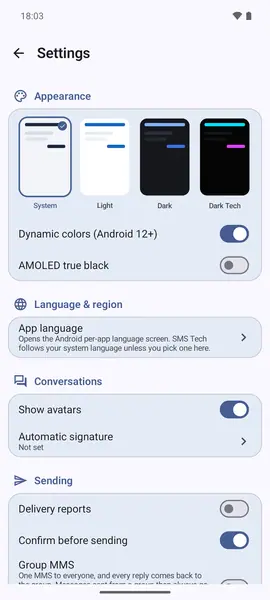
- Themes — Light / Dark / AMOLED / "Dark Tech" slate-blue accent
- English, French, German, Italian and Spanish UI
- Confirmation toggle in Settings → Send → "Confirm before send" requires a confirmation dialog before any SMS, MMS or attachment is dispatched
Privacy
- No analytics, no crash reporters, no third-party tracking SDK
- No network access: SMS Tech does not hold the Internet permission; Android's own MMS service carries MMS. Nothing but your messages leaves the phone
- Location and phone-call permissions serve Emergency mode only. Both are opt-in, neither is ever used in the background, and the app works without granting either
- Apache License 2.0 — source code at https://github.com/gitubpatrice/SMS-TECH
- Security model documented at https://github.com/gitubpatrice/SMS-TECH/blob/main/SECURITY.md
Project home: https://files-tech.com/sms-tech.php
What's new in version 1.30.1
Dual SIM: the SIM used is shown above the text field, tap it to change. Tap a message for its time and status. A failed MMS download is retried, or by hand. PDF export: open or share. New group: each contact added is confirmed; a blocked member is announced before sending. App lock: Mark as read works, Reply is hidden. Fixed: blank list at launch; received SMS an hour off; sent message missing; MMS shown Not sent though sent; notification left in the open chat.
APK file information
| Package name | com.filestech.sms |
|---|---|
| Version | 1.30.1 (code 308) |
| Minimum Android | Android 8.0 · targets Android 15 |
| Architectures | arm64-v8a, armeabi-v7a, x86, x86_64 |
| SHA-256 | 761bafc03508b78a755e27839caf17c0c6ff607d47e47f0d8faf5870b030067c |
| Signature | b09a951114908885aefe6144ac980975dd8bd889beb9e61676a5c2c8966c687d |
| Licence | Apache-2.0 — permissive free licence: the source code is public and reusable |
| Source code | github.com/gitubpatrice/SMS-TECH |
| Official website | files-tech.com/sms-tech.php |
Permissions
- Send SMS sensitive
- Receive SMS sensitive
- Read SMS sensitive
- Read contacts sensitive
- Phone status sensitive
- Show notifications
- Vibrate
- Fingerprint / biometrics
- Microphone sensitive
- Precise location (GPS) sensitive
- Approximate location sensitive
- Make calls sensitive
- Run in the background
- Start at boot
- Fingerprint
- Keep the device awake
- View network status
5 other technical permission(s)
WRITE_SMS RECEIVE_MMS RECEIVE_WAP_PUSH READ_PHONE_NUMBERS HIDE_OVERLAY_WINDOWS
Older versions
- SMS Tech 1.30.1November 20, 2026 · 12.1 MB
- SMS Tech 1.30.0November 11, 2026 · 12.0 MB
- SMS Tech 1.29.2November 6, 2026 · 12.0 MB
How to install SMS Tech APK
- Tap Download APK above, then open the file once the download has finished.
- If Android asks, allow your browser to install unknown apps.
- Tap Install. SMS Tech then appears with your other apps.
Having trouble? Read our guides how to install an APK on Android and "App not installed": how to fix it.
Frequently asked questions
Is SMS Tech free?
Yes. SMS Tech is distributed under the Apache-2.0 licence: free, no subscription, and its source code is public.
Is this APK file safe?
The file is the one built and published by the F-Droid repository from the public source code. Its SHA-256 fingerprint is shown above, so you can compare it after downloading. How to check an APK.
Will SMS Tech work on my phone?
You need at least Android 8.0. The app also works without Google services, so it runs on recent Huawei phones too.