
Snowflake Volunteer APK
Help people in censored countries access the Internet without restrictions
Download APK v1.15 · 28.7 MB- Version1.15
- Size28.7 MB
- RequiresAndroid 8.0
- Updated10/14/2026
- LicenceGPL-3.0-only
- PriceFree
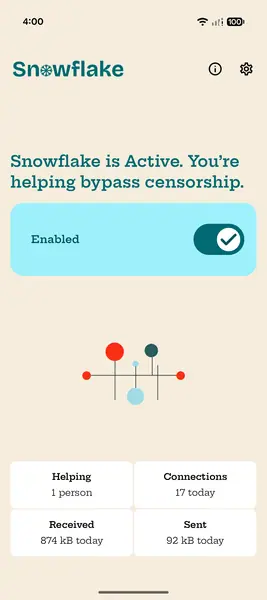
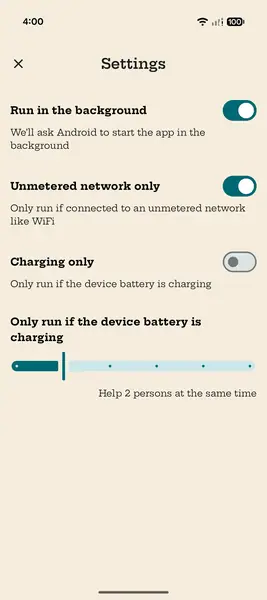
About Snowflake Volunteer
Help people in censored countries access the Internet without restrictions.
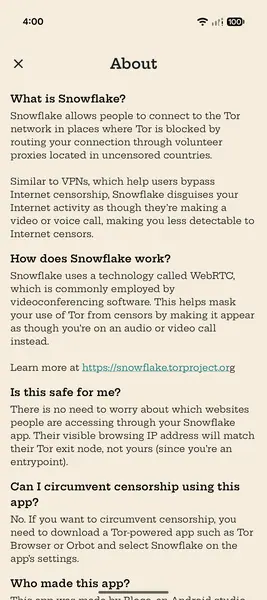
What is Snowflake?
Snowflake allows people to connect to the Tor network in places where Tor is blocked by routing your connection through volunteer proxies located in uncensored countries.
Similar to VPNs, which help users bypass Internet censorship, Snowflake disguises your Internet activity as though they’re making a video or voice call, making you less detectable to Internet censors.
How does Snowflake work?
Snowflake uses a technology called WebRTC, which is commonly employed by videoconferencing software. This helps mask your use of Tor from censors by making it appear as though you’re on an audio or video call instead.
Learn more at https://snowflake.torproject.org
Is this safe for me?
There is no need to worry about which websites people are accessing through your Snowflake app. Their visible browsing IP address will match their Tor exit node, not yours (since you’re an entrypoint).
Can I circumvent censorship using this app?
No. If you want to circumvent censorship, you need to download a Tor-powered app such as Tor Browser or Orbot and select Snowflake on the app’s settings.
APK file information
| Package name | io.bloco.snowflake |
|---|---|
| Version | 1.15 (code 84) |
| Minimum Android | Android 8.0 · targets API 37 |
| Architectures | x86_64 |
| SHA-256 | c2b6683e8c6ded18d9bbc50dfd508ecdb43bc5f138e555f7ef6d17694e2e4016 |
| Signature | 85365aaf1360c88e7c81a2b87382e4c92eaa414ed36117f65ed30ea7ff6e4898 |
| Licence | GPL-3.0-only — copyleft free licence: the code is public and modified versions must stay free |
| Source code | github.com/blocoio/snowflake |
Permissions
- Internet access
- Show notifications
- Run in the background
- Keep the device awake
- View network status
- Start at boot
2 other technical permission(s)
REQUEST_IGNORE_BATTERY_OPTIMIZATIONS REORDER_TASKS
Older versions
- Snowflake Volunteer 1.15October 14, 2026 · 28.7 MB
- Snowflake Volunteer 1.15October 14, 2026 · 25.5 MB
- Snowflake Volunteer 1.15October 14, 2026 · 25.9 MB
- Snowflake Volunteer 1.15October 14, 2026 · 25.3 MB
- Snowflake Volunteer 1.14September 16, 2026 · 27.9 MB
- Snowflake Volunteer 1.14September 16, 2026 · 24.7 MB
- Snowflake Volunteer 1.14September 16, 2026 · 25.2 MB
- Snowflake Volunteer 1.14September 16, 2026 · 24.3 MB
- Snowflake Volunteer 1.13September 15, 2026 · 27.9 MB
- Snowflake Volunteer 1.13September 15, 2026 · 24.7 MB
- Snowflake Volunteer 1.13September 15, 2026 · 25.2 MB
- Snowflake Volunteer 1.13September 15, 2026 · 24.3 MB
How to install Snowflake Volunteer APK
- Tap Download APK above, then open the file once the download has finished.
- If Android asks, allow your browser to install unknown apps.
- Tap Install. Snowflake Volunteer then appears with your other apps.
Having trouble? Read our guides how to install an APK on Android and "App not installed": how to fix it.
Frequently asked questions
Is Snowflake Volunteer free?
Yes. Snowflake Volunteer is distributed under the GPL-3.0-only licence: free, no subscription, and its source code is public.
Is this APK file safe?
The file is the one built and published by the F-Droid repository from the public source code. Its SHA-256 fingerprint is shown above, so you can compare it after downloading. How to check an APK.
Will Snowflake Volunteer work on my phone?
You need at least Android 8.0. The app also works without Google services, so it runs on recent Huawei phones too.





