
URLCheck APK
Allows analyzing (or sharing) URLs before opening them.
Download APK v3.5 · 1.1 MB- Version3.5
- Size1.1 MB
- RequiresAndroid 4.4
- Updated4/8/2026
- LicenceCC-BY-4.0
- PriceFree
About URLCheck
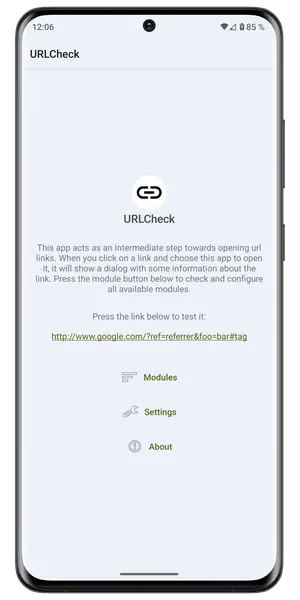
This application acts as an intermediary when opening url links. When you do so, a window containing information about the url is displayed, allowing you to make changes to it as well. Specially useful when you need to open an external link either from an email, a social network app or others.
URLCheck is developed by TrianguloY, originally for personal use. It is open source (under CC BY 4.0 license), free, without any ads or trackers, light sized and using as few permissions as necessary (only the internet permission, for module checks that will only be performed when the user request them). The source code is available on GitHub too, if you want to suggest changes, perform modifications or propose a new translation: https://github.com/TrianguloY/URLCheck
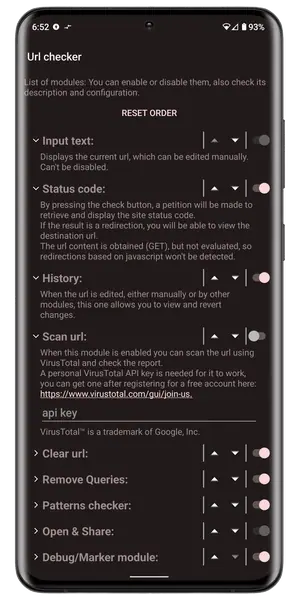
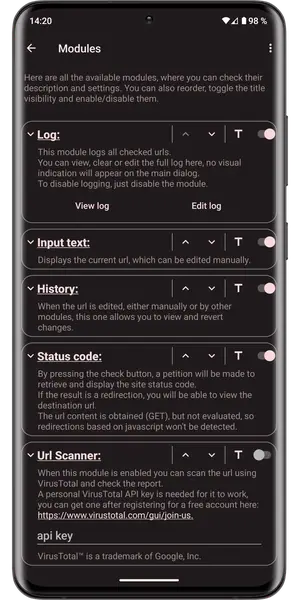
The app is structured with a modular setup, you can enable/disable and reorder individual modules, which include:
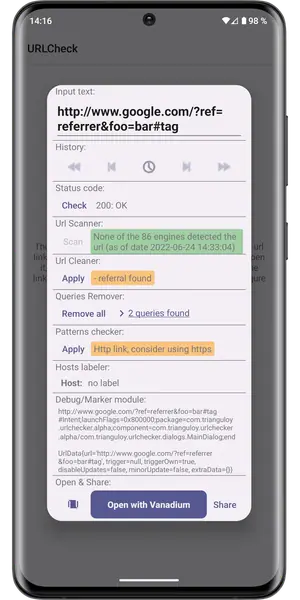
- Input text: Displays the current url which can be edited manually. Can't be disabled.
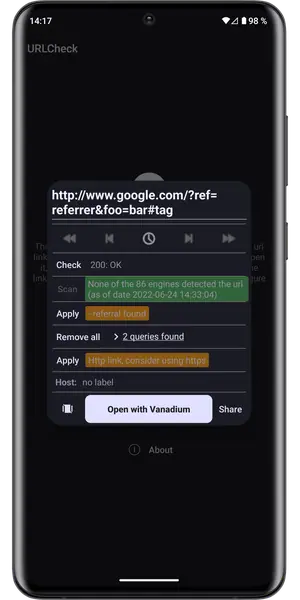
- History: View and revert any change from other modules, including edits from the user (typical undo/redo feature)
- Log: Keeps a log of all checked urls, which you can view, edit, copy, clear...
- Status code: By pressing the button a network request will be made to retrieve that url, and the status code will be displayed (ok, server error, not found...). Additionally, if it corresponds to a redirection, press the message to check the new url. The url is fetched, but not evaluated, so redirection based on javascript won't be detected.
- Url Scanner: Allows you to scan the url using VirusTotal, and check the report. A free personal VirusTotal API key is needed for it to work. VirusTotal™ is a trademark of Google, Inc.
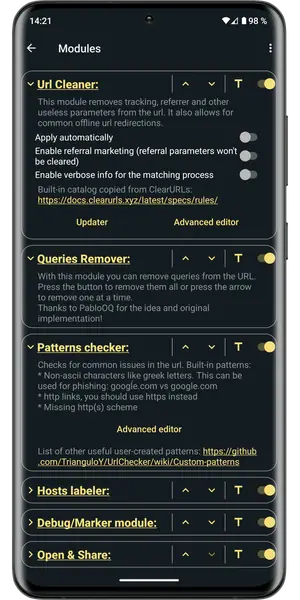
- Url Cleaner: Uses the ClearURLs catalog to remove referral and useless parameters from the url. It also allows for common offline url redirections. Built-in catalog from https://docs.clearurls.xyz/latest/specs/rules/
- Unshortener: Uses https://unshorten.me/ to unshorten urls remotely.
- Queries remover: Displays the decoded individual url queries, which you can remove or check.
- Pattern module: Checks the url with regex patterns that warns, suggests or applies replacements. You can modify or create your own patterns, or even use user-created ones.
Built-in patterns include:
- Warning when contains non-ascii characters like greek letters. This can be used for phishing: googĺe.com vs google.com
- Suggest replacing 'http' with 'https'
- Suggest replacing Youtube, Reddit or Twitter with privacy-friendly alternatives [disabled by default]
- Hosts checker: This module labels hosts, configured either by specifying them manually or by using a remote hosts-like file. You can use it to warn about dangerous or special sites. The builtin configuration specifies StevenBlack's hosts (adware/malware, fakenews, gambling and adult content) from https://github.com/StevenBlack/hosts
- Debug module: Displays the intent uri, and optionally info about the ctabs (custom tabs) service. This is intended for developers.
- Open module: Contains the open and share buttons. If a link can be opened with multiple apps, an arrow will be shown to let you choose. Can't be disabled.
What's new in version 3.5
V 3.5
- Improve: Allow token on Unshorten module
- Improve: Json editor (monospace and font size)
- Improve: Default patterns (Rickroll, twitter, eddrit, farside)
- Internal: Translations fixes and updates
APK file information
| Package name | com.trianguloy.urlchecker |
|---|---|
| Version | 3.5 (code 47) |
| Minimum Android | Android 4.4 · targets Android 16 |
| Architectures | All (universal) |
| SHA-256 | ddcbf344519bff30db9550d16f37104150b816ed401f95370d551f183a9e5520 |
| Signature | 93d79b1e72d5a6b0bc6811b9bc0a83181c3510d58c11571140ff3f8a63f22174 |
| Licence | CC-BY-4.0 — free licence |
| Source code | github.com/TrianguloY/UrlChecker |
| Official website | triangularapps.blogspot.com/search/label/UrlChecker |
Permissions
- Internet access
Older versions
- URLCheck 3.5April 8, 2026 · 1.1 MB
- URLCheck 3.4.1December 23, 2025 · 1.1 MB
- URLCheck 3.4June 7, 2025 · 1.1 MB
How to install URLCheck APK
- Tap Download APK above, then open the file once the download has finished.
- If Android asks, allow your browser to install unknown apps.
- Tap Install. URLCheck then appears with your other apps.
Having trouble? Read our guides how to install an APK on Android and "App not installed": how to fix it.
Frequently asked questions
Is URLCheck free?
Yes. URLCheck is distributed under the CC-BY-4.0 licence: free, no subscription, and its source code is public.
Is this APK file safe?
The file is the one built and published by the F-Droid repository from the public source code. Its SHA-256 fingerprint is shown above, so you can compare it after downloading. How to check an APK.
Will URLCheck work on my phone?
You need at least Android 4.4. The app also works without Google services, so it runs on recent Huawei phones too.





