
WGControl APK
Automated WireGuard tunnel control via home Wi-Fi and Bluetooth.
Download APK v1.49.61411 · 2.0 MB- Version1.49.61411
- Size2.0 MB
- RequiresAndroid 7.0
- Updated11/20/2026
- LicenceGPL-3.0-or-later
- PriceFree
About WGControl
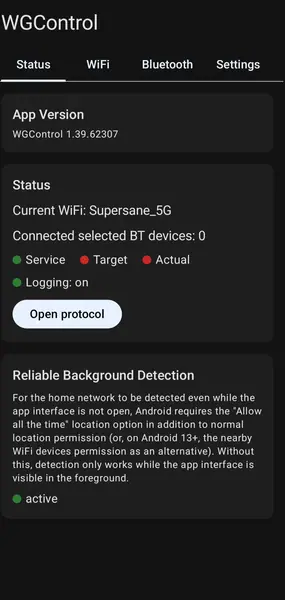
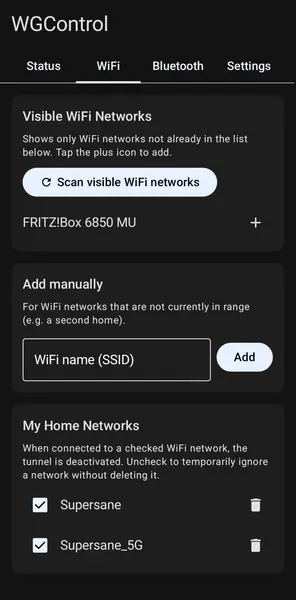
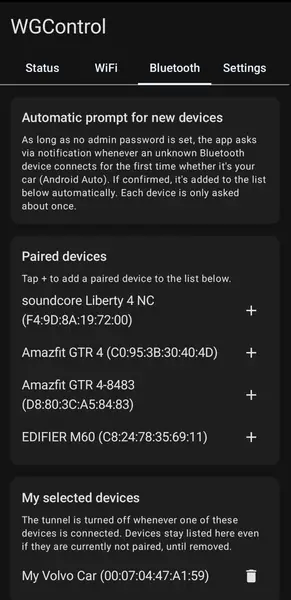
WGControl automatically manages your WireGuard tunnel based on your Wi-Fi and Bluetooth connections. It disables the tunnel when connected to your configured home Wi-Fi or selected Bluetooth devices (e.g., Android Auto) and re-enables it upon leaving.
This app is a VibeCode product. I have thoroughly tested all functions and believe everything works reliably. However, I assume no responsibility for errors, results of errors, or atomic fallout.
Key Features:
- Wi-Fi & Bluetooth Detection: Automatically toggles the tunnel based on home networks or paired Bluetooth devices.
- Real-Time Monitoring: Continuously checks system-level VPN status and enforces the target state.
- Ping Connectivity Check (optional, off by default): Verifies internet availability via ICMP/TCP ping to a configurable host (example.com by default) before re-enabling the tunnel.
- Notification Pause Buttons: Manually override the tunnel from the status notification - indefinitely or for a configurable duration - without opening the app.
- Admin Password Protection: Secures configuration tabs using salted PBKDF2 hashing.
- Local Logging: Tracks tunnel commands and network events locally for up to 24 hours with search and export capabilities.
- QuickSettings Tiles and widget to control pause.
Essential Setup Steps:
- WireGuard App: Enable "Allow remote control apps" in settings.
- Grant Permission: Allow "Control WireGuard tunnels" permission.
- Location Access: Set to "Allow all the time" for background Wi-Fi detection.
- Battery Optimization: Disable for BOTH WGControl and the WireGuard app.
Note: Not affiliated with WireGuard or Jason A. Donenfeld. Controls the official WireGuard app via its public broadcast interface.
What's new in version 1.49.61411
- New: ? in Wi-Fi names = any character (e.g. GR-????)
- Changed: Settings: tunnels card in sections
- Fixed: Wi-Fi switches (e.g. smartwatch AP) detected more reliably
- Fixed: hints name WireGuard setting/permission exactly as shown
- Changed: new languages added to changelogs automatically
- New language: French
- New language: Spanish
- New language: Portuguese (Brazil)
- New language: Portuguese (Portugal)
APK file information
| Package name | org.supersane.wgcontrol |
|---|---|
| Version | 1.49.61411 (code 49) |
| Minimum Android | Android 7.0 · targets Android 14 |
| Architectures | All (universal) |
| SHA-256 | ba44cb0328de91d89e9ed4bb7c5e51c020312924f25e58c6b12e3627a32d9be7 |
| Signature | 894ebaec626c03907a68880f93ed06f777588dd4a8598e9658a75d86934e7327 |
| Licence | GPL-3.0-or-later — copyleft free licence: the code is public and modified versions must stay free |
| Source code | codeberg.org/FadeFX/WGControl |
Permissions
- Internet access
- View network status
- View Wi-Fi status
- Precise location (GPS) sensitive
- Approximate location sensitive
- Change Wi-Fi
- Background location sensitive
- Bluetooth
- Connect via Bluetooth
- Run in the background
- Start at boot
- Show notifications
- Keep the device awake
3 other technical permission(s)
NEARBY_WIFI_DEVICES BLUETOOTH_ADMIN REQUEST_IGNORE_BATTERY_OPTIMIZATIONS
Older versions
- WGControl 1.49.61411November 20, 2026 · 2.0 MB
- WGControl 1.48.60311November 6, 2026 · 2.0 MB
- WGControl 1.47.61910October 22, 2026 · 1.9 MB
How to install WGControl APK
- Tap Download APK above, then open the file once the download has finished.
- If Android asks, allow your browser to install unknown apps.
- Tap Install. WGControl then appears with your other apps.
Having trouble? Read our guides how to install an APK on Android and "App not installed": how to fix it.
Frequently asked questions
Is WGControl free?
Yes. WGControl is distributed under the GPL-3.0-or-later licence: free, no subscription, and its source code is public.
Is this APK file safe?
The file is the one built and published by the F-Droid repository from the public source code. Its SHA-256 fingerprint is shown above, so you can compare it after downloading. How to check an APK.
Will WGControl work on my phone?
You need at least Android 7.0. The app also works without Google services, so it runs on recent Huawei phones too.





