
WGControl APK
Automated WireGuard tunnel control via home Wi-Fi and Bluetooth.
Scarica l'APK v1.49.61411 · 2,0 MB- Versione1.49.61411
- Dimensione2,0 MB
- RichiedeAndroid 7.0
- Aggiornata20/11/2026
- LicenzaGPL-3.0-or-later
- PrezzoGratis
Informazioni su WGControl
Descrizione fornita dallo sviluppatore (in inglese).
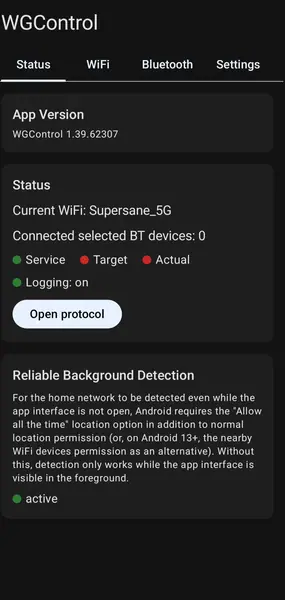
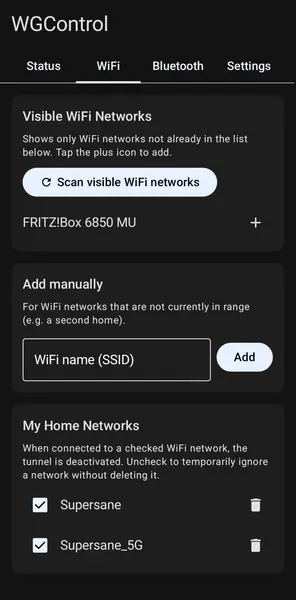
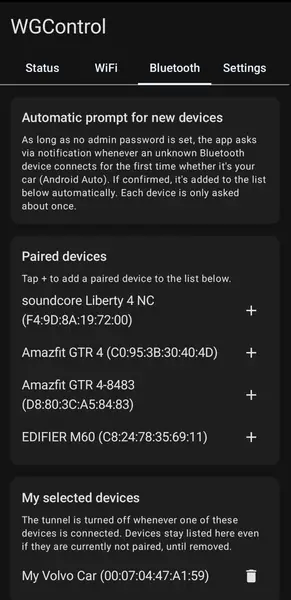
WGControl automatically manages your WireGuard tunnel based on your Wi-Fi and Bluetooth connections. It disables the tunnel when connected to your configured home Wi-Fi or selected Bluetooth devices (e.g., Android Auto) and re-enables it upon leaving.
This app is a VibeCode product. I have thoroughly tested all functions and believe everything works reliably. However, I assume no responsibility for errors, results of errors, or atomic fallout.
Key Features:
- Wi-Fi & Bluetooth Detection: Automatically toggles the tunnel based on home networks or paired Bluetooth devices.
- Real-Time Monitoring: Continuously checks system-level VPN status and enforces the target state.
- Ping Connectivity Check (optional, off by default): Verifies internet availability via ICMP/TCP ping to a configurable host (example.com by default) before re-enabling the tunnel.
- Notification Pause Buttons: Manually override the tunnel from the status notification - indefinitely or for a configurable duration - without opening the app.
- Admin Password Protection: Secures configuration tabs using salted PBKDF2 hashing.
- Local Logging: Tracks tunnel commands and network events locally for up to 24 hours with search and export capabilities.
- QuickSettings Tiles and widget to control pause.
Essential Setup Steps:
- WireGuard App: Enable "Allow remote control apps" in settings.
- Grant Permission: Allow "Control WireGuard tunnels" permission.
- Location Access: Set to "Allow all the time" for background Wi-Fi detection.
- Battery Optimization: Disable for BOTH WGControl and the WireGuard app.
Note: Not affiliated with WireGuard or Jason A. Donenfeld. Controls the official WireGuard app via its public broadcast interface.
Novità della versione 1.49.61411
- New: ? in Wi-Fi names = any character (e.g. GR-????)
- Changed: Settings: tunnels card in sections
- Fixed: Wi-Fi switches (e.g. smartwatch AP) detected more reliably
- Fixed: hints name WireGuard setting/permission exactly as shown
- Changed: new languages added to changelogs automatically
- New language: French
- New language: Spanish
- New language: Portuguese (Brazil)
- New language: Portuguese (Portugal)
Informazioni sul file APK
| Nome del pacchetto | org.supersane.wgcontrol |
|---|---|
| Versione | 1.49.61411 (codice 49) |
| Android minimo | Android 7.0 · pensata per Android 14 |
| Architetture | Tutte (universale) |
| SHA-256 | ba44cb0328de91d89e9ed4bb7c5e51c020312924f25e58c6b12e3627a32d9be7 |
| Firma | 894ebaec626c03907a68880f93ed06f777588dd4a8598e9658a75d86934e7327 |
| Licenza | GPL-3.0-or-later — licenza libera copyleft: il codice è pubblico e le versioni modificate devono restare libere |
| Codice sorgente | codeberg.org/FadeFX/WGControl |
Autorizzazioni richieste
- Accesso a Internet
- Vedere lo stato della rete
- Vedere lo stato del Wi-Fi
- Posizione precisa (GPS) sensibile
- Posizione approssimativa sensibile
- Modificare il Wi-Fi
- Posizione in background sensibile
- Bluetooth
- Connettersi via Bluetooth
- Funzionare in background
- Avviarsi all'accensione
- Mostrare notifiche
- Impedire lo standby
Altre 3 autorizzazioni tecniche
NEARBY_WIFI_DEVICES BLUETOOTH_ADMIN REQUEST_IGNORE_BATTERY_OPTIMIZATIONS
Versioni precedenti
- WGControl 1.49.6141120 novembre 2026 · 2,0 MB
- WGControl 1.48.603116 novembre 2026 · 2,0 MB
- WGControl 1.47.6191022 ottobre 2026 · 1,9 MB
Come installare WGControl APK
- Tocca Scarica l'APK qui sopra, poi apri il file al termine del download.
- Se Android lo chiede, consenti al browser di installare app sconosciute.
- Tocca Installa. WGControl comparirà insieme alle altre app.
→ Come installare un file APK su Android (passo passo)
→ «App non installata»: cause e soluzioni
Domande frequenti
WGControl è gratis?
Sì. WGControl è distribuita con licenza GPL-3.0-or-later: gratuita, senza abbonamento e con codice sorgente pubblico.
Questo file APK è sicuro?
Il file è quello compilato e pubblicato dal repository F-Droid a partire dal codice sorgente pubblico. L'impronta SHA-256 è indicata qui sopra: puoi confrontarla dopo il download. Un APK è pericoloso? Come verificare un file prima di installarlo
WGControl funziona sul mio telefono?
Serve almeno Android 7.0. L'app funziona anche senza i servizi Google, quindi anche sui telefoni Huawei recenti.





