CimBar Scanner APK
Send and receive files and text as animated color barcodes — offline
Descargar APK v0.14.0 · 21,4 MB- Versión0.14.0
- Tamaño21,4 MB
- RequiereAndroid 7.0
- Actualizada20/11/2026
- LicenciaMIT
- PrecioGratis
Acerca de CimBar Scanner
Descripción del desarrollador (en inglés).
CimBar Scanner sends and receives files and text as CimBar barcodes — animated images in which every frame is a grid of colored tile shapes. Point one phone's camera at another phone's screen, or at a computer running the web app, and the file arrives with no network at all. Encoding and decoding happen entirely on your device: no account, no server, no internet connection.
How it works
- Encode a file or a text message into a CimBar barcode: in the app's Send tab, or with the free web app at https://nfcarchiver.com/cimbar/, which runs entirely in your browser.
- Show the barcode full screen, or send it as an animated GIF.
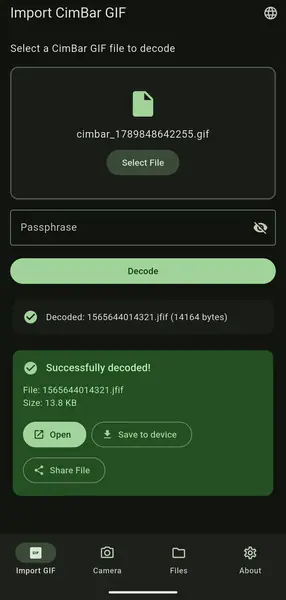
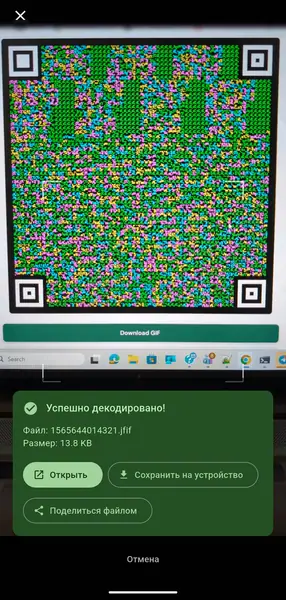
- Receive it with CimBar Scanner: live-scan an animated barcode with the camera, take a photo of a single-frame one, or import the GIF.
- Open, save or share the recovered file, or copy a received text.
Features
- Send tab: type a message or pick a file, add an optional passphrase, then show the barcode full screen — the screen stays on and bright, and repair frames keep coming for as long as it is shown — or share it as an animated GIF
- Received text messages appear right in the app, ready to copy, share or save as .txt
- Live scan with focus and exposure lock, an aiming guide, and hints such as "move closer" or "hold still"
- Frames can be caught in any order: extra repair frames mean any N frames of an N-frame barcode complete the file, so there is no waiting for the one frame you missed
- In-app photo or gallery image for single-frame barcodes
- Import CimBar GIFs from your files, or share one to the app from any other app, such as your gallery; a shared photo of a single-frame barcode goes straight to the photo decoder
- Reed-Solomon error correction in every frame
- Automatic decompression of files that were compressed on encoding
- Optional AES-256-GCM encryption, detected automatically; if a live scan turns out to be encrypted, enter the passphrase right there — no rescan
- Decoded files: open them in another app, save them to Downloads or any folder, or share them
- 7 languages: English, Russian, Ukrainian, Turkish, Georgian, Polish, Belarusian
Privacy
No data collection, no analytics, no trackers, no ads. The only permission the app requests is the camera, used for scanning; no internet access.
Open source
CimBar Scanner is inspired by libcimbar and CFC by sz3 (https://github.com/sz3/libcimbar), the original Color Icon Matrix Barcode projects, but it is a separate project, not an official cimbar app. It uses its own format, CimBar-XL, so it does not read barcodes made by libcimbar or CFC.
MIT licensed. Source code, format specification and the web encoder: https://github.com/mezinster/cimbar
Novedades de la versión 0.14.0
- New languages: Polish and Belarusian
- Live-scan hints and error messages are translated in every language
- Frame counts use the right plural forms, and file sizes use your language's number format
- About → Privacy Policy opens the published policy in your language
Información del archivo APK
| Nombre del paquete | com.nfcarchiver.cimbar |
|---|---|
| Versión | 0.14.0 (código 1953) |
| Android mínimo | Android 7.0 · diseñada para Android 16 |
| Arquitecturas | x86_64 |
| SHA-256 | 328f3718d072f3bcaf861be3e46fbe22ec62ae0156b2e32916a2fae39787b9d1 |
| Firma | f05b1dcc41301c94cca260c24497800b9fec386339b55af37ba9e1b3be3cb0a8 |
| Licencia | MIT — licencia libre permisiva: el código fuente es público y reutilizable |
| Código fuente | github.com/mezinster/cimbar |
| Sitio oficial | nfcarchiver.com/cimbar/ |
Permisos solicitados
- Cámara sensible
Versiones anteriores
- CimBar Scanner 0.14.020 de noviembre de 2026 · 21,4 MB
- CimBar Scanner 0.14.020 de noviembre de 2026 · 20,0 MB
- CimBar Scanner 0.14.020 de noviembre de 2026 · 18,0 MB
- CimBar Scanner 0.13.012 de octubre de 2026 · 21,4 MB
- CimBar Scanner 0.13.012 de octubre de 2026 · 20,0 MB
- CimBar Scanner 0.13.012 de octubre de 2026 · 18,0 MB
Cómo instalar CimBar Scanner APK
- Pulsa Descargar APK arriba y abre el archivo cuando termine la descarga.
- Si Android lo pide, permite que tu navegador instale apps desconocidas.
- Pulsa Instalar. CimBar Scanner aparecerá junto a tus otras apps.
→ Cómo instalar un archivo APK en Android (paso a paso)
→ «La aplicación no está instalada»: causas y soluciones
Preguntas frecuentes
¿CimBar Scanner es gratis?
Sí. CimBar Scanner se distribuye con licencia MIT: gratis, sin suscripción y con el código fuente público.
¿Es seguro este archivo APK?
El archivo es el que compila y publica el repositorio F-Droid a partir del código fuente público. Su huella SHA-256 aparece arriba para que puedas compararla tras la descarga. ¿Un APK es peligroso? Cómo verificar un archivo antes de instalarlo
¿Funciona CimBar Scanner en mi teléfono?
Necesitas como mínimo Android 7.0. La app también funciona sin los servicios de Google, así que funciona en los teléfonos Huawei recientes.





