CimBar Scanner APK
Send and receive files and text as animated color barcodes — offline
Baixar APK v0.14.0 · 21,4 MB- Versão0.14.0
- Tamanho21,4 MB
- RequerAndroid 7.0
- Atualizado20/11/2026
- LicençaMIT
- PreçoGrátis
Sobre o CimBar Scanner
Descrição fornecida pelo desenvolvedor (em inglês).
CimBar Scanner sends and receives files and text as CimBar barcodes — animated images in which every frame is a grid of colored tile shapes. Point one phone's camera at another phone's screen, or at a computer running the web app, and the file arrives with no network at all. Encoding and decoding happen entirely on your device: no account, no server, no internet connection.
How it works
- Encode a file or a text message into a CimBar barcode: in the app's Send tab, or with the free web app at https://nfcarchiver.com/cimbar/, which runs entirely in your browser.
- Show the barcode full screen, or send it as an animated GIF.
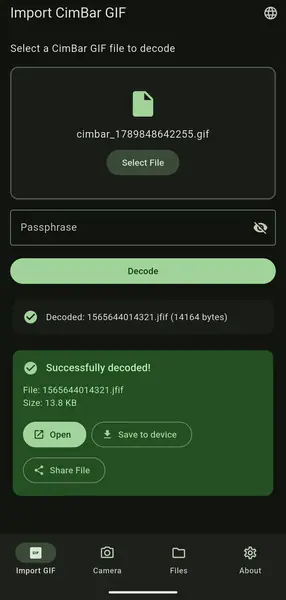
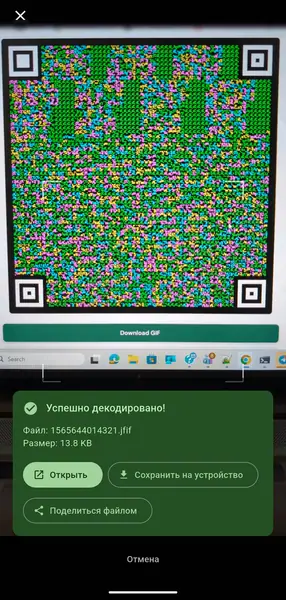
- Receive it with CimBar Scanner: live-scan an animated barcode with the camera, take a photo of a single-frame one, or import the GIF.
- Open, save or share the recovered file, or copy a received text.
Features
- Send tab: type a message or pick a file, add an optional passphrase, then show the barcode full screen — the screen stays on and bright, and repair frames keep coming for as long as it is shown — or share it as an animated GIF
- Received text messages appear right in the app, ready to copy, share or save as .txt
- Live scan with focus and exposure lock, an aiming guide, and hints such as "move closer" or "hold still"
- Frames can be caught in any order: extra repair frames mean any N frames of an N-frame barcode complete the file, so there is no waiting for the one frame you missed
- In-app photo or gallery image for single-frame barcodes
- Import CimBar GIFs from your files, or share one to the app from any other app, such as your gallery; a shared photo of a single-frame barcode goes straight to the photo decoder
- Reed-Solomon error correction in every frame
- Automatic decompression of files that were compressed on encoding
- Optional AES-256-GCM encryption, detected automatically; if a live scan turns out to be encrypted, enter the passphrase right there — no rescan
- Decoded files: open them in another app, save them to Downloads or any folder, or share them
- 7 languages: English, Russian, Ukrainian, Turkish, Georgian, Polish, Belarusian
Privacy
No data collection, no analytics, no trackers, no ads. The only permission the app requests is the camera, used for scanning; no internet access.
Open source
CimBar Scanner is inspired by libcimbar and CFC by sz3 (https://github.com/sz3/libcimbar), the original Color Icon Matrix Barcode projects, but it is a separate project, not an official cimbar app. It uses its own format, CimBar-XL, so it does not read barcodes made by libcimbar or CFC.
MIT licensed. Source code, format specification and the web encoder: https://github.com/mezinster/cimbar
Novidades da versão 0.14.0
- New languages: Polish and Belarusian
- Live-scan hints and error messages are translated in every language
- Frame counts use the right plural forms, and file sizes use your language's number format
- About → Privacy Policy opens the published policy in your language
Informações do arquivo APK
| Nome do pacote | com.nfcarchiver.cimbar |
|---|---|
| Versão | 0.14.0 (código 1953) |
| Android mínimo | Android 7.0 · feito para Android 16 |
| Arquiteturas | x86_64 |
| SHA-256 | 328f3718d072f3bcaf861be3e46fbe22ec62ae0156b2e32916a2fae39787b9d1 |
| Assinatura | f05b1dcc41301c94cca260c24497800b9fec386339b55af37ba9e1b3be3cb0a8 |
| Licença | MIT — licença livre permissiva: o código-fonte é público e reutilizável |
| Código-fonte | github.com/mezinster/cimbar |
| Site oficial | nfcarchiver.com/cimbar/ |
Permissões solicitadas
- Câmera sensível
Versões anteriores
- CimBar Scanner 0.14.020 de novembro de 2026 · 21,4 MB
- CimBar Scanner 0.14.020 de novembro de 2026 · 20,0 MB
- CimBar Scanner 0.14.020 de novembro de 2026 · 18,0 MB
- CimBar Scanner 0.13.012 de outubro de 2026 · 21,4 MB
- CimBar Scanner 0.13.012 de outubro de 2026 · 20,0 MB
- CimBar Scanner 0.13.012 de outubro de 2026 · 18,0 MB
Como instalar o CimBar Scanner APK
- Toque em Baixar APK acima e abra o arquivo quando o download terminar.
- Se o Android pedir, permita que o navegador instale apps desconhecidos.
- Toque em Instalar. O CimBar Scanner aparecerá junto aos seus outros apps.
→ Como instalar um arquivo APK no Android (passo a passo)
→ "App não instalado": causas e soluções
Perguntas frequentes
O CimBar Scanner é grátis?
Sim. O CimBar Scanner é distribuído sob a licença MIT: grátis, sem assinatura e com código-fonte público.
Este arquivo APK é seguro?
O arquivo é o compilado e publicado pelo repositório F-Droid a partir do código-fonte público. A impressão digital SHA-256 aparece acima para você comparar depois do download. APK é perigoso? Como verificar um arquivo antes de instalar
O CimBar Scanner funciona no meu celular?
É preciso ter pelo menos Android 7.0. O app também funciona sem os serviços do Google, inclusive em celulares Huawei recentes.